Wednesday, November 17, 2021

Vector math made easy: John Rose and Paul Sandoz on Java’s Vector API

Oracle Java Tutorial and Materials, Oracle Java Exam, Oracle Java Exam Prep, Java Preparation, Oracle Java Certification, Oracle Java Career

The Vector API provides a mechanism for writing cross-platform data-parallel algorithms in Java, such as complex mathematical and array-based operations.

Download a PDF of this article

The Vector API provides a portable API for expressing vector mathematics computations. The first iteration of the API was proposed by JEP 338 and integrated into Java 16. The second incubator, JEP 414, is part of Java 17. A third incubator is in progress and is currently targeted for Java 18 as JEP 417.

This work is part of Java’s Project Panama, which strengthens many of the connections between the JVM and non-Java APIs (also known as foreign APIs), including making vector math intrinsics part of the HotSpot JVM (and thus, part of core Java).

As JEP 414’s documentation explains

A vector computation consists of a sequence of operations on vectors. A vector comprises a (usually) fixed sequence of scalar values, where the scalar values correspond to the number of hardware-defined vector lanes. A binary operation applied to two vectors with the same number of lanes would, for each lane, apply the equivalent scalar operation on the corresponding two scalar values from each vector. This is commonly referred to as Single Instruction Multiple Data (SIMD).

Vector operations express a degree of parallelism that enables more work to be performed in a single CPU cycle and thus can result in significant performance gains. For example, given two vectors, each containing a sequence of eight integers (i.e., eight lanes), the two vectors can be added together using a single hardware instruction. The vector addition instruction operates on sixteen integers, performing eight integer additions, in the time it would ordinarily take to operate on two integers, performing one integer addition.

HotSpot already supports auto-vectorization, which transforms scalar operations into superword operations which are then mapped to vector instructions. The set of transformable scalar operations is limited, and also fragile with respect to changes in code shape. Furthermore, only a subset of the available vector instructions might be utilized, limiting the performance of generated code.

Today, a developer who wishes to write scalar operations that are reliably transformed into superword operations needs to understand HotSpot’s auto-vectorization algorithm and its limitations in order to achieve reliable and sustainable performance. In some cases, it may not be possible to write scalar operations that are transformable. For example, HotSpot does not transform the simple scalar operations for calculating the hash code of an array (thus the Arrays::hashCode methods), nor can it auto-vectorize code to lexicographically compare two arrays (thus we added an intrinsic for lexicographic comparison).

The Vector API aims to improve the situation by providing a way to write complex vector algorithms in Java, using the existing HotSpot auto-vectorizer but with a user model which makes vectorization far more predictable and robust. Hand-coded vector loops can express high-performance algorithms, such as vectorized hashCode or specialized array comparisons, which an auto-vectorizer may never optimize. Numerous domains can benefit from this explicit vector API including machine learning, linear algebra, cryptography, finance, and code within the JDK itself.

The documentation continues

A vector is represented by the abstract class Vector<E>. The type variable E is instantiated as the boxed type of the scalar primitive integral or floating point element types covered by the vector. A vector also has a shape which defines the size, in bits, of the vector. The shape of a vector governs how an instance of Vector<E> is mapped to a hardware vector register when vector computations are compiled by the HotSpot C2 compiler. The length of a vector, i.e., the number of lanes or elements, is the vector size divided by the element size.

and

Operations on vectors are classified as either lane-wise or cross-lane.

A lane-wise operation applies a scalar operator, such as addition, to each lane of one or more vectors in parallel. A lane-wise operation usually, but not always, produces a vector of the same length and shape. Lane-wise operations are further classified as unary, binary, ternary, test, or conversion operations.

A cross-lane operation applies an operation across an entire vector. A cross-lane operation produces either a scalar or a vector of possibly a different shape. Cross-lane operations are further classified as permutation or reduction operations.

Sample code is listed near the end of this article.

To flesh out the Java team’s intentions behind the Vector API, Java Magazine spoke with two of the top Java architects working on those JEPs, John Rose and Paul Sandoz.

Java Magazine: Can you provide a quick overview of the Vector API?

Rose: Project Panama gives Java programmers better access to all the modern capabilities of a CPU. One of the exciting things CPUs can do is SIMD (single instruction, multiple data) processing, which provides a multilane data flow through your program. There might be four lanes or eight lanes or any number of lanes through which individual data elements flow—and the CPU is organizing operations in parallel on all lanes at once. This greatly increases throughput, as you would expect.

With the Vector API, the Java team is working to give Java programmers direct access to this using Java code; in the past, they had to program vector math at the assembly-code level.

Until now this wasn’t a big deal, because the SIMD microprocessor features were not significant when Java was first being designed 25 years ago, but they have become more standard and widespread today. Being able to work with SIMD instructions and multiple lanes operating in parallel is a requirement now if you’re going to get the full benefit of a modern CPU. With the Vector API, Java is entering into that space in a new way, using native Java code.

Oracle Java Tutorial and Materials, Oracle Java Exam, Oracle Java Exam Prep, Java Preparation, Oracle Java Certification, Oracle Java Career
Java Magazine: How does that work in practice?

Sandoz: The HotSpot compiler translates all the method calls that you do on the vector instances using this API into hardware and vector structures that match closely with the capabilities of the particular hardware platform. This lets you program in a data-parallel way using SIMD processing in a platform-independent manner; you don’t have to know or understand the underlying hardware.

I like to think of it as a “what you see is what you get” API in the sense that when your methods match that of the platform, you would expect the HotSpot compiler to translate to the optimal hardware instructions that are available on the platform.

Today, you might write your code using scalar loops, which are performed over an element at a time. That’s slow. Now, you can transform your scalar algorithms into much faster data-parallel algorithms using the Vector API, so you get a very clear, well-written application that performs well across multiple platforms.

Basically, the Vector API delivers both performance and portability.

Java Magazine: Who should look to the Vector API right away?

Rose: If you have used the Intel Intrinsics API to hand-code your own vector loops, you should look at Java’s Vector API. In fact, it is my hope that you will enjoy the Vector API more than using the vector intrinsics based on C and C++.

The Vector API tends to be a cleaner experience because instead of using ad hoc header file functions that magically open code into vector instructions, the API uses a style that is modeled cleanly with Java objects and Java interfaces and has Java’s deservedly admired rigor of definition.

Your operations can be specified to operate predictably, and that’s important, because even if the vector hardware isn’t in your runtime’s CPU, your algorithms will behave as if it has those capabilities—although, of course, runtime performance probably will be slower if the CPU doesn’t support SIMD processing.

It’s important to emphasize that whatever you end up getting from the vector unit will not be something that’s close to what you intended. That’s not good enough. Rather, the results will always be exactly what the Java code is designed to do, regardless of the underlying hardware implementation. The object modeling goes all the way down to the bit level, so you know which bits are going to come out based on the Java code, and yet the processing goes through the vector unit.

Java Magazine: Sounds great! So, what are the sweet spots for Vector API applications?

Rose: Parsing and sorting are top of mind. There are also many interesting algorithms that are waiting to be further developed, which right now require heroic work in assembly code but with the Vector API will not be so heroic.

Developers can be—will be—more inventive in their rethinking of algorithms that used to be sequential and scalar but can now be vectorized, which makes the code faster and easier to understand; parsing is definitely one of them.

Sandoz: Simple array operations, array mismatch, array comparison, array equality, even hash code of arrays—those are all easy wins in the JDK itself.

Rose: Also, machine learning. I’m looking forward to using more bitwise operations and bit scrambling operations on vectors.

There are interesting algorithms you can build out of things such as the parallel extract and deposit operations, which aren’t vectorized yet on all platforms, or out of the Advanced Encryption Standard (AES) primitives or other cryptographic primitives.

You can do some beautiful algorithm work if vector math is part of your toolkit—and if you’re not penalized for reaching for them because you had to hand-code in C or assembly language at the expense of portability.

Java Magazine: Which vector operations are supported by the API?

Rose: Calculator functions to add, subtract, multiply, and divide across vectors and matrices, as well as floating-point and fixed-point comparisons.

Sandoz: Logical functions, transcendental functions, sine, cosine, log, and all those types of things.

I have to give a shout-out to Intel here because in the first round of the Vector API there were no optimizations for sine, cosine, log, and transcendental functions. In the second incubator, in JEP 414 with Java 17, Intel contributed the vectorized optimizations for those functions based on the Intel Short Vector Math Library (SVML). That’s a great contribution from Intel, providing high-performance vectorized mathematical functions for Java and JVM developers. There are even more optimizations coming with Java 18.

Java Magazine: Final thoughts?

Rose: SIMD programming is growing in importance, and every developer should have better ways to program in the SIMD style. The Vector API is our latest effort to contribute to that style of programming. I’m excited that we’re getting these capabilities into users’ hands, even if the API is still in the incubator phase. It’s something you may want to experiment with. It’s good stuff.

Sample comparison of scalar and vector code

Here is a simple scalar computation over elements of arrays, assuming that the array arguments are of the same length.

void scalarComputation(float[] a, float[] b, float[] c) {

   for (int i = 0; i < a.length; i++) {

        c[i] = (a[i] * a[i] + b[i] * b[i]) * -1.0f;

   }

}

Here is an equivalent vector computation, using the Vector API, which will run in parallel using the CPU’s SIMD capabilities (if they are present in the hardware).

static final VectorSpecies<Float> SPECIES = FloatVector.SPECIES_PREFERRED;

void vectorComputation(float[] a, float[] b, float[] c) {

    int i = 0;

    int upperBound = SPECIES.loopBound(a.length);

    for (; i < upperBound; i += SPECIES.length()) {

        // FloatVector va, vb, vc;

        var va = FloatVector.fromArray(SPECIES, a, i);

        var vb = FloatVector.fromArray(SPECIES, b, i);

        var vc = va.mul(va)

                   .add(vb.mul(vb))

                   .neg();

        vc.intoArray(c, i);

    }

    for (; i < a.length; i++) {

        c[i] = (a[i] * a[i] + b[i] * b[i]) * -1.0f;

    }

}

Source: oracle.com
Monday, November 15, 2021

Primitive data types in Java are a matter of precision

Oracle Java Tutorial and Material, Oracle Java Exam, Oracle Java Exam Prep, Oracle Java Certification, Oracle Java Preparation, Core Java

Why you can assign a char to an int, but you can’t assign a double to a float


In Java, you can assign a char to an int, but you can’t assign a double to a float. And Java doesn’t stop you from performing a mathematical assignment or other operation that might lose precision.

This article explores those topics—and explains the difference between data type storage versus effective storage and why float and double variables store values in two parts: a significand and an exponent.

Primitive type assignments


Generally, Java permits assignments of numeric primitive data types based on whether the values will work reliably—that is, if the values will fit into their destination.

◉ If the entire range of values that can be represented by the type of a given expression can be represented by the type of a given destination type, the assignment from the expression to the destination type is permitted.
◉ If an expression might represent values that are outside the range of the type of a destination, such an assignment is rejected.

In this way, the compiler rejects an assignment where there could be a loss of gross value, that is, where the new value might not fit.

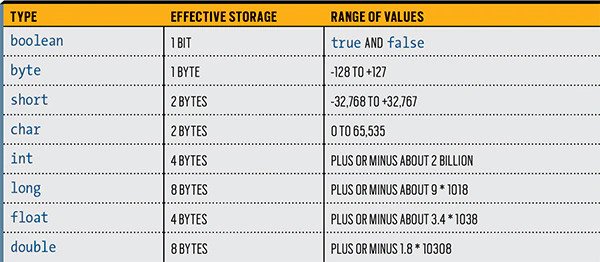
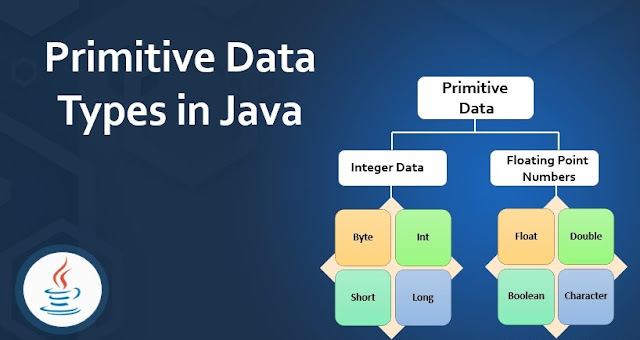
Figure 1 shows the ranges of the primitive data types, their effective storage, and their range of possible values.

Oracle Java Tutorial and Material, Oracle Java Exam, Oracle Java Exam Prep, Oracle Java Certification, Oracle Java Preparation, Core Java
Figure 1. The ranges of Java’s primitive types

The following things should be clear:

◉ A Boolean cannot be assigned to or from a numeric expression at all.
◉ For the main integer numeric types, assignment is possible from smaller to larger, that is, from byte to short to int to long.
◉ For floating-point types, an assignment from float to double is possible.
◉ Assignment from any of the integer types to either of the floating-point types is fine also.
◉ You can see that float and double do some magic to be able to store a vastly bigger range in the same amount of storage.
◉ Perhaps a little surprising is the fact that assignment between short and char cannot be performed in either direction. This is because a char can represent values greater than the maximum value of a short (65,535 > 32,767), while a short can represent negative values, which are not representable by a char.

You can look up the formal specification of these rules (and more) in Java Language Specification section 5.1, “Kinds of conversion,” specifically subsections 5.1.2 and 5.1.3.

Let’s see how these rules work in practice.

You can’t assign a double value to a float. From Figure 1, it’s clear that a double can represent a much greater range of values than a float, so the following assignment is not permitted, and compilation will fail:

double d = 5.0D;
float f = 4.0F;
f = d;

Of course, you might happen to know that in this case, the actual value stored in the double is small enough to be represented properly by the float. If you are 100% confident that the value about to be assigned will never overflow the capacity of the destination, you can use a cast to persuade the compiler to let you perform the assignment. In this case, the resulting code would look like the following:

f = (float)d;

You can assign a char value to an int. Every value that can be represented by a char can be represented perfectly by an int. Therefore, the compiler permits the following assignment, the result is reliably accurate, and everyone is happy.

char c = '1';
int i = 2;
i = c;

Can you assign a long value to a float? The range of a float is much greater than the range of a long and, therefore, the compiler allows the following assignment:

long l = 3L;
float f = 4.0F;
f = l;

But wait a moment: A long has 8 bytes of effective storage, while a float has only 4 bytes. How can you assign an 8-byte value to a 4-byte space? Shouldn’t that operation fail?

This assignment succeeds because there is no loss of gross value. There is only a loss of precision. The float will contain the entire value from the long, although it might not store that value completely accurately. In fact, the float may be only an approximation of the long’s value. The Java compiler doesn’t care about that.

At this point, you’ve seen that assignments that might result in a completely wrong value—based on the ranges representable by the types—will be rejected by the compiler, yet you can force the compiler’s hand by using a cast. A cast operation is safe if you are sure the value will fit.

You’ve also seen that an assignment that risks a loss of precision, but not a loss of gross value, is permitted. Let’s dig into that further and consider how a 4-byte float value can store a larger range than an 8-byte long value, but perhaps only as an approximation.

Significands, exponents, and loss of precision


It’s easy to understand losing the fractional part when you assign (through a cast) a float to an int, but what does it mean to lose precision when you assign, for example, a long to a float? The answer lies in how the float manages to have a wider range than the long, despite using only half the storage.

Floating-point numbers in Java (in fact, in most computer languages) don’t count in units of 1 the way that integer values do. Instead, floating-point numbers count in what might be called a variable chunk size. (Chunk is a term used in this article, but it’s not the correct technical term.)

Although it’s possible that a floating-point value is counted in chunks of 1, it might be counted with chunk sizes of 1/16 or of 1/512. This behavior is how floating-point values handle fractions.

But similarly, the number might be counted in chunks of 256. This is how floating-point values can be a huge number and, thus, floating-point values have much greater ranges than might be expected.

In essence, a floating-point number’s storage is split into two parts. One part stores the number of chunks (technically called the significand) and the other part indicates the size of each chunk (called the exponent).

Because Java works with binary numbers, everything is represented in powers of 2.

A floating-point value is indicated as significand * 2 ^ exponent. Or to write it out in more conventional mathematics format

Floating point value = significand x 2exponent

With that background on floating-point number representation, let’s get back to the idea of loss of precision. It turns out that for a float value in Java, the significand (the chunk count) uses 23 bits, and the exponent is 8 bits. The extra bit is for the sign to indicate whether the floating-point number is positive or negative.

Thus, the largest value a float significand can represent without making an approximation is 16,777,216. This is much lower than the largest value of an int and very much lower than the upper limit for a long.

If you try to use a float value to store a number bigger than that, the exponent, that is, the chunk size, must be increased. Initially the count size is twos, and then after 16,777,216 twos, the count is by fours. In other words, it starts out as follows:

Floating point value = significand x 21 (up to 16,777,216)

Floating point value = significand x 22 (up to 216,777,216)

Floating point value = significand x 24 (up to 416,777,216)

And so on.

However, the significand remains a 23-bit value, which limits its precision. This is what separates floating-point values from integers, which have smaller range but greater precision.

There are immediately demonstrable consequences to this. First, if you try to assign to a float the literals 16,777,216; 16,777,217; 16,777,218; and 16,777,219, you see that it takes on the values 16,777,216 (accurate); 16,777,216 (rounded down by one); 16,777,218 (correct); and 16,777,220 (rounded up by one).

You can demonstrate this easily by casting those literal values to floats, and then casting them back to ints, like this.

System.out.println((int)((float)(16777216)));
System.out.println((int)((float)(16777217)));
System.out.println((int)((float)(16777218)));
System.out.println((int)((float)(16777219)));

Another effect that is perhaps even more significant is what happens in this loop. Try to guess how many times the following will print the string incrementing. Then copy the following code and find out if you were right.

float count = 33554432;
while (count < 33554435) {
    System.out.println("incrementing");
    count = count + 2;
}

Double-precision floating-point numbers have essentially the same behavior, although the boundary numbers are different. Where a float has a 23-bit significand, a double has a 53-bit significand—allowing it to accurately represent the full range of values of a standard 32-bit int. And where a float uses 8 bits for the exponent, a double uses 11 bits.

The point here is that loss of precision means just that: When you assign an int to a float or a long to either a float or a double, you might end up with an approximation of your original number. This approximation might have practical consequences for your code. (Side note: double is the default data type for floating-point numbers in Java.)

If you’re interested in more detail, Java (at least in strictfp mode) uses the IEEE Standard for Floating-Point Arithmetic (IEEE 754) for floating-point representations. Explaining strictfp and IEEE 754 is not specific to Java and is far beyond the scope of this article; a Wikipedia page provides more details.

Effective storage for numeric data types


This discussion is now complete, right? Well, no. Look back at Figure 1. The second column is labeled Effective storage. Why not simply use the title Storage? The difference is significant because the physical storage space used for a variable isn’t specified by the language or the virtual machine specification.

For example, on modern 64-bit Intel or Arm processors, it’s possible that the hardware cannot efficiently address single bytes or perhaps even 4-byte words. In this situation, a particular implementation is free to allocate more storage than is strictly needed for the data.

What the Java specification mandates is that the integral data types must behave as if they are two’s complement binary numbers with the specified amount of storage.

For floating-point values, the Java specification mandates that the behavior must be exactly compliant with the IEEE 754 specification only if the class or method carries the modifier strictfp. The bottom line is that although the table describes what the numerical behavior will be, you simply cannot assume that allocating 1,000 int variables will reliably allocate 4,000 bytes of memory.

This discrepancy can be even more startling with Boolean values. It’s possible that an array of 64 Booleans might be packed into a single 8-byte word, but it’s also possible (though perhaps not very likely) that each individual Boolean might actually take 8 bytes. The reality is likely somewhere in between, but neither the language specification nor the virtual machine specification mandates this behavior. Practically speaking, you probably don’t care in most cases.

Source: oracle.com

Wednesday, November 10, 2021

Quiz yourself: Streams and flatMap operations in Java

Oracle Java Tutorial and Material, Oracle Java Guides, Oracle Java Preparation, Oracle Java Learning, Core Java, Oracle Java

The powerful peek() function can be tricky to use correctly in Java streams.

Download a PDF of this article

Given the code fragment

String[][] arr = {{"a", "d"}, {"n", "d"}, {"a", "x"}};

Arrays.stream(arr)

  .peek(v -> v.equals(new String[] {"a", "d"}))

  .flatMap(u -> Arrays.stream(u))

  .forEach(System.out::print);

What is the output? Choose one.

A. ad

B. [a,d]

C. anaddx

D. adndax

E. [[a,d][n,d][a,x]]

F. Compilation fails due to the argument to peek.

Answer. This question investigates the behavior of arrays and the flatMap operation in streams. Notice first that the array arr is an array containing arrays of Strings. When an array is passed to Arrays.stream, the resulting stream will contain the elements of that array in the order of low to high index values. So, the initial stream contains three elements, {"a", "d"}, {"n", "d"}, and {"a", "x"} in left-to-right order.

The peek method itself never alters the stream, although it’s possible for the argument to do so if it includes a side effect. In this question case, the argument has no side effects and does not modify anything in the stream. In fact, the argument does nothing useful whatsoever. Don’t confuse peek with a filter operation merely because the argument is a lambda that yields a Boolean result. Of course, a filter operation would potentially remove some elements, but that’s not what is shown here.

Does the lambda passed to peek cause a compilation error? The peek method requires an argument that is a Consumer of the stream element type. The lambda provided as argument is correctly formed but appears to return a Boolean result from the equals method. Incidentally, that return will always be false. However, it is acceptable to return a value in this way in a void-compatible lambda; the returned value is simply ignored. This is closely parallel to calling the add method on a list object but ignoring the Boolean value returned by that method. Thus, option F is incorrect because this code does not cause a compilation error.

The flatMap invocation has a lambda expression that expands the String[] elements to Stream<String> elements. The effect of a flatMap is to take the elements of each stream that the argument lambda returns and concatenate them into a single Stream<String>. Again, the substreams returned from the Arrays.stream invocations will be processed from low to high index values. Consequently, the result will be the sequence adndax. From this, you can see that option D is correct, and the remaining options—A, B, C, and E—are incorrect.

Conclusion. The correct answer is option D.

Source: oracle.com

Monday, November 8, 2021

Quiz yourself: Java andThen methods for consumers and functions

Oracle Java Exam Prep, Oracle Java Preparation, Oracle Java Certification, Oracle Java Career, Oracle Java Jobs

In Java, a Consumer method’s role is to execute a side effect such as printing to the console, logging an event, or writing to a database.


Given the following two classes

import java.util.function.Consumer;
import java.util.function.Function;
class Value {
  static Integer counterC = 1;
  static Integer counterF = 1;
}
public class ChainTest {
  public static void main(String[] args) {
    Consumer<Integer> addC = i -> Value.counterC += i;
    Consumer<Integer> showC = i -> System.out.print(i);
    addC.andThen(showC).accept(1);

    Function<Integer, Integer> addF = i -> Value.counterF += i;
    Function<Integer, Integer> showF = i -> {
      System.out.print(i); return i;
    };
    addF.andThen(showF).apply(1);
  }
}

A. 11
B. 12
C. 21
D. 22
E. There is no output.

Answer. This quiz question demonstrates aspects of the java.util.function.Consumer and java.util.function.Function interfaces, and the use of the andThen methods of each.

Let’s start with the Consumer example. The abstract method declared in a Consumer has a void return type, so it cannot return a value. Rather, the method’s role is to execute a side effect such as printing to the console, logging an event, or writing to a database.

The andThen method chains two consumers. After addC is invoked, counter refers to an integer with the value 2, so it’s tempting to think that showC might print 2. However, the second consumer is invoked with the original object that was passed to the first consumer.

Looking at how the Java API implements the method helps reinforce this understanding. Here’s the code.

default Consumer<T> andThen(Consumer<? super T> after) {
  Objects.requireNonNull(after);
  return (T t) -> { accept(t); after.accept(t); };
}

The two calls to accept are both invoked with the same argument t (which is the immutable wrapper Integer(1)) passed sequentially to the first consumer and then to the second consumer.

It’s important to notice that the expression passed to the accept method is a literal 1, and while this will be autoboxed to an Integer, it is that object—not the object referred to by counter—that is passed to both of the consumers.

From this you can see that the first digit printed will be 1. Therefore, options C, D, and E are incorrect.

Now look at the second part of the code, which chains two Function objects. The andThen method of the Function interface passes the value returned by the first function as the argument to the second function. Here is how the Java API implements this method.

default <V> Function<T, V> andThen(Function<? super R, ? extends V> after) {
  Objects.requireNonNull(after);
  return (T t) -> after.apply(apply(t));
}

Oracle Java Exam Prep, Oracle Java Preparation, Oracle Java Certification, Oracle Java Career, Oracle Java Jobs
Notice that the argument to the invocation of after.apply is the value returned from the first apply invocation. In the example in the question, the addF method actually returns the reference to the Integer(2) object that’s assigned to counter. (Recall that assignments in Java form an expression that has the value that is being assigned.) Thus, Integer(2) will be the value passed to showF, which consequently prints 2 to the console. Therefore, option B is the correct answer.

By the way, showF and the entire expression addF.andThen(showF).apply(1) also return the value Integer(2); however, this value is abandoned.

Conclusion. The correct answer is option B.

Source: oracle.com

Wednesday, November 3, 2021

The art of long-term support and what LTS means for the Java ecosystem

Java Ecosystem, Oracle Java Preparation, Oracle Java Exam, Oracle Java Exam Prep, Oracle Java Career, Java Skills, Java Jobs, Java Guides

Here’s what Java 17 has in common with Java 11 and Java 8.

Download a PDF of this article

In June 2018, just over three years ago, Oracle and other participants in the Java ecosystem announced a change to the release cadence model for Java SE.

Rather than having a major release planned for every two to three years (which would often become three to four years), a new six-month feature-release-train model would be used: Every three years, a release would be designated as Long-Term Support (LTS) and receive quarterly security, stability, and performance updates only. This pattern borrowed shamelessly from the Mozilla Firefox release model but tweaked it to be more aligned with the requirements of a development platform.

The first version of Java released under that model was Java SE 11.

The release of Java SE 17, the second LTS release under the new model, is imminent, and this article will provide a refresher on how Java SE releases work. I’ll also offer some commentary on what has worked well over the past three years and what further refinements you should expect going forward.

The six-month feature-release model

Under the feature-release model, the Java platform developers can work on features and release those features within any six-month window—but only when the features are ready. Contrast that to the old legacy major-release model, where the Java platform developers felt enormous pressure to push features into a release; otherwise they would have to wait several years for the next cycle.

Meanwhile, application developers now enjoy a steady cadence of bite-size features on a predictable timeline. That’s a lot better than having Java developers trying to consume hundreds of changes all at once every few years.

Has it worked? Three years into the new model, developer surveys show that between a quarter and a half of developers use the latest six-month Java release as their day-to-day version. Half of those said they have applications in production on the latest release.

What about the rest?

It is well understood and expected that not all developers or organizations would want to consume feature releases on a six-month cadence. More conservative organizations, especially, want to solidify a development stack around a single version and not take on risks associated with the introduction of new features. This is where Java LTS releases come into play.

LTS focuses on stability

Java LTS releases, such as Java 11 and Java 17, are similar to Firefox’s Extended Support Releases. Oracle’s updates to Java LTS releases provide only stability, security, and performance improvements—not new features. This reduces the risk that an update could break interaction with a tool or library. Organizations can count on Java LTS releases being available for at least eight years, providing ample time for toolchains to solidify and for developers to transition to another LTS several years later.

The LTS model allows technology providers to zero in on particular versions in the longer-term support of their products. After all, it would be impractical to expect platform providers and toolchains to provide multiple years of support on every six-month feature release. Very quickly there would be dozens of versions in need of support, as well as a fragmented user base that would be impractical to manage.

The sweet-spot timing for versions that get the LTS treatment is subjective. Historically, if you look back from Java 1.2 to Java 8, there were three to four years between major releases. The new feature-release model has three years between Java 11 and Java 17. For very conservative organizations this three-year interval is ideal, but as more developers use modern tools and techniques, there is increasing demand for Oracle to offer Java LTS releases on a shorter cycle, perhaps every two years.

Let’s be clear: Each provider of Java platform binaries offers its own timelines and support offerings. The default at Oracle is that there will be eight years of support for a Java SE LTS release. For Java 8, LTS has already been extended through at least 2030, meaning that this version will have had at least 16 years of support when it’s finally retired!

Meanwhile, versions such as Java 7 and Java 11 are unlikely to have support extensions. Extensions are based simply on adoption and on whether the organizations providing the respective binaries feel it’s valuable to continue offering (commercial) support.

Source: oracle.com

Monday, November 1, 2021

Your Guide to Getting OCI Certified for Free

Oracle is committed to helping customers and partners upskill their workforce while helping individuals expand their skillsets to become more competitive. For this reason, we are now offering free Oracle Cloud Infrastructure (OCI) digital training and, for a limited time, free OCI certification exams until December 31, 2021.

As part of this exciting initiative, candidates can take exams on Oracle University’s own proctoring system and will receive three (3) free certification exam attempts.

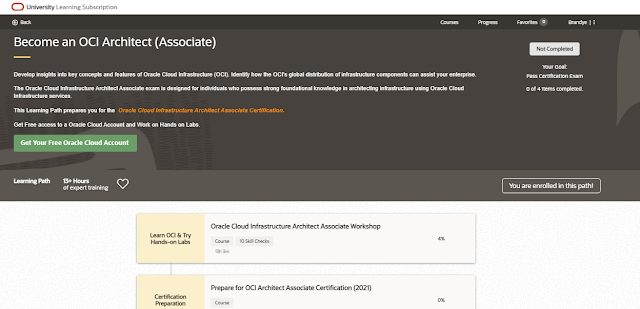
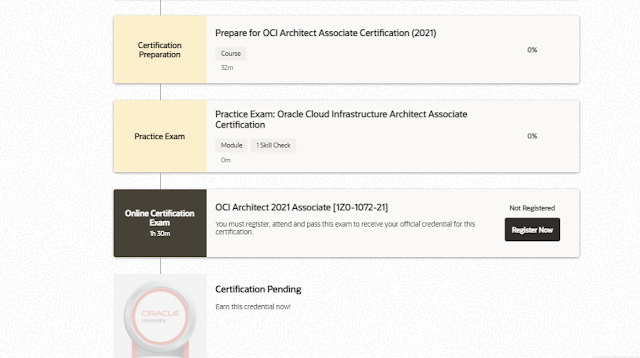
1. Activate your free Learning Path

1. On the free OCI training and certification page, select the Learning Path you want to complete.
2. After being redirected to the Learning Path page, click Enroll in this path.
3. Create an Oracle Account (Single Sign On), which will be your unique Oracle identifier for all Oracle Cloud Learning Subscription courses and associated Oracle Certification applications.
4. Read and accept the terms and conditions then start learning!

Oracle Java, OCI Certified, Java Tutorial and Materials, Java Guides, Oracle Java Prep, Oracle Java Preparation, Oracle Java Certification

2. Complete your Learning Path


Our Learning Paths are available online, giving you the flexibility to learn when you want, how you want on your own personal schedule and timeline. Each course is presented in a micro-learning format, available in multiple languages through machine translation, with support guides and course transcriptions to help your learning. We strongly encourage you to take all available courses before you take an exam. The minimum course time requirement the second attempt is 2 hours and 4 hours for the third attempt.

3. Register for your exam


Scroll to the bottom of your Learning Path to enroll for your exam. An option to register will appear. Click on this.

Oracle Java, OCI Certified, Java Tutorial and Materials, Java Guides, Oracle Java Prep, Oracle Java Preparation, Oracle Java Certification

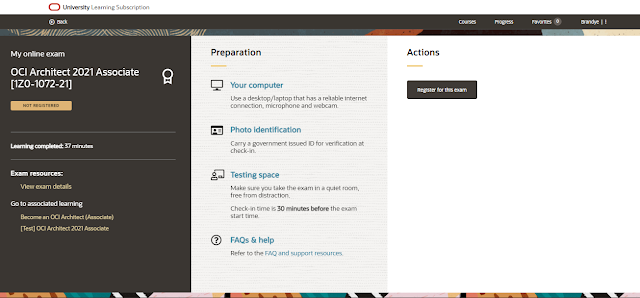
You will be redirected to a registration page that also offers helpful hints to help you succeed. On this registration page:

1. Click Register for this exam.
2. Enter your local time zone.
3. Select the time you wish to take your exam from the available options per day.

Once you select your exam, you will receive a confirmation email.

Oracle Java, OCI Certified, Java Tutorial and Materials, Java Guides, Oracle Java Prep, Oracle Java Preparation, Oracle Java Certification

4. Booking, rescheduling and cancelling your exam

1. When you register for your exam, fill out your Official Name (as it appears on your government-issued ID that you will present on exam day) and your contact number.

2. Next, read and accept the Terms and Conditions.

3. Once registered, you may reschedule the date and time of your booking (pending availability) and/or cancel your time slot if necessary. If you choose to do so, you will receive a confirmation notification in your inbox.

5. Preparing for your exam


To help you prepare for the exam you can utilize the following tools:

1. Take a free practice exam available in the Learning Path. You can take and re-take this as many times as you like.

2. Download our Configuration & Pre-Check software (LockDown Browser) which will be required for you to take your exam.

3. Ensure you have an up-to-date government-issued photo identification card to verify your ID before taking the exam.

4. Find a quiet testing space away from distractions.

6. On the day of your exam


On the day of your exam, you will be prompted with a reminder email containing  a Zoom link which will then connect you with our proctor online. Please connect at least 30 minutes before your allocated exam time.

Your proctor will verify your identity and then allow you to launch your exam. You will have 90 minutes to complete your exam. Upon completion you will be notified whether you have passed or failed.

If you passed – congratulations! You can claim your certification badge in CertView and share it with your network and peers.

If you failed, you must wait another five days before you can retake your exam. You will also have to complete course hours in your Learning Path (if you have not done so). For your second attempt, you must complete two hours of training and for your third attempt, four hours of training.

Please note, if your second and subsequent attempts fall outside of our certification promotional period, you may be asked to purchase the exam via Oracle University and/or Pearson VUE.

Source: oracle.com