Showing posts with label JDK. Show all posts

Wednesday, May 15, 2024

Oracle JDK 17: The Ultimate Guide for Boosting Your Java Projects

Oracle JDK 17: The Ultimate Guide for Boosting Your Java Projects

Java Development Kit (JDK) 17, released by Oracle, represents a significant milestone in the evolution of Java, offering a host of new features, improvements, and long-term support (LTS). This guide is designed to provide a comprehensive overview of Oracle JDK 17, highlighting its key benefits and how it can enhance your Java projects.

Introduction to Oracle JDK 17


Oracle JDK 17 is the latest LTS release, providing stability and support for developers who require a reliable platform for their applications. It introduces several new features, including pattern matching for switch expressions, sealed classes, and new APIs, which are designed to improve developer productivity and code quality.

Key Features of Oracle JDK 17


Pattern Matching for Switch

One of the most anticipated features in JDK 17 is pattern matching for switch expressions. This enhancement simplifies the code by allowing complex data structures to be deconstructed and matched directly within switch statements. This feature improves readability and reduces boilerplate code.

Sealed Classes

Sealed classes are a powerful addition to the Java language, allowing developers to control which classes or interfaces can extend or implement them. This provides better control over the class hierarchy and enhances the security and maintainability of the code.

Enhanced APIs

Oracle JDK 17 introduces several new and improved APIs. Notable among these are:

  • Vector API: This API enables developers to write complex vector computations that are optimized for performance.
  • Foreign Function & Memory API: This API facilitates interaction with native libraries and memory, providing greater flexibility and performance.
  • Deprecations and Removals: Certain outdated features have been deprecated or removed to streamline the JDK and encourage the use of modern alternatives.

Performance Improvements

Performance is a critical aspect of any development platform, and Oracle JDK 17 does not disappoint. The release includes numerous enhancements aimed at optimizing the execution of Java applications, from garbage collection improvements to more efficient memory management.

Security Enhancements

Security remains a top priority in JDK 17, with several updates designed to protect applications against vulnerabilities. These include enhancements to cryptographic libraries and more stringent security policies.

Why Upgrade to Oracle JDK 17?


Long-Term Support (LTS)

As an LTS release, Oracle JDK 17 offers extended support and stability, making it an ideal choice for enterprise applications. Long-term support ensures that critical updates and security patches are available, reducing the risk of vulnerabilities.

Improved Developer Productivity

The new features in JDK 17, such as pattern matching and sealed classes, are designed to simplify the development process, allowing developers to write cleaner, more maintainable code. These enhancements can lead to significant productivity gains over time.

Enhanced Performance

With its focus on performance improvements, Oracle JDK 17 enables developers to build faster and more efficient applications. This can lead to reduced operational costs and improved user experiences.

Security and Compliance

The robust security features in JDK 17 help organizations maintain compliance with industry standards and protect sensitive data. Regular updates and patches ensure that applications remain secure against emerging threats.

How to Migrate to Oracle JDK 17


Assessing Compatibility

Before migrating to JDK 17, it is crucial to assess the compatibility of your existing codebase. This involves reviewing deprecated features, identifying potential issues, and ensuring that all dependencies are compatible with the new JDK version.

Testing and Validation

Thorough testing is essential to ensure a smooth migration. This includes running unit tests, integration tests, and performance benchmarks to validate that your application works as expected with JDK 17.

Updating Dependencies

Ensure that all libraries and frameworks used in your project are updated to versions compatible with JDK 17. This may involve upgrading third-party dependencies or applying necessary patches.

Refactoring Code

Leverage the new features of JDK 17 to refactor and optimize your code. This can involve replacing deprecated features, utilizing new APIs, and adopting best practices introduced in the latest JDK version.

Deployment and Monitoring

Once the migration is complete, deploy the updated application in a controlled environment. Monitor its performance and stability closely to identify and address any issues that arise post-migration.

Best Practices for Using Oracle JDK 17


Stay Updated with Patches and Updates

Regularly apply patches and updates provided by Oracle to ensure your JDK environment remains secure and up-to-date with the latest features and improvements.

Leverage New Features

Take full advantage of the new features and enhancements in JDK 17. This includes utilizing pattern matching, sealed classes, and the enhanced APIs to improve code quality and performance.

Optimize Performance

Regularly profile your application to identify performance bottlenecks. Use the tools and optimizations provided by JDK 17 to enhance the efficiency of your application.

Focus on Security

Implement best security practices by leveraging the enhanced security features in JDK 17. This includes using updated cryptographic libraries and adhering to recommended security policies.

Conclusion

Oracle JDK 17 represents a significant advancement in the Java ecosystem, offering a host of new features, performance improvements, and enhanced security. By upgrading to JDK 17, developers can take advantage of long-term support, improved productivity, and a more secure platform for building robust Java applications.

Friday, April 26, 2024

JDK

Understanding the Java Development Kit (JDK)

Understanding the Java Development Kit (JDK)

In the realm of Java programming, the Java Development Kit (JDK) stands as a cornerstone toolset. It's not merely a single entity but a comprehensive package encompassing everything developers need to build, debug, and deploy Java applications. Let's delve into the core components and functionalities of this indispensable toolkit.

Core Components of JDK


At its core, the JDK comprises three primary components:

1. Java Compiler: At the heart of JDK lies the Java compiler, which translates Java source code into bytecode, the language understood by the Java Virtual Machine (JVM).
2. Java Runtime Environment (JRE): Another essential component is the JRE, which includes the JVM along with libraries and other resources necessary for executing Java applications.
3. Java Development Tools: JDK also equips developers with a plethora of development tools like debuggers, profilers, and documentation generators, streamlining the development process.

Features and Capabilities


The Java Development Kit empowers developers with an array of features and capabilities:

  • Cross-Platform Compatibility: One of JDK's most significant advantages is its cross-platform compatibility, allowing Java applications to run seamlessly on various operating systems.
  • Rich Standard Library: With its extensive standard library, JDK offers a vast collection of pre-built functionalities, reducing development time and effort.
  • Security: Security is paramount in today's digital landscape, and JDK doesn't disappoint. It comes bundled with robust security features to safeguard Java applications against potential threats.
  • Performance Optimization: JDK is continuously optimized for performance, ensuring that Java applications run efficiently and smoothly, even in demanding environments.

Why JDK Matters


For both seasoned developers and aspiring programmers, mastering the Java Development Kit is indispensable. Here's why:

  • Foundation of Java Ecosystem: JDK serves as the foundation of the entire Java ecosystem, laying the groundwork for building diverse applications ranging from enterprise software to mobile apps.
  • Gateway to Opportunities: Proficiency in JDK opens doors to a plethora of career opportunities in software development, as Java remains one of the most sought-after programming languages in the industry.
  • Community Support: With a vast and active community of developers, getting assistance and guidance on JDK-related matters is just a forum post away.

Conclusion

In conclusion, the Java Development Kit (JDK) is not just a tool but a catalyst for innovation and productivity in the world of Java programming. By understanding its intricacies and harnessing its power, developers can embark on a journey of endless possibilities, building robust and scalable Java applications with ease.

Friday, April 12, 2024

JDK

Unlocking the Power of JDK 17: A Comprehensive Guide

Unlocking the Power of JDK 17: A Comprehensive Guide

Introduction


In the ever-evolving landscape of programming languages and tools, Java Development Kit (JDK) 17 stands out as a cornerstone for developers seeking robustness, efficiency, and innovation. At its core, JDK 17 encapsulates a plethora of features, enhancements, and optimizations, empowering developers to streamline their workflows, enhance productivity, and deliver cutting-edge solutions. In this comprehensive guide, we delve into the intricacies of JDK 17, unlocking its full potential and elucidating its myriad benefits for developers worldwide.

Understanding JDK 17


What is JDK 17?

JDK 17, short for Java Development Kit version 17, is the latest installment in the renowned Java ecosystem, brought forth by the collaborative efforts of the Java community and Oracle Corporation. It serves as a comprehensive toolkit for Java developers, encompassing everything necessary for developing, debugging, and deploying Java applications efficiently.

Key Features and Enhancements

Sealed Classes and Interfaces

One of the standout features of JDK 17 is the introduction of sealed classes and interfaces, providing developers with enhanced control over class hierarchies and access modifiers. Sealed types enable the definition of a limited set of subclasses, bolstering code maintainability and security while fostering better API design practices.

Pattern Matching for switch

Pattern matching for switch expressions represents a significant enhancement in JDK 17, simplifying code logic and improving readability. This feature enables developers to streamline conditional logic by combining pattern matching with switch statements, resulting in more concise and expressive code.

Foreign Function and Memory API (Incubator)

The inclusion of the Foreign Function and Memory API as an incubator feature in JDK 17 marks a significant milestone for Java developers. This API facilitates seamless integration with native code and libraries, empowering developers to leverage existing platform capabilities and enhance performance without sacrificing Java's safety and portability.

Unified Tooling Support

JDK 17 comes bundled with unified tooling support, encompassing a suite of tools and utilities to streamline development, testing, and deployment workflows. From enhanced support for containerization technologies to improved diagnostics and monitoring capabilities, JDK 17 equips developers with the tools they need to build robust and scalable Java applications.

Leveraging JDK 17 for Maximum Productivity


Streamlined Development Workflow

With its rich set of features and enhancements, JDK 17 enables developers to streamline their development workflow, reducing time-to-market and enhancing productivity. From simplified syntax and improved error handling to enhanced tooling support, JDK 17 empowers developers to focus on building great software without being encumbered by boilerplate code or cumbersome development processes.

Enhanced Performance and Scalability

By leveraging the latest features and optimizations in JDK 17, developers can unlock unparalleled performance and scalability for their Java applications. Whether it's harnessing the power of sealed classes for better code organization or leveraging pattern matching for more efficient control flow, JDK 17 equips developers with the tools they need to optimize their applications for maximum performance and scalability.

Improved Security and Reliability

Security and reliability are paramount concerns for any software development project, and JDK 17 delivers on both fronts. With enhanced support for sealed classes and interfaces, developers can enforce stronger encapsulation and access controls, mitigating the risk of unauthorized access and potential security vulnerabilities. Additionally, JDK 17's robust error handling mechanisms and diagnostic tools empower developers to identify and address potential issues proactively, ensuring the reliability and stability of their Java applications.

Conclusion

In conclusion, JDK 17 represents a quantum leap forward for Java developers, offering a wealth of features, enhancements, and optimizations to streamline development workflows, enhance productivity, and deliver robust and scalable solutions. From sealed classes and pattern matching to unified tooling support and enhanced performance, JDK 17 empowers developers to push the boundaries of what's possible with Java, ushering in a new era of innovation and efficiency in software development.

Monday, February 19, 2024

Optimize Java Applications and Simplify Uptaking New JDK Versions with Java Management Service

Oracle is pleased to announce that with the latest update of Java Management Service (JMS), system administrators can quickly maximize the performance of their Java applications through expert recommendations tailored to each applications' profile. JMS now also offers invaluable insight to developers looking to take advantage of the many performance and language improvements of newer JDK versions for their existing applications.

Performance Analysis: Optimize Your Java Application Performance


JMS administrators can now leverage Performance Analysis feature to obtain recommendations to improve the performance of their Java applications. This feature analyzes the performance statistics from your Java runtime powering your applications and interprets them to recommend optimal startup parameters to enhance their performance.

By analyzing garbage collection logs and JFR files, Performance Analysis identifies specific areas for optimization and suggests updated startup parameters. With this feature, administrators can identify performance bottlenecks and take appropriate measures to optimize the overall performance of their Java applications.

Optimize Java Applications and Simplify Uptaking New JDK Versions with Java Management Service
Java Management Service recommendations for improving application performance

Java Migration Analysis: Streamline Your Adoption of New JDK Versions


JMS facilitates the migration of applications from older JDKs to newer ones for developers seeking to take advantage of the latest performance enhancements and language improvements. Through its Migration Analysis feature, JMS performs a comprehensive analysis of the application and generates detailed reports calling out the potential effort and risk involved in the migration process.

The Migration Analysis report provides developers with a clear picture of the level of effort required to transition to a newer JDK version. Migration Analysis also allows developers to easily consider different JDK version choices. By quantifying the effort involved in migrating to different JDK versions, developers can make informed decisions about which JDK version to migrate to.

During the migration process, developers can utilize the analysis reports from Migration Analysis to identify classes and APIs that require changes. The reports specify line numbers in the source code where modifications are needed and highlight both mandatory and recommended changes.

The report is available in two formats:

1. In JMS Fleet Management: The report can be viewed in the OCI console from the fleet where the Migration analysis action was initiated.
2. Static HTML: The report can be downloaded from the OCI console, enabling easy sharing with other team members for collaborative analysis and discussion.

Optimize Java Applications and Simplify Uptaking New JDK Versions with Java Management Service
Java Management Service assessing the migration effort for an application

Customized Java runtime installation: Tailor Your Java Runtime Installation for Maximum Control and Security


With the most the recent update of Java Management Service (JMS) Java Runtime Lifecycle Management functionality, administrators can further customize Java Runtime Installed using JMS. With the custom installation options, administrators have the ability to specify a custom installation path and define the package type, such as JDK, JRE, or Server JRE. OCI Oracle Linux users can choose between headless or headful installations. Administrators can extend the customization to post-installation actions, including specifying logging, networking, and security settings. This comprehensive customization empowers administrators with enhanced control and security in their environment.

Summary of Java Management Service Capabilities


With the introduction of these advanced features, Java Management Service (JMS) empowers system administrators to maximize the performance, security, and efficiency of their Java workloads to an even greater extent. These capabilities enable administrators to take full control of their Java applications and leverage Oracle's expertise to achieve optimal results.

JMS administrators can now leverage Oracle's expertise through Java Management Service - Fleet Management to:

  • (New) Evaluate the effort and feasibility of migrating Java applications to newer JDK versions
  • (New) Optimize Java workload performance with JVM tuning recommendations
  • Identify and report potential vulnerabilities (CVE) associated with 3rd party Java libraries used by applications
  • Assess the impact of Oracle JRE and JDK Cryptographic Roadmap on application
  • Use Java Flight Recorder to gather application details
  • Analyze the usage of application servers
  • Download and install Oracle Java versions
  • Remove reported Oracle Java versions

These advanced capabilities can be leveraged on Desktops, Servers, or Cloud deployments covered by an Oracle Java SE Subscription or when running on an Oracle Cloud Infrastructure service that permits access to the underlying operating system. Users without a subscription can explore and try out these advanced features on Oracle Cloud Infrastructure (OCI) instances by creating a free OCI account at cloud.oracle.com/free. This allows users to experience the power of JMS and its advanced capabilities firsthand on OCI.

As announced during the JavaOne 2022 Keynote, the Java Management Service basic features that identify Java Runtimes and Oracle JDK usage is now available to everyone, even users that do not have a Java SE Subscription or are running in Oracle Cloud Infrastructure.

Source: oracle.com

Wednesday, January 31, 2024

Announcing Oracle GraalVM for JDK 21

Announcing Oracle GraalVM for JDK 21

Oracle is pleased to announce the availability of Oracle GraalVM for JDK 21. This release brings with it new Java 21 features, improvements in Native Image performance, simplified usage of embedded languages, and more.

Project Loom Virtual Threads

First previewed in JDK 19, Project Loom is no longer a preview feature in JDK 21. GraalVM for JDK 21 implements Loom’s virtual threads when running on the JVM and when using Native Image.

Native Image Performance

While executables generated by GraalVM Native Image may be best known for their quick startup time, metrics such as memory usage, peak throughput, and latency are also critically important. With Oracle GraalVM for JDK 21 we see ahead-of-time (AOT) compilation achieving superior results on all metrics when benchmarking the popular Spring PetClinic application. While some developers might expect that JIT compilation would always outperform AOT compilation, the throughput achieved by Native Image generated executables in GraalVM for JDK 21 provide competitive peak performance.

All the following Spring PetClinic benchmark results were obtained with a maximum heap size of 512MB. The two configurations compared below are: a native executable produced by Oracle GraalVM for JDK 21 optimized with profile guided optimization (PGO); the same application running on GraalVM Community Edition for JDK 21 using the C2 JIT compiler. Both configurations use the G1 garbage collector.

Startup (seconds): Native 97% faster

GraalVM (C2 JIT) Oracle GraalVM Native Image (PGO+G1) 
7.09 0.21 

Memory Usage (RSS in MB): Native 38% lower

GraalVM (C2 JIT) Oracle GraalVM Native Image (PGO+G1)
1029 641

99th Percentile Latency (ms): Native 28% lower

GraalVM (C2 JIT)

Oracle GraalVM Native Image (PGO+G1)
7.20 5.15

Throughput (requests/second): On par

GraalVM (C2 JIT)

Oracle GraalVM Native Image (PGO+G1)
11066 11902

With these latest results, we can see that Oracle GraalVM Native Image can provide faster startup time, reduced memory requirements, and lower latency while maintaining throughput making it an ideal choice for microservices, functions, and other workloads where minimizing operating cost is critical.

New Container Images


To support container-based application development and deployment, new container images are available for the Oracle GraalVM JDK and Native Image in the Oracle Container Repository. The `jdk` image can be used to deploy Java applications while the `native-image` container image includes all the tools required to compile applications into native executables.

Faster Compile Times


To reduce application compile times, some optimization phases that were previously included in the default level 2 (-O2) have been moved to a new level 3 (-O3). The level 3 optimizations work best with profile guided optimization, so they are automatically enabled when compiling with `--pgo`. The result is faster default compilation times with no significant impact on application performance. PGO continues to employ the same optimizations as in previous releases.

During development, where the focus is on functionality, not performance, developers can continue to use the “quick build” option (-Ob) to reduce compile times. This option disables most memory and performance optimizations so the resulting executables are not recommended for production deployments.

Source: oracle.com

Thursday, January 11, 2024

Unleashing the Power of Oracle GraalVM for JDK 21

Introduction


In the ever-evolving landscape of Java Development, staying ahead of the curve is not just a choice; it's a necessity. The advent of JDK 21 brings forth a technological marvel, and we, at Oracle Java Certifed, are excited to guide you through the immense capabilities of Oracle GraalVM, propelling your Java applications to new heights.

Understanding Oracle GraalVM


What sets GraalVM Apart?

Oracle GraalVM, often hailed as the secret weapon for developers, is a high-performance runtime that supports various languages, including Java, JavaScript, Python, Ruby, and more. What distinguishes GraalVM is its ability to provide unmatched speed and efficiency, transcending the limitations of conventional Java Development Kits.

Unleashing the Power of Oracle GraalVM for JDK 21

Key Features of Oracle GraalVM

1. Polyglot Programming: Embrace a polyglot approach, enabling seamless integration of multiple languages within the same application.

2. Ahead-of-Time Compilation (AOT): Boost your application's startup time and overall performance with GraalVM's AOT compilation, a game-changer for resource-intensive applications.

3. Native Image Support: Transform your Java applications into standalone executables with GraalVM's native image support, reducing memory footprint and enhancing deployment flexibility.

4. Extended Ecosystem Compatibility: GraalVM ensures compatibility with a vast ecosystem of libraries and frameworks, allowing developers to leverage existing tools effortlessly.

Harnessing the Power of JDK 21


Unveiling JDK 21 Features

Record Types Revolutionize Data Handling

In JDK 21, the introduction of record types signifies a paradigm shift in how developers handle data. With a concise syntax and automatic generation of methods like toString(), equals(), and hashCode(), record types enhance code readability and reduce boilerplate.

Pattern Matching for Switch Statements

JDK 21 introduces enhanced pattern matching for switch statements, simplifying code structures and making it more expressive. This feature streamlines the process of writing clear and concise code for complex scenarios.

Oracle GraalVM and JDK 21 Synergy

Performance Boost with Just-In-Time Compilation

The seamless integration of Oracle GraalVM with JDK 21 brings forth a synergy that developers dream of. The combination of GraalVM's Just-In-Time Compilation and JDK 21's powerful features results in unparalleled performance gains for your Java applications.

Polyglot Possibilities in Action

Imagine a scenario where your application seamlessly incorporates Java, JavaScript, and Python components. Oracle GraalVM, coupled with JDK 21, makes this a reality, opening the door to a world of polyglot possibilities that were once considered complex and challenging.

Implementation Best Practices


Incorporating Oracle GraalVM and JDK 21 in Your Project

1. Evaluate Compatibility: Before migration, assess the compatibility of your existing codebase with Oracle GraalVM and JDK 21 to ensure a smooth transition.

2. Optimize for Native Image: Leverage GraalVM's native image support by optimizing your application for better performance and reduced resource consumption.

3. Explore Polyglot Scenarios: Identify areas in your project where a polyglot approach could enhance functionality, and leverage GraalVM's capabilities accordingly.

Conclusion

In conclusion, Oracle GraalVM for JDK 21 is not just an upgrade; it's a leap into the future of Java development. The powerful features of JDK 21, coupled with the unmatched capabilities of Oracle GraalVM, position your applications for success in an increasingly competitive landscape.

Friday, December 22, 2023

Unleashing the Power of JDK 20: A Comprehensive Guide

Unleashing the Power of JDK 20: A Comprehensive Guide

Introduction


In the dynamic landscape of Java Development, staying ahead is not just an option; it's a necessity. In this article, we delve deep into the intricacies of JDK 20, exploring its features, enhancements, and how it stands as a game-changer in the realm of Java programming.

Understanding JDK 20


Java Development Kit (JDK) 20, the latest iteration of the JDK series, brings forth a myriad of improvements aimed at optimizing development workflows and enhancing the overall user experience. Let's unravel the key facets that make JDK 20 a standout in the Java development ecosystem.

1. Feature-rich Modules

JDK 20 introduces a set of feature-rich modules, each designed to address specific aspects of Java development. From enhanced security protocols to streamlined compilation processes, these modules empower developers to navigate the complexities of coding with ease.

2. Performance Boosts

One of the noteworthy aspects of JDK 20 is its focus on performance enhancements. The compiler optimizations and runtime improvements integrated into this version ensure that Java applications run faster and more efficiently, marking a significant stride in the evolution of Java programming.

Benefits of Upgrading to JDK 20


Upgrading to JDK 20 is not merely an option but a strategic move for developers aiming to elevate their projects. Let's explore the tangible benefits that come with making the leap to this advanced version.

1. Enhanced Security Measures

Security is paramount in the digital age, and JDK 20 doesn't disappoint. With reinforced security measures, including upgraded cryptographic algorithms and secure coding practices, developers can build robust, secure applications that stand resilient against evolving cyber threats.

2. Improved Developer Productivity

JDK 20 streamlines the development process, offering tools and utilities that enhance developer productivity. From advanced debugging capabilities to optimized build tools, the JDK 20 ecosystem empowers developers to write cleaner code in less time.

3. Compatibility with Modern Technologies

Staying relevant in the ever-evolving tech landscape is crucial. JDK 20 ensures compatibility with the latest technologies, providing developers with the flexibility to integrate cutting-edge features into their applications seamlessly.

How to Upgrade to JDK 20


Now that we've established the compelling reasons to embrace JDK 20, let's delve into the practicalities of upgrading your development environment.

1. Assessing Compatibility

Before making the transition, it's imperative to assess the compatibility of your existing codebase with JDK 20. Conduct a thorough analysis using tools like Jdeps to identify potential issues and ensure a smooth migration.

2. Backup and Version Control

Prior to upgrading, create a robust backup of your projects. Utilize version control systems such as Git to track changes and have a failsafe mechanism in place to revert to previous versions if needed.

3. Gradual Implementation

To minimize disruptions, consider a gradual implementation strategy. Start by upgrading non-production environments, allowing developers to acclimate to the new features and address any unforeseen challenges before rolling out the changes to production.

Conclusion

In conclusion, JDK 20 is more than just an update; it's a strategic move towards a future-proof and efficient Java development ecosystem. By understanding its features, benefits, and the seamless upgrade process, developers can harness the full potential of JDK 20, ensuring their projects thrive in the ever-evolving world of Java programming.

Wednesday, June 7, 2023

Is Oracle Java different from Java?

Oracle Java Career, Oracle Java Skills, Oracle Java Jobs, Oracle Java Prep, Oracle Java Preparation, Oracle Java Guides, Oracle Java Learning

Introduction:


When it comes to programming languages, Java has been a dominant force for decades. It is renowned for its versatility, reliability, and extensive use in various domains, including web development, mobile applications, enterprise software, and more. However, there seems to be some confusion surrounding the terms "Oracle Java" and "Java." In this article, we aim to clarify the relationship between these two terms and shed light on whether there is any substantial difference between them.

Understanding Java:


Java, first released in 1995, is a general-purpose programming language developed by Sun Microsystems, which was later acquired by Oracle Corporation. Java quickly gained popularity due to its "write once, run anywhere" mantra, which allows developers to write code that can be executed on multiple platforms without the need for recompilation. This characteristic made Java an ideal choice for creating cross-platform applications.

Oracle Java:


Oracle Java refers to the Java Development Kit (JDK) and Java Runtime Environment (JRE) provided by Oracle Corporation. Oracle took over the stewardship of Java when it acquired Sun Microsystems in 2010. Since then, Oracle has been responsible for the ongoing development, maintenance, and updates of Java. Oracle's commitment to Java has ensured its continued growth and relevance in the ever-evolving technological landscape.

OpenJDK and Oracle JDK:


To further clarify the distinction, it's essential to mention OpenJDK. OpenJDK is an open-source implementation of the Java SE (Standard Edition) platform. Oracle JDK, on the other hand, is a commercial offering provided by Oracle Corporation. Both OpenJDK and Oracle JDK are based on the same codebase, with Oracle JDK including additional features and support that are not present in OpenJDK. It's worth noting that Oracle JDK was historically more feature-rich than OpenJDK, but over the years, the gap has significantly narrowed.

Compatibility and Interchangeability:


Java applications developed using Oracle Java, OpenJDK, or any other compliant JDK are generally compatible with each other. The bytecode generated from Java source code remains consistent across these implementations, ensuring portability and interchangeability. This means that developers can utilize either Oracle Java or OpenJDK without worrying about compatibility issues.

Community Involvement and Support:


Java's strength lies not only in its language features but also in its vast and vibrant community. The Java community encompasses millions of developers, contributors, and enthusiasts who actively engage in improving the language, sharing knowledge, and providing support. This community-driven approach ensures that Java remains a cutting-edge and well-supported programming language.

Furthermore, both Oracle and the wider Java community actively contribute to the development and enhancement of OpenJDK. This collaboration fosters innovation, drives standardization, and guarantees the availability of high-quality implementations of Java.

Conclusion:

In conclusion, the terms "Oracle Java" and "Java" refer to the same programming language. Oracle Java specifically pertains to the JDK and JRE distributions provided by Oracle Corporation. However, with the rise of OpenJDK as an open-source alternative, developers have more flexibility in choosing their Java implementation.

The compatibility and interchangeability between Oracle Java and OpenJDK ensure that Java applications can run seamlessly across different implementations. Whether you decide to use Oracle Java or OpenJDK, you can rely on the robustness, scalability, and extensive ecosystem that Java offers.

Monday, May 29, 2023

JDK

What is Java Development Kit?

Oracle Java Development Kit, Oracle Java Career, Oracle Java Skills, Oracle Java Jobs, Oracle Java Prep, Oracle Java Preparation, Oracle Java Preparation Exam, Oracle Java Guides, Oracle Java Learning, Oracle Java Materials

In the ever-evolving world of technology, Java has emerged as one of the most popular and widely used programming languages. With its versatility and extensive functionality, Java has found its place in a wide range of applications, from web development to mobile app development and beyond. At the core of Java lies the Java Development Kit (JDK), a powerful toolkit that enables developers to create robust and efficient Java applications. In this article, we will delve into the intricacies of the Java Development Kit, exploring its components, features, and the role it plays in the development process.

Understanding the Java Development Kit (JDK)


The Java Development Kit, often referred to as JDK, is a comprehensive software development environment specifically designed for Java programming. It provides developers with all the necessary tools, libraries, and resources required to write, compile, and debug Java code. The JDK serves as a platform for developing, testing, and deploying Java applications across various operating systems and computing environments.

Components of the Java Development Kit (JDK)


The JDK comprises several essential components that contribute to its functionality and versatility. Let's take a closer look at these components:

1. Java Compiler (javac): The Java compiler is a fundamental component of the JDK. It translates the human-readable Java source code into a machine-readable format known as bytecode. This bytecode can then be executed on any platform that has a Java Virtual Machine (JVM) installed.

2. Java Virtual Machine (JVM): The JVM is an integral part of the JDK that executes Java bytecode. It acts as a virtual computer, providing a runtime environment for Java applications. The JVM interprets the bytecode and translates it into machine code that can be executed by the underlying operating system.

3. Java Runtime Environment (JRE): The JRE is a subset of the JDK that includes the JVM and other necessary libraries and files required to run Java applications. While the JDK is primarily used for development purposes, the JRE is used for executing Java programs on end-user machines.

4. Java Development Tools: The JDK offers a wide range of development tools that streamline the software development process. These tools include the Java debugger (jdb), the Java Archive (JAR) tool for packaging Java applications, the Java documentation generator (javadoc), and many more.

5. Java Class Library: The JDK provides an extensive class library that encompasses pre-written code modules and APIs (Application Programming Interfaces). The Java Class Library simplifies the development process by offering ready-made components for various tasks, such as handling input and output, networking, database connectivity, and graphical user interface (GUI) creation.

Benefits of Using the Java Development Kit (JDK)


By harnessing the power of the Java Development Kit, developers can unlock numerous benefits and capabilities. Let's explore some of the key advantages of utilizing the JDK in Java development:

1. Platform Independence: Java is renowned for its "write once, run anywhere" mantra, and the JDK plays a pivotal role in achieving platform independence. With the help of the JVM, Java applications can run seamlessly on diverse operating systems, including Windows, macOS, Linux, and more.

2. Robustness and Security: Java is designed with a strong emphasis on reliability and security. The JDK incorporates various mechanisms, such as exception handling and memory management, to ensure robustness and prevent common programming errors. Furthermore, Java's sandbox security model adds an extra layer of protection against malicious activities.

3. Vast Ecosystem: Java has a vast and thriving ecosystem, thanks in large part to the extensive libraries, frameworks, and tools provided by the JDK. Developers can leverage this ecosystem to expedite development, access ready-made solutions, and tap into the collective knowledge and expertise of the Java community. Whether it's utilizing popular frameworks like Spring or libraries like Apache Commons, the JDK empowers developers with a wealth of resources to enhance their productivity.

4. Scalability and Performance: The Java Development Kit is engineered to deliver scalability and high-performance capabilities. Java's inherent scalability allows developers to build applications that can handle increased workloads and accommodate future growth. Additionally, the JVM's efficient memory management and just-in-time (JIT) compilation contribute to Java's ability to deliver robust performance, making it suitable for enterprise-level applications.

5. Cross-Platform Compatibility: With the JDK, developers can develop applications that seamlessly run on various platforms, making it an ideal choice for organizations that operate in heterogeneous computing environments. Java's compatibility across different operating systems ensures that applications can be deployed without the need for major modifications or rewrites.

Staying Ahead with Java Development Kit (JDK)


In today's fast-paced digital landscape, staying ahead of the competition is crucial. With the Java Development Kit (JDK), developers have a powerful ally that enables them to build cutting-edge, feature-rich applications. The JDK's comprehensive set of tools, libraries, and resources empowers developers to harness the true potential of Java and deliver high-quality solutions.

From startups to large enterprises, organizations across the globe rely on the JDK to build robust web applications, scalable enterprise systems, mobile apps, and much more. Java's versatility and the extensive capabilities of the JDK make it a preferred choice for developers seeking reliability, security, and platform independence.

By leveraging the JDK's components, such as the Java compiler, JVM, and Java Class Library, developers can streamline their development process, improve code quality, and enhance productivity. The JDK's vast ecosystem, including popular frameworks and libraries, further accelerates development and fosters innovation.

Java, backed by the Java Development Kit, has stood the test of time and continues to evolve, adapt, and thrive in an ever-changing technological landscape. Its strong community, regular updates, and dedication to backward compatibility ensure that developers can rely on Java for their long-term projects.

In conclusion, the Java Development Kit (JDK) is a vital toolkit for Java developers, offering a wealth of resources, tools, and libraries to create powerful and efficient applications. By harnessing the capabilities of the JDK, developers can unlock the true potential of Java, enabling them to stay ahead in today's competitive software development landscape.

Monday, May 1, 2023

What is Java SE?

Java SE, Oracle Java Certification, Oracle Java Prep, Oracle Java Learning, Oracle Java Guides, Oracle Java Tutorial and Materials

Java SE, also known as Java Standard Edition, is a widely used platform for developing and deploying Java-based applications. It provides a comprehensive set of APIs, tools, and runtime environments that allow developers to build and run Java applications on various platforms.

Overview of Java SE

Java SE is a platform that consists of three main components: the Java Development Kit (JDK), the Java Runtime Environment (JRE), and the Java Virtual Machine (JVM).

Java Development Kit (JDK)

The Java Development Kit (JDK) is a software development kit used to develop Java applications. It contains tools and libraries necessary for developing, debugging, and monitoring Java applications. The JDK includes a Java Virtual Machine (JVM), which is responsible for executing Java code. It also includes the Java compiler, which converts Java source code into bytecode that can be executed by the JVM. Additionally, the JDK includes various tools such as the Java debugger, profiler, and documentation generator. The JDK is available for multiple platforms such as Windows, macOS, and Linux.

Java Runtime Environment (JRE)

The Java Runtime Environment (JRE) is a software package that provides the runtime environment necessary to run Java applications. It contains the Java Virtual Machine (JVM), which is responsible for executing Java bytecode, as well as the core Java class libraries. The JRE does not contain the tools and libraries needed for Java application development, which are provided by the Java Development Kit (JDK).

The JRE is available for multiple platforms, including Windows, macOS, and Linux, and can be downloaded and installed independently of the JDK. Many computers already have a JRE installed, as it is often included with web browsers or other software that requires Java. When a Java application is run, the JRE is responsible for interpreting and executing the bytecode, providing the necessary resources for the application to run properly.

Java Virtual Machine (JVM)

The Java Virtual Machine (JVM) is a software program that provides a runtime environment for Java applications to run. It acts as an interpreter for Java bytecode, which is a compiled version of Java source code. When a Java application is executed, the JVM reads the bytecode and translates it into machine-specific code that can be executed on the computer's processor.

The JVM provides several features, including memory management, garbage collection, and security. It dynamically allocates memory for Java objects as needed, and the garbage collector automatically frees up memory when it is no longer being used. Additionally, the JVM provides a layer of security by enforcing Java's access control and ensuring that applications cannot access resources outside of their designated permissions.

The JVM is available for multiple platforms, including Windows, macOS, and Linux, and is a core component of the Java Runtime Environment (JRE) and Java Development Kit (JDK). The JVM is an essential part of the Java platform, providing the ability to write platform-independent code that can run on any device with a JVM implementation.

Features of Java SE

Java SE provides various features that make it a popular platform for developing and deploying Java applications. Some of these features include:

Object-oriented programming

Java SE is an object-oriented programming language, which means that it allows developers to create classes and objects that encapsulate data and behavior.

Platform independence

Java SE is a platform-independent platform, which means that Java applications can run on different platforms without any modifications.

Security

Java SE provides a secure environment for running Java applications by using a sandboxing mechanism that restricts the access of Java applications to system resources.

Automatic memory management

Java SE includes automatic memory management, which means that developers do not have to manage memory manually. The JVM automatically allocates and deallocates memory for Java applications.

Multithreading

Java SE provides support for multithreading, which allows Java applications to perform multiple tasks simultaneously.

Benefits of Java SE

Java SE provides various benefits for developers and organizations that use it for developing and deploying Java applications. Some of these benefits include:

Reduced development time

Java SE provides a comprehensive set of APIs and tools that allow developers to build Java applications quickly and efficiently.

Portability

Java SE allows Java applications to run on different platforms, which makes it easier for organizations to deploy Java applications in different environments.

Security

Java SE provides a secure environment for running Java applications, which helps organizations protect their sensitive data and assets.

Scalability

Java SE allows developers to build scalable Java applications that can handle large amounts of data and traffic.

Conclusion

Java SE is a widely used platform for developing and deploying Java applications. It provides a comprehensive set of APIs, tools, and runtime environments that allow developers to build and run Java applications on different platforms. Java SE provides various features and benefits that make it a popular platform for developing and deploying Java applications.

Wednesday, February 15, 2023

Differences Between Oracle JDK and OpenJDK

Oracle JDK, OpenJDK, Oracle Java Tutorial and Materials, Oracle Java Career, Java Prep, Oracle Java Certification, Java Guides, Java Prep, Oracle Java Preparation

Java has been one of the most popular programming languages in the world for many years, and for good reason. It is versatile, reliable, and scalable, making it an excellent choice for developing everything from small mobile apps to large enterprise systems. However, when it comes to choosing a Java Development Kit (JDK) for your project, you may be wondering what the differences are between Oracle JDK and OpenJDK. In this article, we will explore the key differences between the two JDKs and help you make an informed decision on which one is right for your project.

What is Oracle JDK?


Oracle JDK is the official implementation of Java Standard Edition (Java SE), developed and maintained by Oracle Corporation. It is the original implementation of Java, and it includes all the features and components required to develop, run, and debug Java applications. Oracle JDK is available under a commercial license, which means that if you want to use it for commercial purposes, you will need to purchase a license from Oracle.

What is OpenJDK?


OpenJDK, on the other hand, is an open-source implementation of Java SE, developed and maintained by the Java community. It is an alternative to Oracle JDK, and it includes all the features and components required to develop, run, and debug Java applications. OpenJDK is available under the GNU General Public License, which means that it is free to use for commercial and non-commercial purposes.

Key Differences between Oracle JDK and OpenJDK


1. Licensing

One of the key differences between Oracle JDK and OpenJDK is the licensing. Oracle JDK is available under a commercial license, which means that if you want to use it for commercial purposes, you will need to purchase a license from Oracle. OpenJDK, on the other hand, is available under the GNU General Public License, which means that it is free to use for commercial and non-commercial purposes.

2. Support

Another important difference between Oracle JDK and OpenJDK is the support. Oracle provides commercial support for Oracle JDK, which includes bug fixes, security updates, and technical support. OpenJDK, on the other hand, is community-supported, which means that there is no formal support from any organization. However, many companies and individuals provide community support for OpenJDK, which includes bug fixes, security updates, and technical support.

3. Release Schedule

Oracle JDK and OpenJDK also have different release schedules. Oracle releases a new version of Oracle JDK every six months, and provides support for each version for at least three years. OpenJDK, on the other hand, is released by different vendors, each with its own release schedule. Some vendors release a new version of OpenJDK every six months, while others release it every few years. The length of support for each version of OpenJDK also varies depending on the vendor.

4. Features

While both Oracle JDK and OpenJDK include all the features and components required to develop, run, and debug Java applications, there are some differences in the implementation. Oracle JDK includes some proprietary features that are not available in OpenJDK, such as Java Flight Recorder and Java Mission Control. However, these features are available in OpenJDK if you use a build that includes them.

Which one should you choose?


Choosing between Oracle JDK and OpenJDK depends on your specific needs and requirements. If you require commercial support, then Oracle JDK may be the better choice for you. If you are looking for a free and open-source alternative, then OpenJDK may be the better choice. It is also worth noting that some third-party vendors provide commercial support for OpenJDK, so you may be able to get the support you need without purchasing a license from Oracle.

Monday, October 10, 2022

Go deep at JavaOne: 20 developer sessions that caught my eye

Oracle Java, Oracle Java Prep, Oracle Java Preparation, Oracle Java Tutorial and Material, Oracle Java Guides, Java Skills, Java Jobs, Java Certified

What are the latest and greatest features of Java? Where is the platform going? How can you leverage Java’s capabilities to build better application—while also enhancing your own skills as a developer?

You’ll find these topics addressed in the technical learning sessions, labs, workshops, and solutions keynotes at the JavaOne Conference, October 17-20, 2022, in Las Vegas.

The conference offers 135 sessions covering all aspects of the language and run-time platform, as well as interoperability and integration with other technologies such as Linux, GitHub, and Spring Boot.
Many of the session leaders are engineers working in the Oracle Java Platform Group, and many also come from the broader community. For example, you can learn from a rock star in the Java world, Venkat Subramaniam, president of Agile Developer Inc., by catching his class “Functional Programming Idioms in Java.”

By the way, JavaOne is collocated with the Oracle CloudWorld Conference, and as an attendee of JavaOne, you can welcome to attend any of the CloudWorld sessions, keynotes, and other events.

Here are some of the JavaOne sessions that I personally find most interesting, but feel free to peruse the entire catalog—or just jump in and register now:

Java First. Java Always.


Modern application development is unrecognizable without Java. For more than 25 years, Java has empowered developers to create the next generation of rich, scalable, and secure applications. In this keynote, learn how Oracle’s ongoing Java leadership and stewardship is creating a contemporary language and platform that helps developer productivity.

Data-Oriented Programming with Records, Sealed Classes, Text Blocks, and More


Java has undergone rapid evolution in the past several years. Many of the new features, while surely useful on their own, are designed to work together. See how three of the recent features—records, sealed classes, and pattern matching—work together to enable a data-oriented style of programming, which is a good match for today's cloud applications.

Developing Long-Lasting Java Microservices


Modern Java development is about simplicity and productivity; the days of ceremony are long gone. We explore what can make an application "modern" and, more importantly, which code practices can help sustain that "modern" feeling—and keep the "legacy" out. See code examples and their consequences (based on code from a global financial super-app), and modern Java Development Kit, naturally.

Evolving the Security of the Java Platform


Maintaining and improving the security of the Java Platform is an essential and continuous process. We discuss recent improvements to the security and cryptographic APIs and libraries, as well as the process and changes made to update releases via the Java Cryptographic Roadmap.

CI/CD, Github Actions, and GraalVM Native Image


For cloud applications, generating a native executable using GraalVM Native Image is often the final build step. Fortunately, new GraalVM Native Image support for GitHub actions makes it easy to incorporate ahead-of-time compilation into a GitHub build pipeline. We look at incorporating GraalVM Native Image compilation into continuous integration and continuous delivery pipelines—including GitHub with GitHub actions—along with generating executables for multiple platforms such as Windows, macOS, and Linux.

Accelerate Java Cloud Native DevOps with Oracle Linux and Oracle VM VirtualBox 


How do you simplify Java cloud native development and deployment? Oracle Linux offers an open, integrated operating environment with application development tools, management tools, containers, and orchestration capabilities. Plus, there are open-source Cloud Native Computing Foundation projects such as Kubernetes, RunC, CRI-O, Kata Containers, and Istio. Learn how to accelerate your DevOps using these resources, and efficiently build reliable, secure cloud native Java applications. See how to create, maintain, and deploy your Java apps across hybrid cloud environments, with an open-source stack that is tested, integrated, and supported worldwide by Oracle.

Functional Programming Idioms in Java


Many developers and organizations are immersed in Java's functional programming capabilities. Writing code is easy, but writing maintainable code takes effort, discipline, and care. What are some of the dos and don'ts we should keep in mind when programming in functional style? Spot the common mistakes you may have seen in your code base and learn several supporting pieces of evidence for why we should avoid these mistakes and how to write better quality functional style code.

How to Avoid Common Pitfalls with Modern Microservices Testing


Have you ever wondered why your microservices break in production after all the tests passed during continuous integration/continuous delivery (CI/CD)? Have you wondered if you're testing too much or too little? Learn about common pitfalls and how to catch them at build time rather than runtime. We share some common battle scars observed in the wild and introduce the testing pyramid—explaining how it allows you to continuously deploy microservices independently without fear. We demonstrate, through a test-driven development approach, how combining Pact contract testing with Quarkus developer joy can help prevent your microservices from breaking in production.

How to Run Your Application up to 60X Faster with Native Images


In a world with more and more distributed applications with no state control, performance is one of the biggest challenges (being related to startup or even to the response to the first request). For a while, this context made Java a dubious choice for approaches like serverless, microservices, and containers. Today we not only have platforms that take Java to a brand-new performance level; we also have something that allows us to take a step further: the native images built using GraalVM. Learn what can and can't be done with native images, and how you can run your code up to 60X faster today.

Jakarta EE 10: Simplicity for Modern and Lightweight Cloud Applications


Jakarta EE 10 is packed with new features that make it easy to develop modern, lightweight enterprise Java applications for the cloud. The new Jakarta EE Core Profile helps develop microservices with Jakarta EE technologies with runtimes smaller than ever. It even makes compiling Jakarta EE applications to native images possible—to reduce the footprint even further. We explore Jakarta EE 10's new features in an interactive way packed with live code demos. We also talk about what we can expect from the future of Jakarta EE.

Java and the Promise of Quantum Computing


We've all heard the hype: Quantum computers will leave our current machines wallowing in the dust. Quantum algorithms will crack our existing encryption schemes in seconds. Will it really happen? The answer depends on engineering problems that have yet to be solved. But for those who write code, many insights are already available. This lab lets you run Java code using Johan Vos's Strange platform. We use the code to learn about quantum computing's revolutionary approach to problem solving.

Java + Project Loom = Synchronous Performance


We long were forced to choose: either use complicated and performant reactive code, or use a simple (yet limited) synchronous approach. Thanks to Project Loom, the paradigm can shift once more—even for applications that require high concurrency. We introduce a server designed for Loom with fully synchronous routing that can block as needed, yet still provide high performance under heavy concurrent load. We then dive a bit deeper to show the advantages of Project Loom, design choices made, and the implementation of other protocols, such as HTTP/1.1, HTTP/2, gRPC, and WebSocket.

(Mis)Understanding Cloud Native Java


Cloud is great, and cloud native is really nice. However, some misconceptions and terms are often thrown around—from JDK distributions and memory footprints to startup times, health probes, observability, serverless Java apps, zero downtime, and many more. Some can be confusing, and some even intimidating. We try to bust a few myths about cloud native development and give you some pointers on how you can develop better and more modern applications.

New Java features: Simplified Design Patterns


Java is often accused of being too verbose. We show how new and announced features and syntactic improvements in Java are helping to reduce the truth of this. We examine how newly added features and semantic improvements contribute to our code's simplification, maintainability, and efficiency. Find out how to use these new features to solve everyday challenges. We show a beauty of pattern matching, Records, Sealed classes and more on commonly used design patterns.

Refactoring Rules: How and When to Refactor Java Code


Test-driven development (TDD) is a multistep process, but most developers skip the last step (refactoring) because they aren't confident in how to do it. The test is green, right? Isn't that what's supposed to happen on TDD? Not really... Thinking like this leads to a fragile pile of code that ends up causing more harm than good. This fast-paced, action-focused presentation shares refactoring guidelines you can quickly apply to any piece of code—letting you turn your first draft into a flexible and maintainable design. With a little practice, the refactoring step will be another fun part of the development cycle.

Supercharge Your Java Code for Optimal Database Performance


Java is lightning-fast and powerful but, when a database is part of the stack, application performance can quickly hit a bottleneck. For years, databases have been seen as the slow, monolithic backends that limit throughput. But are they the real culprits? Not necessarily. Most of the time, the code—using autocommit, too many network round-trips, and unnecessary work on the database end—is the issue. We show some of these pitfalls and how to avoid them using code refactoring and simple tricks to supercharge your application. Learn the fundamentals of database performance and never wait for a reply from your DBA again.

Training and Tracking Machine Learning Models in Java with Tribuo


Tribuo is a Java machine learning (ML) library, developed by Oracle Labs, used inside Oracle since 2017, and open sourced in 2020. It has several features that make it suitable for enterprise deployments of ML models. It can train and deploy ML models in Java and tracks the provenance of the models it trains. Each model is self-describing; it knows its training data, how that data was processed, and all the algorithmic details that went into building it. Tribuo also can export models in ONNX format and integrates with popular libraries like TensorFlow and XGBoost. Get introduced to Tribuo, learn how to use it for a variety of ML tasks, and watch as we demonstrate its integrated provenance features.

Your Guide to OpenJDK Development


Java, its libraries, and Java HotSpot VM are all built through OpenJDK, an open-source project. The OpenJDK Developers’ Guide aligns developers around terminology and process. Learn how you can contribute to the project.

The Future of Java Is You


Not only does Oracle take our Java leadership seriously, we also embrace our stewardship of the Java community. As the Java language and platform evolves to rapidly address modern application development, Oracle continues to invest in the Java community to ensure it remains one of the strongest developer ecosystems on the planet. In this keynote, learn about the many Java community programs from Oracle that give developers a voice in shaping the future of Java.

Source: oracle.com

Wednesday, July 20, 2022

Java garbage collection: The 10-release evolution from JDK 8 to JDK 18

Introducing garbage collection, metrics, and trade-offs

The component of the HotSpot JVM that manages the application heap of your application is called the garbage collector (GC). A GC governs the whole lifecycle of application heap objects, beginning when the application allocates memory and continuing through reclaiming that memory for eventual reuse later.

At a very high level, the most basic functionality of garbage collection algorithms in the JVM are the following:

◉ Upon an allocation request for memory from the application, the GC provides memory. Providing that memory should be as quick as possible.

◉ The GC detects memory that the application is never going to use again. Again, this mechanism should be efficient and not take an undue amount of time. This unreachable memory is also commonly called garbage.

◉ The GC then provides that memory again to the application, preferably “in time,” that is, quickly.

There are many more requirements for a good garbage collection algorithm, but these three are the most basic ones and sufficient for this discussion.

There are many ways to satisfy all these requirements, but unfortunately there is no silver bullet and no one-size-fits-all algorithm. For this reason, the JDK provides a few garbage collection algorithms to choose from, and each is optimized for different use cases. Their implementation roughly dictates behavior about one or more of the three main performance metrics of throughput, latency, and memory footprint and how they impact Java applications.

◉ Throughput represents the amount of work that can be done in a given time unit. In terms of this discussion, a garbage collection algorithm that performs more collection work per time unit is preferable, allowing higher throughput of the Java application.

◉ Latency gives an indication of how long a single operation of the application takes. A garbage collection algorithm focused on latency tries to minimize impacting latency. In the context of a GC, the key concerns are whether its operation induces pauses, the extent of any pauses, and how long the pauses may be.

◉ Memory footprint in the context of a GC means how much extra memory beyond the application’s Java heap memory usage the GC needs for proper operation. Data used purely for the management of the Java heap takes away from the application; if the amount of memory the GC (or, more generally, the JVM) uses is less, more memory can be provided to the application’s Java heap.

These three metrics are connected: A high throughput collector may significantly impact latency (but minimizes impact on the application) and the other way around. Lower memory consumption may require the use of algorithms that are less optimal in the other metrics. Lower latency collectors may do more work concurrently or in small steps as part of the execution of the application, taking away more processor resources.

This relationship is often graphed in a triangle with one metric in each corner, as shown in Figure 1. Every garbage collection algorithm occupies a part of that triangle based on where it is targeted and what it is best at.

Java Garbage Collection, Oracle Java Certification, Oracle Java Career, Oracle Java Skills, Oracle Java Jobs, Oracle Java Prep, Oracle Java Learning, Core Java

Figure 1. The GC performance metrics triangle

Trying to improve a GC in one or more of the metrics often penalizes the others.

The OpenJDK GCs in JDK 18


OpenJDK provides a diverse set of five GCs that focus on different performance metrics. Table 1 lists their names, their area of focus, and some of the core concepts used to achieve the desired properties.

Table 1. OpenJDK’s five GCs

Garbage collector Focus area  Concepts
Parallel  Throughput Multithreaded stop-the-world (STW) compaction and generational collection
Garbage First (G1)  Balanced performance  Multithreaded STW compaction, concurrent liveness, and generational collection 
Z Garbage Collector (ZGC) (since JDK 15)  Latency  Everything concurrent to the application 
Shenandoah (since JDK 12)  Latency  Everything concurrent to the application 
Serial  Footprint and startup time  Single-threaded STW compaction and generational collection

The Parallel GC is the default collector for JDK 8 and earlier. It focuses on throughput by trying to get work done as quickly as possible with minimal regard to latency (pauses).

The Parallel GC frees memory by evacuating (that is, copying) the in-use memory to other locations in the heap in more compact form, leaving large areas of then-free memory within STW pauses. STW pauses occur when an allocation request cannot be satisfied; then the JVM stops the application completely, lets the garbage collection algorithm perform its memory compaction work with as many processor threads as available, allocates the memory requested in the allocation, and finally continues execution of the application.

The Parallel GC also is a generational collector that maximizes garbage collection efficiency. More on the idea of generational collection is discussed later.

The G1 GC has been the default collector since JDK 9. G1 tries to balance throughput and latency concerns. On the one hand, memory reclamation work is still performed during STW pauses using generations to maximize efficiency—as is done with the Parallel GC—but at the same time, it tries to avoid lengthy operations in these pauses.

G1 performs lengthy work concurrent to the application, that is, while the application is running using multiple threads. This decreases maximum pause times significantly, at the cost of some overall throughput.

The ZGC and Shenandoah GCs focus on latency at the cost of throughput. They attempt to do all garbage collection work without noticeable pauses. Currently neither is generational. They were first introduced in JDK 15 and JDK 12, respectively, as nonexperimental versions.

The Serial GC focuses on footprint and startup time. This GC is like a simpler and slower version of the Parallel GC, as it uses only a single thread for all work within STW pauses. The heap is also organized in generations. However, the Serial GC excels at footprint and startup time, making it particularly suitable for small, short-running applications due to its reduced complexity.

OpenJDK provides another GC, Epsilon, which I omitted from Table 1. Why? Because Epsilon only allows memory allocation and never performs any reclamation, it does not meet all the requirements for a GC. However, Epsilon can be useful for some very narrow and special-niche applications.

Short introduction to the G1 GC


The G1 GC was introduced in JDK 6 update 14 as an experimental feature, and it was fully supported beginning with JDK 7 update 4. G1 has been the default collector for the HotSpot JVM since JDK 9 due to its versatility: It is stable, mature, very actively maintained, and it’s being improved all the time. I hope the remainder of this article will prove that to you.

How does G1 achieve this balance between throughput and latency?

One key technique is generational garbage collection. It exploits the observation that the most recently allocated objects are the most likely ones that can be reclaimed almost immediately (they “die” quickly). So G1, and any other generational GC, splits the Java heap into two areas: a so-called young generation into which objects are initially allocated and an old generation where objects that live longer than a few garbage collection cycles for the young generation are placed so they can be reclaimed with less effort.

The young generation is typically much smaller than the old generation. Therefore, the effort for collecting it, plus the fact that a tracing GC such as G1 processes only reachable (live) objects during young-generation collections, means the time spent garbage collecting the young generation generally is short, and a lot of memory is reclaimed at the same time.

At some point, longer-living objects are moved into the old generation.

Therefore, from time to time, there is a need to collect garbage and reclaim memory from the old generation as it fills up. Since the old generation is typically large, and it often contains a significant number of live objects, this can take quite some time. (For example, the Parallel GC’s full collections often take many times longer than its young-generation collections.)

For this reason, G1 splits old-generation garbage collection work into two phases.

◉ G1 first traces through the live objects concurrently to the Java application. This moves a large part of the work needed for reclaiming memory from the old generation out of the garbage collection pauses, thus reducing latency. The actual memory reclamation, if done all at once, would still be very time consuming on large application heaps.
◉ Therefore, G1 incrementally reclaims memory from the old generation. After the tracing of live objects, for every one of the next few regular young-generation collections, G1 compacts a small part of the old generation in addition to the whole young generation, reclaiming memory there as well over time.

Reclaiming the old generation incrementally is a bit more inefficient than doing all this work at once (as the Parallel GC does) due to inaccuracies in tracing through the object graph as well as the time and space overhead for managing support data structures for incremental garbage collections, but it significantly decreases the maximum time spent in pauses. As a rough guide, garbage collection times for incremental garbage collection pauses take around the same time as the ones reclaiming only memory from the young generation.

In addition, you can set the pause time goal for both of these types of garbage collection pauses via the MaxGCPauseMillis command-line option; G1 tries to keep the time spent below this value. The default value for this duration is 200 ms. That might or might not be appropriate for your application, but it is only a guide for the maximum. G1 will keep pause times lower than that value if possible. Therefore, a good first attempt to improve pause times is trying to decrease the value of MaxGCPauseMillis.

Progress from JDK 8 to JDK 18


Now that I’ve introduced OpenJDK’s GCs, I’ll detail improvements that have been made to the three metrics—throughput, latency, and memory footprint—for the GCs during the last 10 JDK releases.

Throughput gains for G1. To demonstrate the throughput and latency improvements, this article uses the SPECjbb2015 benchmark. SPECjbb2015 is a common industry benchmark that measures Java server performance by simulating a mix of operations within a supermarket company. The benchmark provides two metrics.

◉ maxjOPS corresponds to the maximum number of transactions the system can provide. This is a throughput metric.
◉ criticaljOPS measures throughput under several service-level agreements (SLAs), such as response times, from 10 ms to 100 ms.

This article uses maxjOPS as a base for comparing the throughput for JDK releases and the actual pause time improvements for latency. While criticaljOPS values are representative of latency induced by pause time, there are other sources that contribute to that score. Directly comparing pause times avoids this problem.

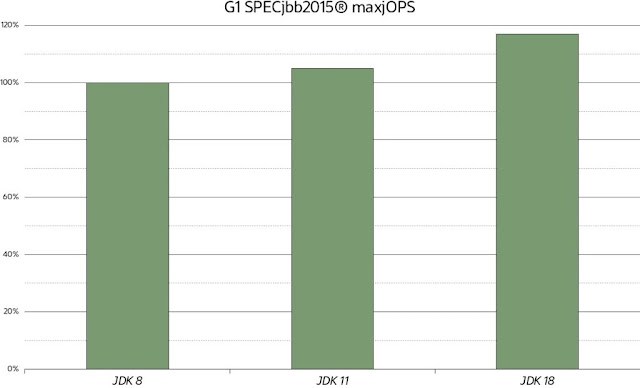
Figure 2 shows maxjOPS results for G1 in composite mode on a 16 GB Java heap, graphed relative to JDK 8 for JDK 11 and JDK 18. As you can see, the throughput scores increase significantly simply by moving to later JDK releases. JDK 11 improves by around 5% and JDK 18 by around 18%, respectively, compared to JDK 8. Simply put, with later JDKs, more resources are available and used for actual work in the application.
Java Garbage Collection, Oracle Java Certification, Oracle Java Career, Oracle Java Skills, Oracle Java Jobs, Oracle Java Prep, Oracle Java Learning, Core Java

Figure 2. G1 throughput gains measured with SPECjbb2015 maxjOPS

The discussion below attempts to attribute these throughput improvements to particular garbage collection changes. However, garbage collection performance, particularly throughput, is also very amenable to other generic improvements such as code compilation, so the garbage collection changes are not responsible for all the uplift.

One significant improvement early in JDK 9 was how G1 starts the old-generation collection lazily, as late as possible.

In JDK 8 the user had to manually set the time when G1 started concurrent tracing of live objects for old-generation collection. If the time was set too early, the JVM did not use all the application heap assigned to the old generation before starting the reclamation work. One drawback was that this did not give the objects in the old generation as much time to become reclaimable. So G1 would not only take more processor resources to analyze liveness because more data was still live, but also G1 would do more work than necessary freeing memory for the old generation.

Another problem was that if the time to start old-generation collection were set to be too late, the JVM might run out of memory, causing a very slow full collection. Beginning with JDK 9, G1 automatically determines an optimal point at which to start old-generation tracing, and it even adapts to the current application’s behavior.

Another idea that was implemented in JDK 9 is related to trying to reclaim large objects in the old generation that G1 automatically places there at a higher frequency than the rest of the old generation. Similar to the use of generations, this is another way the GC focuses on “easy pickings” work that has potentially very high gain—after all, large objects are called large objects because they take lots of space. In some (admittedly rare) applications, this even yields such large reductions in the number of garbage collections and total pause times that G1 beats the Parallel GC on throughput.

In general, every release includes optimizations that make garbage collection pauses shorter while performing the same work. This leads to a natural improvement in throughput. There are many optimizations that could be listed in this article, and the following section about latency improvements points out some of them.

Similar to the Parallel GC, G1 got dedicated nonuniform memory access (NUMA) awareness for allocation to the Java heap in JDK 14. Since then, on computers with multiple sockets where memory access times are nonuniform—that is, where memory is somewhat dedicated to the sockets of the computer, and therefore access to some memory can be slower—G1 tries to exploit locality.

When NUMA awareness applies, the G1 GC assumes that objects allocated on one memory node (by a single thread or thread group) will be mostly referenced from other objects on the same node. Therefore, while an object stays in the young generation, G1 keeps objects on the same node, and it evenly distributes the longer-living objects across nodes in the old generation to minimize access-time variation. This is similar to what the Parallel GC implements.

One more improvement I would like to point out here applies to uncommon situations, the most notable probably being full collections. Normally, G1 tries to prevent full collections by ergonomically adjusting internal parameters. However, in some extreme conditions this is not possible, and G1 needs to perform a full collection during a pause. Until JDK 10, the implemented algorithm was single-threaded, and so it was extremely slow. The current implementation is on par with the Parallel GC’s full garbage collection process. It’s still slow, and something you want to avoid, but it’s much better.

Throughput gains for the Parallel GC. Speaking of the Parallel GC, Figure 3 shows maxjOPS score improvements from JDK 8 to JDK 18 on the same heap configuration used earlier. Again, only by substituting the JVM, even with the Parallel GC, you can get a modest 2% to around a nice 10% improvement in throughput. The improvements are smaller than with G1 because the Parallel GC started off from a higher absolute value, and there has been less to gain.
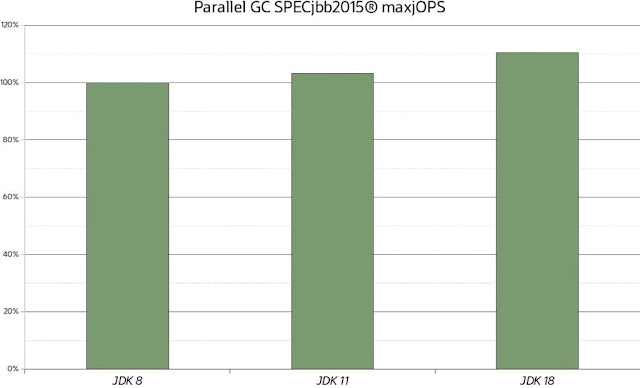
Java Garbage Collection, Oracle Java Certification, Oracle Java Career, Oracle Java Skills, Oracle Java Jobs, Oracle Java Prep, Oracle Java Learning, Core Java

Figure 3. Throughput gains for the Parallel GC measured with SPECjbb2015 maxjOPS

Latency improvements on G1. To demonstrate latency improvements for HotSpot JVM GCs, this section uses the SPECjbb2015 benchmark with a fixed load and then measures pause times. The Java heap size is set to 16 GB. Table 2 summarizes average and 99th percentile (P99) pause times and relative total pause times within the same interval for different JDK versions at the default pause time goal of 200 ms.

Table 2. Latency improvements with the default pause time of 200 ms

  JDK 8, 200 ms JDK 11, 200 ms JDK 18, 200 ms
Average (ms) 124 111 89
P99 (ms) 176 111 111
Relative collection time (%) n/a -15.8 -34.4

JDK 8 pauses take 124 ms on average, and P99 pauses are 176 ms. JDK 11 improves average pause time to 111 ms and P99 pauses to 134 ms—in total spending 15.8% less time in pauses. JDK 18 significantly improves on that once more, resulting in pauses taking 89 ms on average and P99 pause times taking 104 ms—resulting in 34.4% less time in garbage collection pauses.

I extended the experiment to add a JDK 18 run with a pause time goal set to 50 ms, because I arbitrarily decided that the default for -XX:MaxGCPauseMillis of 200 ms was too long. G1, on average, met the pause time goal, with P99 garbage collection pauses taking 56 ms (see Table 3). Overall, total time spent in pauses did not increase much (0.06%) compared to JDK 8.

In other words, by substituting a JDK 8 JVM with a JDK 18 JVM, you either get significantly decreased average pauses at potentially increased throughput for the same pause time goal, or you can have G1 keep a much smaller pause time goal (50 ms) at the same total time spent in pauses, which roughly corresponds to the same throughput.

Table 3. Latency improvements by setting the pause time goal to 50 ms

  JDK 8, 200 ms JDK 11, 200 ms JDK 18, 200 ms JDK 18, 50 ms
Average (ms) 124 111 89 44
P99 (ms) 176 134 104 56
Relative collection time (%) n/a -15.8 -34.4 +0.06

The results in Table 3 were made possible by many improvements since JDK 8. Here are the most notable ones.

A fairly large contribution to reduced latency was the reduction of the metadata needed to collect parts of the old generation. The so-called remembered sets have been trimmed significantly by both improvements to the data structures themselves as well as to not storing and updating never-needed information. In today’s computer architectures, a reduction in metadata to be managed means much less memory traffic, which improves performance.

Another aspect related to remembered sets is the fact that the algorithm for finding references that point into currently evacuated areas of the heap has been improved to be more amenable to parallelization. Instead of looking through that data structure in parallel and trying to filter out duplicates in the inner loops, G1 now separately filters out remembered-set duplicates in parallel and then parallelizes the processing of the remainder. This makes both steps more efficient and much easier to parallelize.

Further, the processing of these remembered-set entries has been looked at very thoroughly to trim unnecessary code and optimize for the common paths.

Another focus in JDKs later than JDK 8 has been improving the actual parallelization of tasks within a pause: Changes have attempted to improve parallelization either by making phases parallel or by creating larger parallel phases out of smaller serial ones to avoid unnecessary synchronization points. Significant resources have been spent to improve work balancing within parallel phases so that if a thread is out of work, it should be cleverer when looking for work to steal from other threads.

By the way, later JDKs started looking at more uncommon situations, one of them being evacuation failure. Evacuation failure occurs during garbage collection if there is no more space to copy objects into.

Garbage collection pauses on ZGC. In case your application requires even shorter garbage collection pause times, Table 4 shows a comparison with one of the latency-focused collectors, ZGC, on the same workload used earlier. It shows the pause-time durations presented earlier for G1 plus an additional rightmost column showing ZGC.

Table 4. ZGC latency compared to G1 latency

  JDK 8, 200 ms, G1 JDK 18, 200 ms, G1 JDK 18, 50 ms, G1 JDK 18, ZGC
Average (ms) 124 89 44 0.01
P99 (ms) 176 104 56 0.031

ZGC delivers on its promise of submillisecond pause time goals, moving all reclamation work concurrent to the application. Only some minor work to provide closure of garbage collection phases still needs pauses. As expected, these pauses will be very small: in this case, even far below the suggested millisecond range that ZGC aims to provide.

Footprint improvements for G1. The last metric this article will examine is progress in the memory footprint of the G1 garbage collection algorithm. Here, the footprint of the algorithm is defined as the amount of extra memory outside of the Java heap that it needs to provide its functionality.

In G1, in addition to static data dependent on the Java heap size, which takes up approximately 3.2% of the size of the Java heap, often the other main consumer of additional memory is remembered sets that enable generational garbage collection and, in particular, incremental garbage collection of the old generation.

One class of applications that stresses G1’s remembered sets is object caches: They frequently generate references between areas within the old generation of the heap as they add and remove newly cached entries.

Figure 4 shows G1 native memory usage changes from JDK 8 to JDK 18 on a test application that implements such an object cache: Objects that represent cached information are queried, added, and removed in a least-recently-used fashion from a large heap. This example uses a Java heap of 20 GB, and it uses the JVM’s native memory tracking (NMT) facility to determine memory usage.
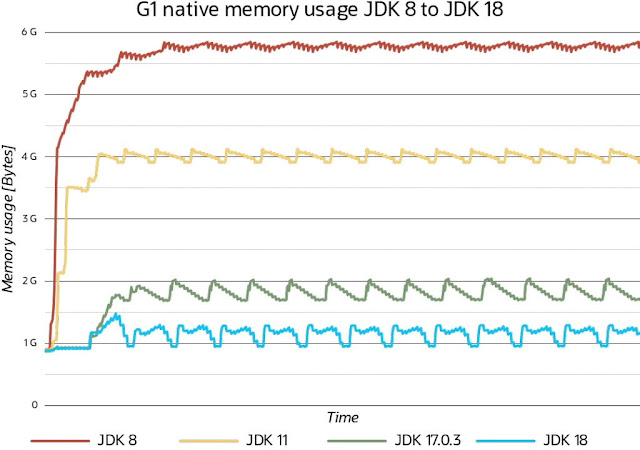
Java Garbage Collection, Oracle Java Certification, Oracle Java Career, Oracle Java Skills, Oracle Java Jobs, Oracle Java Prep, Oracle Java Learning, Core Java

Figure 4. The G1 GC’s native memory footprint

With JDK 8, after a short warmup period, G1 native memory usage settles at around 5.8 GB of native memory. JDK 11 improved on that, reducing the native memory footprint to around 4 GB; JDK 17 improved it to around 1.8 GB; and JDK 18 settles at around 1.25 GB of garbage collection native memory usage. This is a reduction of extra memory usage from almost 30% of the Java heap in JDK 8 to around 6% of extra memory usage in JDK 18.

There is no particular cost in throughput or latency associated with these changes, as previous sections showed. Indeed, reducing the metadata the G1 GC maintains generally improved the other metrics so far.

The main principle for these changes from JDK 8 through JDK 18 has been to maintain garbage collection metadata only on a very strict as-needed basis, maintaining only what is expected to be needed when it is needed. For this reason, G1 re-creates and manages this memory concurrently, freeing data as quickly as possible. In JDK 18, enhancements to the representation of this metadata and storing it more densely contributed significantly to the improvement of the memory footprint.

Figure 4 also shows that in later JDK releases G1 increased its aggressiveness, step by step, in giving back memory to the operating system by looking at the difference between peaks and valleys in steady-state operations—in the last release, G1 even does this process concurrently.

The future of garbage collection


Although it is hard to predict what the future holds and what the many projects to improve garbage collection and, in particular, G1, will provide, some of the following developments are more likely to end up in the HotSpot JVM in the future.

One problem that is actively being worked on is removing the need to lock out garbage collection when Java objects are used in native code: Java threads triggering a garbage collection must wait until no other regions are holding references to Java objects in native code. In the worst cases, native code may block garbage collection for minutes. This can lead to software developers choosing to not use native code at all, affecting throughput adversely. With the changes suggested in JEP 423 (Region pinning for G1), this will become a nonissue for the G1 GC.

Another known disadvantage of using G1 compared to the throughput collector, Parallel GC, is its impact on throughput—users report differences in the range of 10% to 20% in extreme cases. The cause of this problem is known, and there have been a few suggestions on how to improve this drawback without compromising other qualities of the G1 GC.

Fairly recently, it’s been determined that pause times and, in particular, work distribution efficiency in the garbage collection pauses are still less than optimal.

One current focus of attention is removing one-half of G1’s largest helper data structure, the mark bitmaps. There are two bitmaps used in the G1 algorithm that help with determining which objects are currently live and can be safely concurrently inspected for references by G1. An open enhancement request indicates that the purpose of one of these bitmaps could be replaced by other means. That would immediately reduce G1 metadata by a fixed 1.5% of the Java heap size.

There is much ongoing activity to change the ZGC and Shenandoah GCs to be generational. In many applications, the current single-generational design of these GCs has too many disadvantages regarding throughput and timeliness of reclamation, often requiring much larger heap sizes to compensate.

Source: oracle.com