Wednesday, December 22, 2021

Making a case for a commercial offering of open source–based software

Oracle Java Exam Prep, Oracle Java Exam, Java Preparation, Oracle Java Certification, Oracle Java Career, Core Java

By subscribing to an enterprise support subscription for platforms based on open source, companies are in essence combining the best aspects of both proprietary and open source software into one solution.

Download a PDF of this article

[The following is an excerpt from “Java and the art of driving digital transformation,” a 2021 paper from Omdia. You can download the full paper here. –Ed.]

Enterprise consumers of open source software are increasingly turning to third-party providers of support services to help them more rapidly innovate while also maintaining secure and sturdy operations.

By subscribing to an enterprise support subscription for platforms based on open source like OpenJDK, companies are in essence combining the best aspects of both proprietary and open source software into one solution.

On the surface, this may sound counterintuitive. For a programming language like Java, what if anything is there to support beyond platform compatibility for the Java JVM?

Of course, this kind of traditional phone/email engineering support and timely access to critical security patches are crucial for any enterprise-class deployment. But there are many more subtle reasons that make commercial support itself a crucial investment, particularly for enterprises with a long-term investment in an open source language like Java.

◉ Direct access to major technology releases

◉ Global, multi-lingual 24/7/365 technical support services

◉ Access to expert practitioner communities

◉ Service ticket response with service level agreements

◉ Accelerated, early access to critical performance, stability, and security updates

◉ Access to regulatory, licensing, and other legal updates

◉ Continued support for software releases past the end of public updates

◉ Software compliance, monitoring, and management software

◉ Upgraded tools, utilities, and scripts

◉ Third-party product compatibility certification

◉ Premier access to consultative services

◉ Performance tuning and license optimization advisory services

◉ Exclusive entitlements such as Java Management Service and GraalVM Enterprise

In evaluating Oracle’s own Java subscription offering, Oracle Java SE Subscription, several key benefits surface.

Inclusive and mature support services. In supporting more than 430,000 global customers, Oracle has built up substantial engineering expertise, which flows to its Java SE subscription customer experience in the form of 24/7/365 access to Java experts with more than 15 years of experience and the ability to converse in more than 27 languages from within the company’s Premier Support team.

Subscribers not only gain access to Java expertise but also access to critical bug fixes well before they reach the broader public. And this support extends beyond basic support issue resolution to include performance tuning and monitoring, security baseline and compliance services, and deployment mode evolution.

Improved application management. Included in the Java SE Subscription and Java SE Desktop Subscription, as well incorporated as a free native service within Oracle Cloud Infrastructure (OCI), Oracle’s new Java Management Service (JMS) provides a single pane of glass through which enterprises can discover all Java assets including Java Development Kit (JDK), Java Runtime Environment (JRE), and GraalVM—whether those assets are running on cloud, on-premises, or within a third-party cloud service.

At a glance, JMS users view the current version, originating vendor (e.g. Oracle), type of runtime, status, and most importantly for Oracle-provided runtimes, if they are above or below the security baseline. For large, complex deployments, in a future release JMS will be able to act as an early warning system, helping customers head off often unforeseen issues such as an imminent expiration of security certificates.

Flexible modernization. Customers can confidently remain with the version of Java used in creating a particular project, migrating to a newer version according to their schedule rather than that of the language. This is crucial for companies that maintain more than one version of Java.

For Java SE Subscription, this is best demonstrated within long term support (LTS) releases, which are now updated every two years (prior to Q3, 2021, this cycle stood at every three years). With an LTS release, customers can stay on the same version longer (Oracle releases new versions of Java every six months) and patch intermittently, at their own schedule before upgrading to the next LTS release. This term-based licensing mechanism lets enterprise practitioners completely control their upgrade path.

Taking this a step further, Oracle’s recently introduced Oracle No-Fee Terms and Conditions (NFTC) license enables developers to freely use Oracle JDK beginning with version 17, even in production and commercially so long as there’s no associated fee for redistribution. This lets developers standardize on Oracle’s enterprise-grade implementation of Java, moving freely between six-month releases and two-year LTS updates.

Long-term risk mitigation. Maintaining code that’s no longer supported with hot fixes and security patches not only creates technical debt, it also opens up companies to potential security risks.

Recognizing that companies often need to continue running on older versions of Java, Oracle Java SE Subscription offers extended support for older, popular versions of Java extending back to version 8 (released in 2014 but available for extended support through 2030) and Java 11 (released in 2016 and available for extended support through 2026). With these options, Oracle can create a consistent support baseline for code written over multiple decades.

This ability to go fast (incorporate new features every six months) or go slow (hold onto a given release for anywhere between two and eight years) is of crucial importance to heavily regulated companies within financial, healthcare, and public sector markets, where it is particularly difficult to balance the pressure to innovate with the need to mitigate risk.

Source: oracle.com

Monday, December 20, 2021

Perform textual sentiment analysis in Java using a deep learning model

Positive? Negative? Neutral? Use the Stanford CoreNLP suite to analyze customer product reviews.

Download a PDF of this article

Sentiment analysis is a text classification task focused on identifying whether a piece of text is positive, negative, or neutral. For example, you might be interested in analyzing the sentiment of customer feedback on a certain product or in detecting the sentiment on a certain topic trending in social media.

Core Java, Oracle Java Certification, Oracle Java Prep, Oracle Java Career, Oracle Java Skills, Java Jobs

This article illustrates how such tasks can be implemented in Java using the sentiment tool integrated into Stanford CoreNLP, an open source library for natural language processing.

The Stanford CoreNLP sentiment classifier

To perform sentiment analysis, you need a sentiment classifier, which is a tool that can identify sentiment information based on predictions learned from the training data set.

In Stanford CoreNLP, the sentiment classifier is built on top of a recursive neural network (RNN) deep learning model that is trained on the Stanford Sentiment Treebank (SST), a well-known data set for sentiment analysis.

In a nutshell, the SST data set represents a corpus with sentiment labels for every syntactically possible phrase derivable from thousands of sentences used, thus allowing for the capture of the compositional effects of sentiment in text. In simple terms, this allows the model to identify the sentiment based on how words compose the meaning of phrases rather than just by evaluating words in isolation.

To better understand the structure of the SST data set, you can examine the data set files downloadable from the Stanford CoreNLP sentiment analysis page.

In Java code, the Stanford CoreNLP sentiment classifier is used as follows.

To start, you build up a text processing pipeline by adding the annotators required to perform sentiment analysis, such as tokenize, ssplit, parse, and sentiment. In terms of Stanford CoreNLP, an annotator is an interface that operates on annotation objects, where the latter represent a span of text in a document. For example, the ssplit annotator is required to split a sequence of tokens into sentences.

The point is that Stanford CoreNLP calculates sentiment on a per-sentence basis. So, the process of dividing text into sentences is always followed by applying the sentiment annotator.

Once the text has been broken into sentences, the parse annotator performs syntactic dependency parsing, generating a dependency representation for each sentence. Then, the sentiment annotator processes these dependency representations, checking them against the underlying model to build a binarized tree with sentiment labels (annotations) for each sentence.

In simple terms, the nodes of the tree are determined by the tokens of the input sentence and contain the annotations indicating the predicted class out of five sentiment classes from very negative to very positive for all the phrases derivable from the sentence. Based on these predictions, the sentiment annotator calculates the sentiment of the entire sentence.

Setting up Stanford CoreNLP

Before you can start using Stanford CoreNLP, you need to do the following setup:

◉ To run Stanford CoreNLP, you need Java 1.8 or later.

◉ Download the Stanford CoreNLP package and unzip the package in a local folder on your machine.

◉ Add the distribution directory to your CLASSPATH as follows:

export CLASSPATH=$CLASSPATH:/path/to/stanford-corenlp-4.3.0/*:

After completing the steps above, you are ready to create a Java program that runs a Stanford CoreNLP pipeline to process text.

In the following example, you implement a simple Java program that runs a Stanford CoreNLP pipeline for sentiment analysis on text containing several sentences.

To start, implement a class that provides a method to initialize the pipeline and a method that will use this pipeline to split a submitted text into sentences and then to classify the sentiment of each sentence. Here is what the implementation of this class might look like.

//nlpPipeline.java

import java.util.Properties;

import edu.stanford.nlp.pipeline.StanfordCoreNLP;

import edu.stanford.nlp.ling.CoreAnnotations;

import edu.stanford.nlp.pipeline.Annotation;

import edu.stanford.nlp.neural.rnn.RNNCoreAnnotations;

import edu.stanford.nlp.sentiment.SentimentCoreAnnotations;

import edu.stanford.nlp.sentiment.SentimentCoreAnnotations.SentimentAnnotatedTree;

import edu.stanford.nlp.trees.Tree;

import edu.stanford.nlp.util.CoreMap;

public class nlpPipeline {

    static StanfordCoreNLP pipeline;

    public static void init() 

    {

        Properties props = new Properties();

        props.setProperty("annotators", "tokenize, ssplit, parse, sentiment");

        pipeline = new StanfordCoreNLP(props);

    }

    public static void estimatingSentiment(String text)

    {

   int sentimentInt;

      String sentimentName; 

      Annotation annotation = pipeline.process(text);

      for(CoreMap sentence : annotation.get(CoreAnnotations.SentencesAnnotation.class))

      {

         Tree tree = sentence.get(SentimentAnnotatedTree.class);

        sentimentInt = RNNCoreAnnotations.getPredictedClass(tree); 

                sentimentName = sentence.get(SentimentCoreAnnotations.SentimentClass.class);

        System.out.println(sentimentName + "\t" + sentimentInt + "\t" + sentence);

      }

     }

}

The init() method initializes the sentiment tool in the Stanford CoreNLP pipeline being created, and it also initializes the tokenizer, dependency parser, and sentence splitter needed to use this sentiment tool. To initialize the pipeline, pass a Properties object with the corresponding list of annotators to the StanfordCoreNLP() constructor. This creates a customized pipeline that is ready to perform sentiment analysis on text.

In the estimatingSentiment() method of the nlpPipeline class, invoke the process() method of the pipeline object created previously, passing in text for processing. The process() method returns an annotation object that stores the analyses of the submitted text.

Next, iterate over the annotation object getting a sentence-level CoreMap object on each iteration. For each of these objects, obtain a Tree object containing the sentiment annotations used to determine the sentiment of the underlying sentence.

Pass the Tree object to the getPredictedClass() method of the RNNCoreAnnotations class to extract the number code of the predicted sentiment for the corresponding sentence. Then, obtain the name of the predicted sentiment and print the results.

To test the functionality above, implement a class with the main() method that invokes the init() method and then invokes the estimatingSentiment() method of the nlpPipeline class, passing sample text to the latter.

In the following implementation, the sample text is hardcoded in the program for simplicity. The sample sentences were designed to cover the entire spectrum of sentiment scores available with Stanford CoreNLP: very positive, positive, neutral, negative, and very negative.

//SentenceSentiment.java

public class SentenceSentiment 

{

  public static void main(String[] args) 

  {

               String text = "This is an excellent book. I enjoy reading it. I can read on Sundays. Today is only Tuesday. Can't wait for next Sunday. The working week is unbearably long. It's awful.";

    nlpPipeline.init();

    nlpPipeline.estimatingSentiment(text);

  }

}

Now, compile the nlpPipeline and SentenceSentiment classes and then run SentenceSentiment:

$ javac nlpPipeline.java

$ javac SentenceSentiment.java 

$ java SentenceSentiment

Here is what the output should look like.

Very positive  4     This is an excellent book.

Positive       3     I enjoy reading it.

Neutral        2     I can read on Sundays.

Neutral        2     Today is only Tuesday.

Neutral        2     Can't wait for next Sunday.

Negative       1     The working week is unbearably long.

Very negative  0     It's awful.

The first column in the output above contains the name of the sentiment class predicted for a sentence. The second column contains the corresponding number code of the predicted class. The third column contains the sentence.

Analyzing online customer reviews

As you learned from the previous example, Stanford CoreNLP can return a sentiment for a sentence. There are many use cases, however, where there is a need to analyze the sentiment of many pieces of text, each of which may contain more than a single sentence. For example, you might want to analyze the sentiment of tweets or customer reviews from an ecommerce website.

To calculate the sentiment of a multisentence text sample with Stanford CoreNLP, you might use several different techniques.

When dealing with a tweet, you might analyze the sentiment of each sentence in the tweet and if there are some sentences that are either positive or negative you could rank the entire tweet respectively, ignoring the sentences with the neutral sentiment. If all (or almost all) the sentences in a tweet are neutral, then the tweet could be ranked neutral.

Sometimes, however, you don’t even have to analyze each sentence to estimate the sentiment of an entire text. For example, when analyzing customer reviews, you can rely on their titles, which often consist of a single sentence.

To work through the following example, you’ll need a set of customer reviews. You can use the reviews found in the NlpBookReviews.csv file accompanying this article. The file contains a set of actual reviews downloaded from an Amazon web page with the help of Amazon Review Export, a Google Chrome browser extension that allows you to download a product’s reviews with their titles and ratings to a comma-separated values (CSV) file. (You can use that tool to explore a different set of reviews for analysis.)

There is another requirement. Because the Java language lacks any native support for the efficient handling of CSV files, you’ll need a third-party library such as Opencsv, an easy-to-use CSV parser library for Java. You can download the Opencsv JAR and its dependencies. In particular, you will need to download the Apache Commons Lang library. Include them in the CLASSPATH as follows:

export CLASSPATH=$CLASSPATH:/path/to/opencsv/*:

Then, add the following method to the nlpPipeline class created in the previous section:

//nlpPipeline.java

    ...

    public static String findSentiment(String text) {

        int sentimentInt = 2;

        String sentimentName = "NULL";

        if (text != null && text.length() > 0) {

          Annotation annotation = pipeline.process(text);

          CoreMap sentence = annotation

                    .get(CoreAnnotations.SentencesAnnotation.class).get(0);

          Tree tree = sentence

                     .get(SentimentAnnotatedTree.class);

          sentimentInt = RNNCoreAnnotations.getPredictedClass(tree);

          sentimentName = sentence.get(SentimentCoreAnnotations.SentimentClass.class);

        }

        return sentimentName;

    }

As you might notice, the code above is similar to the code in the estimatingSentiment() method defined in the previous section. The only significant difference is that this time you don’t iterate over the sentences in input text. Instead, you get only the first sentence, since in most cases a review’s title consists of a single sentence.

Create a ReviewsSentiment.java file with the main method that will read the reviews from a CSV file and pass them to the newly created findSentiment() for processing, as follows:

import com.opencsv.CSVReader;

import com.opencsv.CSVParser;

import com.opencsv.CSVReaderBuilder;

import com.opencsv.exceptions.CsvException; 

import java.io.FileReader;

import java.io.IOException;

public class ReviewsSentiment {

    public static void main(String[] args) throws IOException, CsvException {

        nlpPipeline.init();

        String fileName = "NlpBookReviews.csv";

        try (CSVReader reader = new CSVReaderBuilder(new FileReader(fileName)).withSkipLines(1).build())

        {

            String[] row;

            while ((row = reader.readNext()) != null) {

                System.out.println("Review: " + row[1] + "\t" + " Amazon rating: " + row[4] + "\t" + " Sentiment: " + nlpPipeline.findSentiment(row[1]));

            }

        }

    }

}

You’ll need to recompile the nlpPipeline class and compile the newly created ReviewsSentiment class. After that, you can run ReviewsSentiment as follows:

$ javac nlpPipeline.java

$ javac ReviewsSentiment.java

$ java ReviewsSentiment

The output should look as follows:

Review: Old version of python useless            Amazon rating: 1    Sentiment: Negative

Review: Excellent introduction to NLP and spaCy  Amazon rating: 5    Sentiment: Positive

Review: Could not get spaCy on MacBook           Amazon rating: 1    Sentiment: Negative

Review: Good introduction to SPACY for beginner. Amazon rating: 4    Sentiment: Positive

Source: oracle.com

Friday, December 17, 2021

Dalia’s gentle introduction to Docker

The friendly overview of containers and Docker that many Java developers have been looking for

Download a PDF of this article

You’ve certainly heard of containers and Docker by now. It seems like someone is always talking about them—just like my brother-in-law always talking about cryptocurrency and Bitcoin. What are containers? What is Docker? Why would you use them? Well, I’m going to attempt to answer those questions the way I wish someone explained them to me when I first started learning about this technology.

(Would you prefer watching instead of reading? This article goes over the same concepts covered in the first half of my Intro to Docker video.)

The problem

Imagine you’ve written an awesome application in Java. For simplicity’s sake, let’s say the application is running on a laptop, perhaps on Linux, macOS, or Windows. The application uses a database, such as Oracle Database, MySQL, or MongoDB. It also uses an application server, such as Tomcat or Open Liberty, as seen in Figure 1. You’ve finished writing your application and it runs great on your machine.

Oracle Java Exam, Oracle Java Exam Prep, Oracle Java Tutorial and Materials, Oracle Java Career
Figure 1. The application stack running on your machine

Now, you need to show the application to your coworker Alex to try out. A simple task, right? Let’s see how it plays out.

You: “Hey Alex, I’d like you to try out my application. I’m sending you the application JAR file so you can run it on your machine.”

Alex: “Got it! I’ve already got Java installed. I’ll go ahead and run it.”

You: “Wait, you have to install MongoDB first.”

Alex: “Oh, I’ve never used MongoDB before. I’ll look up how to do that.”

You: “I’d be happy to help you! Let’s start a screen-sharing session.”

<You start a screen-sharing session.>

You (to yourself): Oh no, it’s a Linux machine. Linux…I have no idea how to do this on Linux.

<Several minutes (or hours) and steps later>

Alex: “Looks like MongoDB is installed! Okay, let’s run the application.”

You: “Wait. You have to install an application server too.”

Alex: “An application server?”

Alex (to himself): This had better be the best application I’ve ever seen.

You: “Yeah. Let me show you.”

<Several minutes, curses, and steps later>

Alex: “Okay, the app server is ready. Can I run the application now?”

You: “Yes!”

<The application server starts and shows an error: “The application failed to start.”>

You: “BUT IT WORKS ON MY MACHINE!”

<You and Alex debug for a while.>

You: “Oh, which version of Java are you using?”

Alex: “Java 8.”

You: “I think that’s the problem. I’m using Java records and that capability is available only since Java 16. Can you install Java 16 and try running the application with that?”

Alex: “Java 16? They’re on Java 16 now?”

<Alex goes off to install Java 16.>

Alex: “Okay. Java 16 is installed. Let me try to run the application again.”

<Another failure: Debug, fix, rinse, and repeat.>

Finally, Alex gets the Java application working (see Figure 2) and is amazed at how awesome it is.

Oracle Java Exam, Oracle Java Exam Prep, Oracle Java Tutorial and Materials, Oracle Java Career
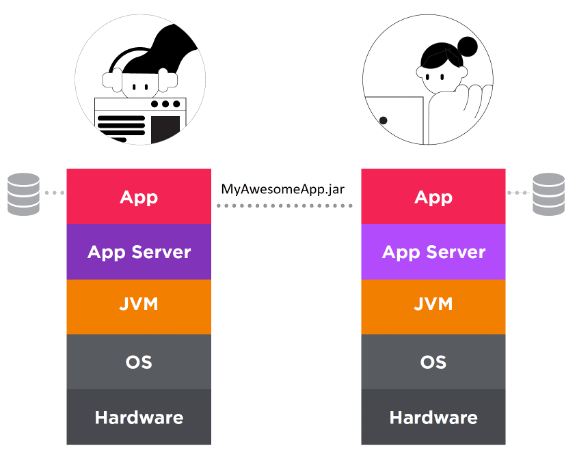
Figure 2. You and Alex can run the Java application on your machines, because each machine contains the same stack.

A couple of hours later, you receive a message from Jordan.

Jordan: “Hey, Alex told me about the new application. I’d love to try it out.”

You (to yourself): Oh no, not again!

All this was to illustrate that if you have Java applications that use any external resources such as a database or application servers, you’ll find it painful to set up the applications on other machines. (That can be equally true for server-based, cloud-based, or hybrid applications.)

Every time you add a new developer to the project, set up a machine for testing, or configure a continuous integration and continuous deployment (CI/CD) pipeline, you could be spending hours or days doing so (see Figure 3). This is one of the many ways Docker and containers can help.

Oracle Java Exam, Oracle Java Exam Prep, Oracle Java Tutorial and Materials, Oracle Java Career
Figure 3. More developers can mean more configurations to replicate and synchronize.

What is a container?


A container is a standard component that lets you package your application and its dependencies in an easy-to-share way. Some of the most important characteristics of a container are that they’re portable, isolated, and lightweight (see Figure 4).

Oracle Java Exam, Oracle Java Exam Prep, Oracle Java Tutorial and Materials, Oracle Java Career
Figure 4. Containers package applications and their dependencies.

The term container comes from shipping containers, which became popular in the 1950s and 1960s. With shipping containers, you could transport a car or a bunch of apples without the ship's captain having to worry about the size or shape of its cargo (see Figure 5). As long as you provide the contents in a uniform container, they will be shipped. (These are also called intermodal containers, since the same container can be carried by ships, trains, and trucks without unloading or repacking its contents.)

Oracle Java Exam, Oracle Java Exam Prep, Oracle Java Tutorial and Materials, Oracle Java Career
Figure 5. Shipping standardized containers

Similarly, a containerized application can be a web application, a mobile application, or an enterprise application. It can be written in any language, such as Java. The application can use Spring Boot, Jakarta EE, or any other framework. The container can include databases, application servers, and other necessary dependencies. As long as you package your application in a container, Alex, Jordan, and everyone else can run the software with minimal work.

Docker is a popular open source platform that allows you to use containers (see Figure 6).

Oracle Java Exam, Oracle Java Exam Prep, Oracle Java Tutorial and Materials, Oracle Java Career
Figure 6. Docker’s whale logo looks like a ship filled with standardized containers.

The solution


You (wisely) decide to install Docker and containerize your application. You put the application code, application server, and JVM into a single container since they’re all closely tied together. Then, in a separate container, you install the database. (See Figure 7.)

Oracle Java Exam, Oracle Java Exam Prep, Oracle Java Tutorial and Materials, Oracle Java Career
Figure 7. The application now lives in two containers: one for the application, application server, and JVM and the other for the database.

How is this any better? Well, if you had this setup earlier, the conversation with Alex might have gone like this.

You: “Hey Alex, I’d like you to try out my application. Since you already have Docker installed, you will need only a couple of simple commands to run it on your machine, and you don’t even need to upgrade from your old Java 8 to the Java 16 JVM that I’m using or figure out how to install MongoDB.”

Alex: “Done! Your application looks awesome!”

That sounds easy, but how do you create a container? First, you need an image.

What is an image?


A helpful analogy for understanding the relationship between images and containers is to consider classes and runtime objects. In Java, if I want to create an Employee object, I need to first create an Employee class. Once I have the Employee class, I can instantiate as many Employee objects as I want. Similarly, in Docker, if I want to create a container, I need to first create an image. Once I have the image, I can use it to instantiate as many containers as I’d like.

In other words, a container is the running instance of an image.

To create an image, you need a Dockerfile, which contains the list of instructions that need to be executed to create an image.

Virtual machines versus containers


A common question when developers are learning about containers is “What is the difference between containers and virtual machines?” Well, they’re both trying to solve the same problem, but containers and VMs approach it differently.

Let’s take a look at the VM scenario. If you wanted to run the applications in a virtual machine, the setup would look something like Figure 8, with a machine running a host operating system. That OS has a hypervisor that creates, executes, and manages virtual machines.

Oracle Java Exam, Oracle Java Exam Prep, Oracle Java Tutorial and Materials, Oracle Java Career
Figure 8. A machine running a hypervisor, which in turn hosts one or more VMs, each with its own operating system and application stack

When VMs are created, each VM includes its own guest operating system that the application runs on. Unfortunately, having a guest operating system is not cheap resource-wise. Lots of memory and CPU cycles are consumed by each VM’s guest operating system.

Now, let’s compare that to Docker. With Docker containers, you don’t have a guest operating system, making Docker containers much smaller and faster than virtual machines (see Figure 9).

Oracle Java Exam, Oracle Java Exam Prep, Oracle Java Tutorial and Materials, Oracle Java Career
Figure 9. The stacks required by applications managed by Docker containers (left) and virtual machines (right)

Applications running in containers use fewer resources than those consumed by virtual machines, which lets you run more containers on a given physical machine. The startup time on a container is also much faster, especially since containers don’t need to load a guest operating system.

To be clear, there are pros and cons for containers versus virtual machines. I won’t dive into that here. The main takeaway is that they both solve the “but it works on my machine” problem but approach the solution in different ways. In many instances, however, such as for distributing applications, Docker is often the best solution.

Source: oracle.com

Wednesday, December 15, 2021

A new reporting platform for managing installed Java versions and apps

Java Management Service provides analytics on Java running in the cloud and on-premises.

Download a PDF of this article

Java Management Service (JMS) is a new cloud-based service designed to help organizations understand the Java versions installed within both test and deployment environments. Introduced in June 2021, the service provides analytics on Java running in the cloud and on-premises.

According to a post by Alexandra Huff, director of Java global marketing at Oracle, JMS offers a single console to help you manage Java deployments across the enterprise, answering questions such as

◉ What are all the Java versions installed on my environment?

◉ What versions of Java are running on development and production systems?

◉ Which JDK distribution is each of these systems using?

◉ Are any unplanned Java applications running?

◉ Are all the installed Java versions up to date with the latest security patches?

JMS offers continuous insight based on telemetry data from the JVM to analyze security, performance, compliance, and efficiency. Huff writes, “For example, normally cryptography usage is a black box; expired certificates or disabled algorithms are often found only when something breaks or after a malicious attack.” The service can look inside and report on what’s going on.

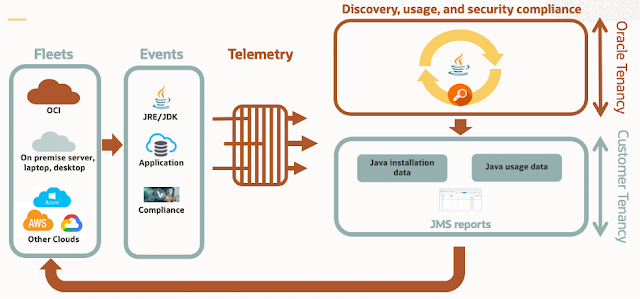
Figure 1 shows the architecture of the service. Presently, JMS supports Linux hosts only.

Oracle Java, Oracle Java Exam Prep, Oracle Java Certification, Oracle Java Career
Figure 1. Architecture overview of Java Management Service

The monitoring service uses data provided by Java Usage Tracker, which is available for all releases of Java 7 and later.

Java Usage Tracker tracks how Java runtime environments (JREs) are used in your systems. Java Usage Tracker output is a plain text, comma-separated record that contains the JRE version, the application being run, and other details. This record is added to a file or sent over the network in a UDP packet. Java Usage Tracker is a feature of Oracle JDK and JRE, and it is not available for OpenJDK binaries.

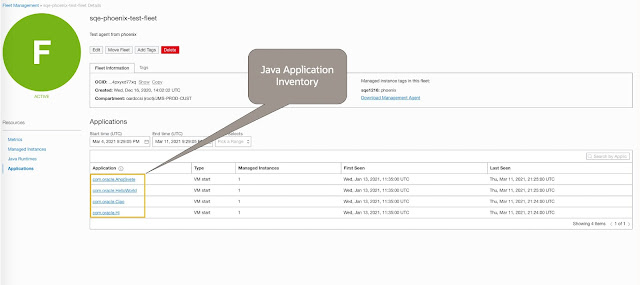
With Java Usage Tracker, JMS can track usage for Java running on Oracle Cloud Infrastructure and on on-premises desktops, laptops, and servers, as well as on any provider’s cloud services, via a telemetry agent you install on the managed instances. The system can monitor the JDK, JRE, and GraalVM. Figure 2 shows the type of information reported for Java applications.

Oracle Java, Oracle Java Exam Prep, Oracle Java Certification, Oracle Java Career
Figure 2. Application inventory report from Java Management Service

JMS is hosted on Oracle Cloud Infrastructure. If you have an Oracle Cloud Infrastructure account, navigate to the Observability and Management section, and select Java Management Service from the menu.

The agent is installed in your Oracle Cloud Infrastructure tenancy for monitoring and producing reports. Only you can see the reports. Oracle cannot see the data and does not charge compute time for the use of the service; Oracle charges only if usage exceeds the free-tier thresholds. Telemetry data is stored in your own cloud tenancy for privacy protection.

Source: oracle.com

Monday, December 13, 2021

Arm resources show how to optimize your Java applications for AArch64

Choosing the best runtime switches can greatly affect the performance of your workload.

Java developers don’t need to worry about the deployment hardware as long as a first-class JVM is available, and that’s certainly the case for Arm processors. Whether you’re writing the code or running the code, it’s business as usual: At the end of the day, it’s plain old Java bytecode.

Of course, many Java developers and systems administrators want to know more, and there are several excellent resources, especially two posts from Arm.

Java performance on Ampere A1 Compute

Arguably the most important post for the deployment of processor-intensive applications is a November 2021 post from Arm senior performance engineer Shiyou (Alan) Huang. His post, “Improving Java performance on OCI Ampere A1 Compute instances,” begins with the following:

Oracle Cloud Infrastructure (OCI) has recently launched the Ampere A1 Compute family of Arm Neoverse N1-based VMs and bare-metal instances. These A1 instances use Ampere Altra CPUs that were designed specifically to deliver performance, scalability, and security for cloud applications. The A1 Flex VM family supports an unmatched number of VM shapes that can be configured with 1-80 cores and 1-512GB of RAM (up to 64GB per core). Ampere A1 compute is also offered in bare-metal configurations with up to 2-sockets and 160-cores per instance.

In this blog, we investigate the performance of Java using SPECjbb2015 on OCI A1 instances. We tuned SPECjbb2015 for best performance by referring to the configurations used by the online SPECjbb submissions. Those Java options may not apply to all Java workloads due to the very large heap size and other unrealistic options. The goal here is to see the best scores we can achieve on A1 using SPECjbb. We compared the performance results of SPECjbb2015 over different versions of OpenJDKs to identify a list of patches that improve the performance. As SPECjbb is a latency-sensitive workload, we also presented the impact of Arm LSE (Large System Extensions) on the performance in this blog.

Huang’s paper presents two metrics to evaluate the performance of a JVM: max-jOPS for throughput and critical-jOPS for critical throughput under service-level agreements (SLAs).

One of Huang’s charts, reproduced below as Figure 1, shows the SPECjbb scores from OpenJDK 11 to 16 using Arm’s tuned configurations.

Oracle Java Exam Prep, Oracle Java Certification, Oracle Java Career, Oracle Java Exam Preparation, Core Java, Oracle Java Study Materials
Figure 1. SPECjbb scores from OpenJDK 11 to 16 using Arm’s tuned configurations

Java performance on Neoverse N1 systems


Huang wrote another relevant blog post, “Improving Java performance on Neoverse N1 systems,” in July 2021.

In this post, Huang writes the following:

…we investigate Java performance using an enterprise benchmark on Arm’s Neoverse N1 based CPU, which has demonstrated huge cost/power/performance improvements in server CPUs. We built OpenJDK from the source code with different compiling flags to test the impact of LSE (Large System Extensions), the new architecture extension introduced in ARMv8.1. The Java enterprise benchmark we tested provides two throughput-based metrics: maximum throughput and throughput under service level agreement (SLA). We tuned performance by tweaking an initial set of Java runtime flags and augmented system parameters using an automated optimization tool.

Huang summarizes the tests as follows: “As we can see, tuning is critical to the performance of Java applications. The throughput is improved by 40% and the SLA score for more than 80% after the tuning configurations are applied” (as shown in Figure 2).

Oracle Java Exam Prep, Oracle Java Certification, Oracle Java Career, Oracle Java Exam Preparation, Core Java, Oracle Java Study Materials
Figure 2. Tuning the JVM’s runtime flags can greatly impact performance.

Large System Extensions


A key section of both of Huang’s blog posts is his discussion of Arm’s Large System Extensions (LSE), which first appeared in the Arm 8.1 architecture. He describes LSE as “a set of atomic operations such as compare-and-swap (CAS), atomic load and increment (LDADD). Most of the new operations have load-acquire or store-release semantics which are low-cost atomic operations comparing to the legacy way to implement atomic operations through pairs of load/store exclusives.”

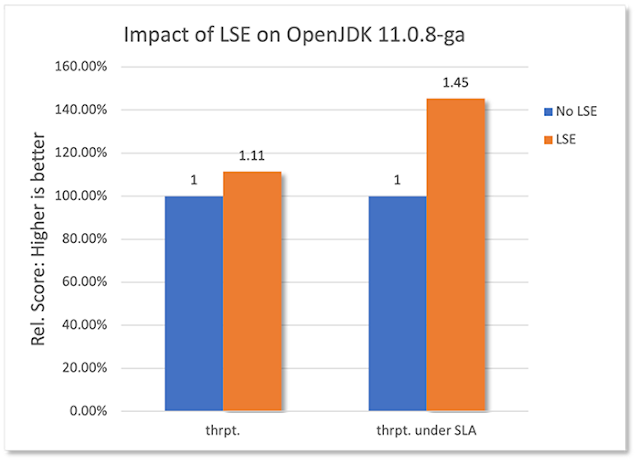
Huang adds that in his experiments, “We see that LSE benefits the workloads that are highly concurrent and use heavy synchronizations,” as seen in Figure 3.

Oracle Java Exam Prep, Oracle Java Certification, Oracle Java Career, Oracle Java Exam Preparation, Core Java, Oracle Java Study Materials
Figure 3. The impact of Arm’s LSE

Source: oracle.com

Friday, December 10, 2021

Gavin Bierman explains pattern matching for switch, a Java 17 preview

Oracle Java Exam, Oracle Java Exam Prep, Oracle Core Java, Oracle Java Certification, Oracle Java Career

Pattern matching for switch follows logically from pattern matching for instanceof, which was delivered as part of JDK 16.

Download a PDF of this article

JEP 406 describes a Java feature previewed in JDK 17: pattern matching for switch. This feature follows logically from pattern matching for instanceof, which was delivered as part of JDK 16 by JEP 394.

Gavin Bierman, a consulting member of the Oracle technical staff based in the UK, explained the concepts behind pattern matching in general and, more specifically, pattern matching for switch. Bierman, who managed the JEP 406 process, works in the Java Platform Group helping design the next versions of Java. He is also a member of Oracle Labs’ Programming Language Research Group

Java Magazine: What’s the general concept behind pattern matching?

Bierman: Pattern matching is a big topic. We’re pushing pattern matching out into Java in small pieces so people can get used to it and see the beauty of it.

A pattern is something you can test a value against. A value will either match a pattern or not match a pattern. If a value matches the specified pattern, the pattern variable is initialized with the value it matched.

Java Magazine: In this context, what is a pattern variable?

Bierman: The pattern itself can contain holes because you don’t want to specify all the details of every part of the value. So, sometimes a developer puts placeholders in certain places within the pattern. We use variables to represent those holes. We call them pattern variables, but they’re really just local variables.

Java Magazine: That brings us to pattern matching for switch.

Bierman: Once we added pattern matching to instanceof, developers started using patterns in big if-then-else chains using instanceof. That works, but such if-then-else statements are messy, inelegant, and hard to maintain. For example

static String formatter(Object o) {

    String formatted = "unknown";

    if (o instanceof Integer i) {

        formatted = String.format("int %d", i);

    } else if (o instanceof Long l) {

        formatted = String.format("long %d", l);

    } else if (o instanceof Double d) {

        formatted = String.format("double %f", d);

    } else if (o instanceof String s) {

        formatted = String.format("String %s", s);

    }

    return formatted;

}

We’d like developers to create better code than that. We already have a feature in the Java language to allow for a multiplace conditional, that is, switch. The next natural location for us to enhance pattern matching is the switch statement.

The expression that we’re testing is called the selector expression. We have a block of code, and it has case labels. Prior to this preview feature for pattern matching for switch, those labels were constants. The idea is you evaluate the selector expression, then you find the label that is equal to the value of the selector expression, and then you execute the code associated with that case label.

Prior to the JEP 406 preview, switch restricted the types of selector expression. But that doesn’t make sense if we’re going to add pattern labels. Thus, we’re relaxing that restriction on switch. So now you can switch on anything. Here’s how much more concise and readable the previous code looks by using pattern matching.

static String formatterPatternSwitch(Object o) {

    return switch (o) {

        case Integer i -> String.format("int %d", i);

        case Long l    -> String.format("long %d", l);

        case Double d  -> String.format("double %f", d);

        case String s  -> String.format("String %s", s);

        default        -> o.toString();

    };

}

Java Magazine: What does this preview mean for the completeness of a switch statement?

Bierman: Completeness appeared with switch expressions that were finalized in Java 14. When you are evaluating any expression in Java, you expect it to result in either a value or an exception.

When we introduced switch expressions, we had a question in the design process: What if your cases don’t cover all the values that could arise from the thing you are switching over? That’s got to be an error.

But which error?

Rather than cause the application to always throw an exception in such a situation, we decided it would be useful for the compiler to flag a switch expression that was not complete.

Thus, we have a simple check for switch expressions that looks at all the case labels and asks, “Is there a case for every possible value in this expression?” Otherwise, it’s not going to be a valid expression. There might be a situation where we don’t know what the value is or what the exception will be.

As we extend switch with patterns, we get a similar question. Obviously, for switch expressions, we must enhance the notion of completeness to deal with the fact that the case labels are no longer just simple constants but can contain patterns. Therefore, we have lifted the notion of completeness from simple case constants to pattern labels.

One problem with switch statements, as they exist currently, is that if you’ve forgotten a case in a switch statement, the switch statement simply does nothing. It just carries on as before. This silent behavior leads to tough-to-debug situations where you realize some value hasn’t been set in the way you expected.

For switch expressions, that must not happen because switch requires the body to be complete. The feedback we’ve received from developers about switch expressions indicates they really like that the compiler does extra checks for them and spots mistakes. That’s why we decided that switch statements that use pattern labels must also be complete, just as for switch expressions.

Java Magazine: What can you tell us about null values here?

Bierman: There’s a long-standing issue in Java and in other languages like Java: the dreaded null value.

Prior to JEP 406, switch had a very important design feature: It threw a null pointer exception if the value of the selector expression was null—without looking at any of the body of the switch block. Null simply wasn’t permitted as an option.

Now that we’re enhancing switch to do pattern matching and more-complicated things coming in the future, forbidding null seems like an unsustainable design decision.

We’ve done two things. One is we don’t instantly throw that null pointer exception. Secondly, we’ve added a new case label so you can be even more explicit about null, if you want to be, which I think is going to be very useful. You can write case null in the switch body. If you use these new values, everything works smoothly.

This is a nonbreaking change: All nonpattern switch statements will continue to throw a null pointer exception when switching over null, and this will make switch a much more usable construct in the future.

Java Magazine: Speaking of things to come…

Bierman: This is the next step in pattern matching for Java, where patterns are not just solely asking about types but rather do more work by deconstructing the value for you. (This is a JEP that might target JDK 18.)

Records are a great candidate for this type of functionality and will be the first types that will support deconstruction patterns.

Records are special sorts of classes that have what we call components. All records have components that appear in the declaration. For example, if you say record Point, and then your components are X and Y, you know every point has a component X and a component Y.

In the future, we’re going to allow a pattern that not only asks whether a value is a Point but also specifies that if the value is indeed a Point, it will initialize pattern variables with the values of X and Y from that Point.

In other words, the pattern will break apart the value, deconstruct it into its component values, and assign the pattern variables you supplied with the values of the components.

It’s kind of like the opposite of a constructor. So then you can nest the patterns in the same way you can nest constructor cells. If you can nest constructors, you ought to be able to nest deconstructors. Developers can write beautiful-looking code, and they start to really see the power of pattern matching.

I encourage everybody to read the JEPs that are out there and to try out the preview of JEP 406. The JEP description page contains a lot more detail. Please give us feedback, because these are complicated features and significant changes to the language. We’d love to hear your experience and your thoughts on the design.

Source: oracle.com