Thursday, February 13, 2020

How to Create File and Directory in Java Example - Java IO

Oracle Java Tutorial and Materials, Oracle Java Guides, Oracle Tutorial and Material, Oracle Java Prep

How to create File and directory in Java is probably the first things come to mind when we exposed to the file system from Java. Java provides rich IO API to access contents of File and Directory in Java and also provides lots of utility method to create a file, delete a file, read from a file, and write to file or directory. Anybody who wants to develop an application in Java should have a solid understanding of IO and Networking package. In this Java File Tutorial, we will basics of File and Directory in Java, How to Create File and Directory in Java, Utility methods provided by File API and Common Exception or Error you will face during File and Directory Creation or access time. Creating File is different than creating Thread in java as you don’t have to implement any interface for making a Class as File in Java.

File in Java is also getting its place on various core java interviews questions especially after the introduction of java.nio package and concepts like In Memory Files, we will discuss those in probably another blog post but what it confirms is the importance of knowledge of File IO for java programmer.

How to Create File and Directory in Java Example


What is File in Java

create file and directory in java example tutorialLet’s start with first basic questions “What is File in Java”, File is nothing but a simple storage of data, in java language we call it one object belongs to Java.io package it is used to store the name of the file or directory and also the pathname. An instance of this class represents the name of a file or directory on the file system. Also, this object can be used to create, rename, or delete the file or directory it represents.

An important point to remember is that java.io.File object can represent both File and Directory in Java.  You can check whether a File object is a file in filesystem by using utility method isFile() and whether its directory in file system by using isDirectory(). Since File permissions is honored while accessing File from Java, you can not write into a read-only files, there are utility methods like canRead() and CanWrite().

PATH Separator for File in Java


Oracle Java Tutorial and Materials, Oracle Java Guides, Oracle Tutorial and Material, Oracle Java Prep
Path Separator for file in Java depends on which operating system you are working , in Microsoft Windows platform its “\”  while in Unix and Linux platform its forward slash “/”. You can access file system separator in Java by system property file.separator and its also made available from File Class by public static field separator.

Constructors for creating File in Java

◉ File(String PathName) :it will create file object within the current directory

◉ File(String dirName,string name):it will create file object inside  a directory which is passed as the first argument  and the second argument is child of that directory which can be a file or a directory

◉ File(File dir,String name):create new file object inside the dir as a parent of the second argument which can be a file name or a directory name.

Java File Class Method Summary

Before you start creating files and directory in Java its good to get familiar with what kind of operations are exposed via File Class API.l Here I have described only some important method which is commonly used while dealing with File and Directory in Java

◉ Public string getName(): returns the name of a file.

◉ Public boolean exists():returns true if file exist or return false

◉ Public boolean createNewFile():this method create new empty file if file not exist.return false if file not created and already exist.

◉ Public boolean delete():delete the file and return true.

◉ Public boolean mkdirs(): return true if directory created successfully or false

◉ Public string getPath() :return the path or location of file object

◉ CanRead() and CanWrite() for checking whether File or Directory is read-only or not.

◉ setReadOnly(), listFiles() for making the file as read only in Java and listing files from a directory in Java.

Common Exception occurs during File Handling:

Some common exception related with the method of File object and their operation which we need to take care when to deal with files. You can get these exceptions while opening File in Java, While Creating Files in Java or during reading and writing from File or Directory in Java. Whole File System is protected by SecurityManager in Java and Applets or other Java program from untrusted source is not allowed to access File System from Java to protect User from any Internet threat.

◉ IOException: if anyI/O error occurred we got this Exception

◉ SecurityException: this exception we get when security Manger exist its checkWrite or checkRead method denies to access the file

◉ IllegalArgumentException: if method argument we are passing is invalid then we get this exception

◉ MalFormedUrlException: this kind of exception is generated if path cannot be parsed a URL

Example of How to Create File in Java


Here is a simple example of how to create file in Java:

import java.io.*;

public class FileExample {

public static void main(String[] args) {
boolean flag = false;

// create File object
File stockFile = new File("d://Stock/stockFile.txt");

try {
    flag = stockFile.createNewFile();
} catch (IOException ioe) {
     System.out.println("Error while Creating File in Java" + ioe);
}

System.out.println("stock file" + stockFile.getPath() + " created ");

}
}

In this example of creating File in Java we have created one new file called stock file inside the stock directory on d drive first time when we execute this program
 it will check for the file if it will not get that file simply create the new file and flag will become true, next time when we again run this program the file is already get created inside d:\\stock folder so it will not create the file and flag value will be false.

Example of How to Create Directory in Java


Just like above example of creating file in Java we can create directory in Java, only difference is that we need to use mkdir() method to create directory in Java

import java.io.*;

public class DirectoryExample {

public static void main(String[] args) {
boolean dirFlag = false;

// create File object
File stockDir = new File("d://Stock/ stockDir ");

try {
   dirFlag = stockDir.mkdir();
} catch (SecurityException Se) {
System.out.println("Error while creating directory in Java:" + Se);
}

if (dirFlag)
   System.out.println("Directory created successfully");
else
   System.out.println("Directory was not created successfully");
}
}

That’s all on how to create File and Directory in Java , as I suggest Java IO package is an important package both for beginners in Java and with others and giving time to understand methods and operations of file  Class in Java and overall IO package in Java is worth effort.

Wednesday, February 12, 2020

Difference between Class and Object in Java and OOPS with Example

Oracle Java Tutorial and Material, Oracle Java Certification, Oracle Java OOPs, Oracle Java Prep

Class and Object are two most important concept of Object oriented programming language (OOPS)  e.g. Java. Main difference between a Class and an Object in Java is that class is a blueprint to create different objects of same type. This may looks simple to many of you but if you are beginner or just heard term Object Oriented Programming language it might not be that simple. I have met many students, beginners and programmers who don’t know difference between class and object and often used them interchangeably. Also Java API having classes like java.lang.Object and java.lang.Class also adds more confusion in beginners mind. Both of them are totally different things, class and object in OOPS are concepts and applicable to all Object oriented programming language e.g. C++ or Scala. On the other hand java.lang.Class and java.lang.Object are part of Java API. Along with other OOPS concepts like Abstraction, Encapsulation, Inheritance and Polymorphism, this is also one of the most fundamental of Object oriented programming (OOPS) which needs to be clearly understood before proceeding into serious application programming. Without clear understanding of Class and Object you are more prone to make errors, not able to comprehend an already written program and it would be pretty hard for you to find bugs or fix errors or exceptions in Java code.  In this article we will look this on different angles to differentiate Class and object in Java.

Difference between Class vs Object in OOPS and Java


Here is my list of differences between Class and Object in OOPS. Class and Object are related to each other because every Object must be type of any class. In the same time class itself is of no use until you create object. Let’s see these difference between class and object in points :

1) Class is blueprint means you can create different object based on one class which varies in there property. e.g. if Car is a class than Mercedes, BMW or Audi can be considered as object because they are essentially a car but have different size, shape, color and feature.

2) A Class can be analogous to structure in C programming language with only difference that structure doesn't contain any methods or functions, while class in Java contains both state and behavior, state is represented by field in class e.g. numberOfGears, whether car is automatic or manual, car is running or stopped etc. On the other hand behavior is controlled by functions, also known as methods in Java e.g. start() will change state of car from stopped to started or running and stop() will do opposite.

Oracle Class, Oracle Object in Java, Oracle OOPS, Oracle Java Tutorials and Material

3) Object is also called instance in Java and every instance has different values of instance variables. e.g. in following code

class Person {
    private String name;

    public Person(String name) {
        this.name = name;
    }

    public String getName() {
        return name;
    }
}

Person p1 = new Person("Rakesh");
Person p2 = new Person("Jimmy");
Person p3 = new Person("Peter");

Here Person is a class as it defines design of Person objects i.e. How will a person object look like, what properties it will have etc. By the way Class is declared by keyword "class" in Java and p1, p2, p3 are different object of Person class. In natural language you can say different person which has different names where name is a property of Person Class. Another difference between Class and Object in Java is that we have a class keyword to declare class in Java but there is no object keyword. Objects are most notably created using new() operator, which calls constructor of class to create and initialize object in Java.

That’s all on difference between class and object in OOPS and Java. As I said main difference between class and object is that former is a design while later is actual thing. Class specifies how an object will look like and object belongs to a particular type. In Object oriented programming language you can find real examples of class and object in your surroundings e.g. Home can be a class and everyone’s home can be considered object of class home, because they are home but they are also different to other homes.

Tuesday, February 11, 2020

10 Tips to Debug Java Program in Eclipse

Oracle Java Study Materials, Oracle Java Tutorial and Material, Oracle Java Guides, Oracle Java Prep

How to debug java program in Eclipse


Debugging is a must have skill for any java developer. Having ability to debug java program enables to find you any subtle bug which is not visible during code review or comes when a particular condition offer, This becomes even more important if you are working in high frequency trading or electronic trading system project where time to fix a bug is very less and bug usually comes on production environment and doesn't appear in your Windows XP machine. in my experience debugging java application also helps you understand flow of java program. In this java tutorial we will see how to debug a java program, setting up remote debugging in java and some java debugging tips on Eclipse and Netbeans IDE. It’s also good to know various java debug tool available and how java debugger or jdb works but it’s not mandatory for doing debugging in Java. To start java debugging you just needs your project to be configured in a modern IDE like eclipse and Netbeans and you are ready to debug java program.

Java debugging tools


I mostly used Eclipse IDE and Netbeans IDE for java development and these IDE have great support for java debugging. They allow you to set various breakpoints like line breakpoint, conditional breakpoints or exception breakpoint. I prefer Eclipse over netbeans because of its seamless integration with remote debugging because most of the time your application will run on Linux machine and you might not have local version running on your machine, in such scenario remote debugging is extremely useful. You can check how to setup java remote debugging in eclipse for step by step guide on setting remote debugging in eclipses. Apart from Eclipse and Netbeans IDE you can also use Java debugger jdb which is a simple command line based java debugger and based on java platform debugging architecture and can be used to debug java program locally or remotely.

Java debug options


If you are not using any IDE for java debugging locally you need to provide java debug option while starting your program. You need to provide java debug option also if you are setting up remote debugging session or using jdb for java debugging. Following are the two java debugging option which needs to be provided to java program:

Debug Options Purpose
Xdebug Used to run java program in debug mode
Xrunjdwp:transport=dt_socket,server=y,suspend=n   Loads in Process debugging libraries and specifies the kind of connection to be mode.

Suspend=y and n is quite useful for debugging from start or debugging at any point.

Using jdb to debug java application


1) Start your java program with two options provided above for example, below command will start StockTrading java program in debug mode.

 % java -Xdebug -Xrunjdwp:transport=dt_socket,address=8000,server=y,suspend=n StockTrading

After starting your java application in debug mode you can attach java debugger "jdb" to the VM with the following command:

 % jdb -attach 8000

You can check the jdb manual page for complete detail on how to do java debugging with jdb.

Java remote debugging with eclipse


This is another cool feature of eclipse which allows you to connect your java application running on remote host and do remote debugging. You just need to start your java application with the java debug option discussed above and then connect your application from eclipse into specified port.

Debugging Java Program in Eclipse and Netbeans


Debugging java application locally on any IDE like Eclipse or Netbeans it’s very simple, just select the project and click debug or use debug shortcut provided by IDE. You can also debug a single java class with main method. In Eclipse just right click and select "Debug as Java Application".

10 practical Java debugging tips


Now let's see some java debugging tips which I used while doing debugging in Java in eclipse.

1) Use conditional breakpoint

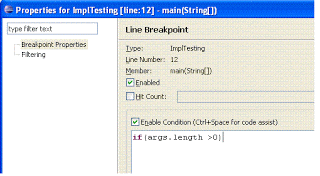
Eclipse allows you to setup conditional break point for debugging java program, which is a breakpoint with condition and your thread will only stop at specified line if condition matches instead of just stopping on that line like in case of line breakpoint. To setup a conditional breakpoint just double click on any line where you want to setup a breakpoint and then right click --> properties and then insert the condition. Now program will only stop when that particular condition is true and program is running on debug mode.

Oracle Java Study Materials, Oracle Java Tutorial and Material, Oracle Java Guides, Oracle Java Prep

Oracle Java Study Materials, Oracle Java Tutorial and Material, Oracle Java Guides, Oracle Java Prep

2) Use Exception breakpoint

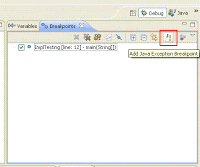
How many times you have frustrated with a NullPointerException and you don't know the source from where the exception is coming. Exception breakpoints are just made for such situation. Both Eclipse and Netbeans allows you to setup Exception breakpoint. You can setup Exception breakpoint based on java exception like NullPointerException or ArrayIndexOutOfBoundException. You can setup Exception breakpoint from breakpoint window and your program will stop when you start it on debug mode and exception occurs.

Oracle Java Study Materials, Oracle Java Tutorial and Material, Oracle Java Guides, Oracle Java Prep

3) Step over, Step Into

These are simply great debugging options available in any Java IDE, extremely useful if you are debugging multi-threaded application and want to navigate step by step.

4) Stopping for a particular Thread

This is my own custom made java debugging tips which I made using conditional breakpoints. since most of my projects are multi-threaded java programs and I want only a particular thread to stop on a particular line, for doing that I setup a conditional breakpoint on that line and put Thread.currentThread().getName().equals("TestingThread") and it works fantastically.

5) Inspect and Watch

These are two menu options which I use to see the value of expression during debugging java program. I just select the statement, right click and inspect and it will show you the value of that statement at debugging time. You can also put watch on that and that condition and its value will appear on watch window.

6) Suspending and resuming thread

You can suspend and resume any thread while debugging java program from debug window. Just right click on any thread and select either suspends or resume. This is also very useful while debugging multi-threading program and simulating race conditions.

7) Using logical structure

Logical structure option is very useful for examining contents inside java collection classes like java hasmap or Java Arraylist during java debugging. Logical view will show the contents like key and value of hashmap instead of showing full details of hashmap which we may not be interested, you can enable and disable logical view from variables window.

8) Step filtering

When we do Step Into on process debugging java program control goes form one class to other and it eventually go to JDK classes like System or String. Some time we just to remain in our application and don't want to navigate into JDK System classes in that case Step filtering is great you can just filter out JDK class from Step into. You can setup step filtering from preferences àJavaàDebugàStep Filtering and enable and disable it from Debug window.

9) Copy Stack

While debugging java program if you want to copy the stack of a thread which hit the breakpoint and suspended you do so by "Copy Stack" option. Just right click on Thread on Debug Window and select "Copy Stack".

10) Last tip is use java debugging as last option and not the first option because it’s very time consuming, especially remote java debugging which takes a lot of time if network latency is very high between local and remote host. Try to identify problem by looking at code it would be very handy and quick.

Monday, February 10, 2020

Top 10 JDBC Interview questions answers for Java programmer

JDBC Interview Question and Answer


JDBC Questions are integral part of any Java interview, I have not seen any Java Interview which is completed without asking single JDBC Interview question, there are always at least one or two question from JDBC API. In this article I have summarized few frequently asked questions in JDBC, they ranges from easy to difficult and beginner to advanced. Questions like distributed transaction management and 2 phase commit is tough to answer until you have real experience but mostly asked in various J2EE interviews. This is not an extensive list of JDBC question answers but practicing or revising this question before going to any Java interview certainly helps.

Oracle Java Study Materials, Oracle Java Prep, Oracle Java Study Materials, Oracle Java Guides

10 JDBC Interview question answer in Java


Here is my list of frequently asked JDBC question in Java, I have tried to provide answer to most of question. If you have any interesting JDBC question which you have faced and not in this list then please share with us.

Question 1: What is JDBC?

Answer : One of the first JDBC interview question in most of interviews. JDBC is java database connectivity as name implies it’s a java API for communicating to relational database, API has java classes and interfaces using that developer can easily interact with database. For this we need database specific JDBC drivers.

Question 2: What are the main steps in java to make JDBC connectivity?

Answer : Another beginner level JDBC Interview question, mostly asked on telephonic interviews. Here are main steps to connect to database.

◉ Load the Driver: First step is to load the database specific driver which communicates with database.

◉ Make Connection: Next step is get connection from the database using connection object, which is used to send SQL statement also and get result back from the database.

◉ Get Statement object: From connection object we can get statement object which is used to query the database

◉ Execute the Query: Using statement object we execute the SQL or database query and get result set from the query.

◉ Close the connection: After getting resultset and all required operation performed the last step should be closing the database connection.

Oracle Java Study Materials, Oracle Java Prep, Oracle Java Study Materials, Oracle Java Guides
Question 3: What is the mean of “dirty read“ in database?

Answer : This kind of JDBC interview question is asked on 2 to 4 years experience Java programmer, they are expected to familiar with database transaction and isolation level etc. As the name it self convey the meaning of dirty read “read the value which may or may not be correct”. in database when one transaction is executing and changing some field value same time some another transaction comes and read the change field value before first transaction commit or rollback the value ,which cause invalid value for that field, this scenario is known as dirty read.

Question 4: What is 2 phase commit?

Answer : This is one of the most popular JDBC Interview question and asked at advanced level, mostly to senior Java developers on J2EE interviews. Two phase commit is used in distributed environment where multiple process take part in distributed transaction process. In simple word we can understand like if any transaction is executing and it will effect multiple database then two phase commit will be used to make all database synchronized with each other.

In two phase commit, commit or rollback is done by two phases:

1. Commit request phase: in this phase main process or coordinator process take vote of all other process that they are complete their process successfully and ready to commit if all the votes are “yes” then they go ahead for next phase. And if “No “then rollback is performed.

2. Commit phase: according to vote if all the votes are yes then commit is done.

Similarly when any transaction changes multiple database after execution of transaction it will issue pre commit command on each database and all database send acknowledgement and according to acknowledgement if all are positive transaction will issue the commit command otherwise rollback is done .

Question 5: What are different types of Statement?

Answer : This is another classical JDBC interview question. Variants are Difference between Statement, PreparedStatemetn and CallableStatement in Java. Statement object is used to send SQL query to database and get result from database, and we get statement object from connection object.

There are three types of statement:

1. Statement: it’s a commonly used for getting data from database useful when we are using static SQL statement at runtime. it will not accept any parameter.
              Statement stmt = conn.createStatement( );
      ResultSet rs = stmt.executeQuery();

2. PreparedStatement: when we are using same SQL statement multiple time its is useful and it will accept parameter at runtime.
 
              String SQL = "Update stock SET limit = ? WHERE stockType = ?";
      PreparedStatement pstmt = conn.prepareStatement(SQL);
      ResultSet rs = pstmt.executeQuery();

3. Callable Statement: when we want to access stored procedures then callable statement are useful and they also accept runtime parameter. It is called like this
         
      CallableStatement cs = con.prepareCall("{call SHOW_SUPPLIERS}");
      ResultSet rs = cs.executeQuery();

Question 6: How cursor works in scrollable result set?

Answer : Another tough JDBC Interview question, not many Java programmer knows about using Cursor in Java.

in JDBC 2.0 API new feature is added to move cursor in resultset backward forward and also in a particular row .

There are three constant define in result set by which we can move cursor.

◉ TYPE_FORWARD_ONLY: creates a nonscrollable result set, that is, one in which the cursor moves only forward
◉ TYPE_SCROLL_INSENSITIVE : a scrollable result set does not reflects changes that are made to it while it is open
◉ TYPE_SCROLL_SENSITIVE: a scrollable result set reflects changes that are made to it while it is open

Question 7: What is connection pooling?

Answer : This is also one of the most popular question asked during JDBC Interviews. Connection pooling is the mechanism by which we reuse the recourse like connection objects which are needed to make connection with database .In this mechanism client are not required every time make new connection and then interact with database instead of that connection objects are stored in connection pool and client will get it from there. so it’s a best way to share a server resources among the client and enhance the application performance.


Question 8: What do you mean by cold backup, hot backup?

Answer : This question is not directly related to JDBC but some time asked during JDBC interviews. Cold back is the backup techniques in which backup of files are taken before the database restarted. In hot backup backup of files and table is taken at the same time when database is running. A warm is a recovery technique where all the tables are locked and users cannot access at the time of backing up data.

Question 9: What are the locking system in JDBC

Answer : One more tough JDBC question to understand and prepare. There are 2 types of locking in JDBC by which we can handle multiple user issue using the record. if two user are reading the same record then there is no issue but what if users are updating the record , in this case changes done by first user is gone by second user if he also update the same record .so we need some type of locking so no lost update.

Optimistic Locking: optimistic locking lock the record only when update take place. Optimistic locking does not use exclusive locks when reading

Pessimistic locking: in this record are locked as it selects the row to update

Question 10: Does the JDBC-ODBC Bridge support multiple concurrent open statements per connection?

Answer: No, we can open only one statement object when using JDBC-ODBC Bridge.

That’s all on this list of 10 JDBC Interview question with answer. As I said JDBC API and there concepts are integral part of any Java interview and there is always atleast one question from JDBC. Since most application uses datbase in backend, JDBC becomes critical for any Java developer.

Sunday, February 9, 2020

4 example to Iterate over HashMap, Hashtable or any Map in Java

Oracle Java HashMap, Oracle Java Hashtable, Oracle Java Study Materials, Oracle Java Tutorial and Material, Oracle Java Certifications

There are multiple ways to iterate, traverse or loop through Map, HashMap or TreeMap in Java and we all familiar of either all of those or some of those. But to my surprise, one of my friends was asked in his interview (he has more than 6 years of experience in Java programming) to write code for getting values from hashmap or TreeMap in Java with at least 4 ways. Just like me he also surprised on this question but written it. I don't know why exactly someone asks this kind of java interview question to a relatively senior java programmer. Though my closest guess is to verify that whether he is still hands on with coding in java. Anyway, that gives me an idea to write this Java tutorial and here are multiple ways to traverse, iterate or loop on a Map in Java, so remember this because you may also ask this question J.

How to traverse or loop Map, HashMap or TreeMap in Java


In next section of this Java tutorial, we will see four different ways of looping or iterating over Map in Java and will display each key and value from HashMap. We will use following hashmap for our example:

HashMap<String, String> loans = new HashMap<String, String>();
loans.put<"home loan", "Citibank");
loans.put<"personal loan", "Wells Fargo");

Iterating or looping map using Java 5 foreach loop


Here we will use new foreach loop introduced in JDK5 for iterating over any map in java and using KeySet of the map for getting keys. this will iterate through all values of Map and display key and value together.

HashMap<String, String> loans = new HashMap<String, String>();
loans.put("home loan", "citibank");
loans.put("personal loan", "Wells Fargo");

for (String key : loans.keySet()) {
   System.out.println("------------------------------------------------");
   System.out.println("Iterating or looping map using java5 foreach loop");
   System.out.println("key: " + key + " value: " + loans.get(key));
}

Output:
------------------------------------------------
Iterating or looping map using java5 foreach loop
key: home loan value: Citibank
------------------------------------------------
Iterating or looping map using java5 foreach loop
key: personal loan value: Wells Fargo

Iterating Map in Java using KeySet Iterator


Oracle Java HashMap, Oracle Java Hashtable, Oracle Java Study Materials, Oracle Java Tutorial and Material, Oracle Java Certifications
In this Example of looping hashmap in Java we have used Java Iterator instead of for loop, rest are similar to earlier example of looping:

Set<String> keySet = loans.keySet();
Iterator<String> keySetIterator = keySet.iterator();
while (keySetIterator.hasNext()) {
   System.out.println("------------------------------------------------");
   System.out.println("Iterating Map in Java using KeySet Iterator");
   String key = keySetIterator.next();
   System.out.println("key: " + key + " value: " + loans.get(key));
}

Output:
------------------------------------------------
Iterating Map in Java using KeySet Iterator
key: home loan value: Citibank
------------------------------------------------
Iterating Map in Java using KeySet Iterator
key: personal loan value: Wells Fargo

Looping HashMap in Java using EntrySet and Java 5 for loop


In this Example of traversing Map in Java, we have used EntrySet instead of KeySet. EntrySet is a collection of all Map Entries and contains both Key and Value

Set<Map.Entry<String, String>> entrySet = loans.entrySet();
for (Entry entry : entrySet) {
   System.out.println("------------------------------------------------");
   System.out.println("looping HashMap in Java using EntrySet and java5 for loop");
   System.out.println("key: " + entry.getKey() + " value: " + entry.getValue());
}

Output:
------------------------------------------------
looping HashMap in Java using EntrySet and java5 for loop
key: home loan value: Citibank
------------------------------------------------
looping HashMap in Java using EntrySet and java5 for loop
key: personal loan value: Wells Fargo

Iterating HashMap in Java using EntrySet and Java iterator


This is the fourth and last example of looping Map and here we have used Combination of Iterator and EntrySet to display all keys and values of a Java Map.

Set<Map.Entry<String, String>> entrySet1 = loans.entrySet();
Iterator<Entry<String, String>> entrySetIterator = entrySet1.iterator();
while (entrySetIterator.hasNext()) {
   System.out.println("------------------------------------------------");
   System.out.println("Iterating HashMap in Java using EntrySet and Java iterator");
   Entry entry = entrySetIterator.next();
   System.out.println("key: " + entry.getKey() + " value: " + entry.getValue());
}

Output:
------------------------------------------------
Iterating HashMap in Java using EntrySet and Java iterator
key: home loan value: Citibank
------------------------------------------------
Iterating HashMap in Java using EntrySet and Java iterator
key: personal loan value: Wells Fargo

That’s all on multiple ways of looping Map in Java. We have seen exactly 4 examples to iterator on Java Map in a combination of KeySet and EntrySet by using for loop and Iterator. Let me know if you are familiar with any other ways of iterating and getting each key value from Map in Java.

Source: javarevisited.blogspot.com

Saturday, February 8, 2020

How to find difference between two dates in Java 8? Example

Oracle Java Study Material, Oracle Java Guides, Oracle Java Prep, Oracle Java Learning

One of the most common programming task while working with date and time objects are calculating the difference between dates and finding a number of days, months or years between two dates. You can use the Calendar class in Java to get days, months between two dates. The easiest way to calculate the difference between two dates is by calculating milliseconds between them by converting java.util.Date to milliseconds using the getTime() method. The catch is converting those milliseconds into Days, Months and Year is not tricky due to leap years, the different number of days in months and daylight saving times.

You can also use the TimeUnit class to convert milliseconds into seconds, minutes and other time units.

If you are running in Java 6 or Java 7 and cannot use any third party library then use Calendar class to find the difference, else use the JodaTime library. You have to use Joda in order to calculate the accurate difference, there are no better ways than using JodaTime in the pre-Java 8 world.

If you are running in Java SE 8 then its better to use the new Date and Time API, which is a lot cleaner, readable, and robust than Calendar and old date-time API.

Using JodaTime to find the difference between two dates in Java


Using JodaTime, you can get the difference between two dates in Java using the following code:

Days d = Days.daysBetween(startDate, endDate).getDays();

And, if you want to find the difference between two dates in Java in Months, then you can use the following code example:

Months m = Days.daysBetween(startDate, endDate).getMonths();

And, if you want to calculate the difference between two dates in Java in Years, here is the code you need to use:

Months m = Days.daysBetween(startDate, endDate).getYears();

Similarly, you can calculate the difference between two dates in Java in Weeks by changing getYears() method to getWeeks() as shown below:

Months m = Days.daysBetween(startDate, endDate).getWeeks();

And, finally, if you want to get the difference between two dates in Java in Hours then you can use getHours() method as shown in the following example:

Months m = Days.daysBetween(startDate, endDate).getWeeks();

You can calculate the difference between two dates in months by using the Calendar class and if you need code you can check this example, but honestly, I don't recommend it until it is the only way for you. If you only care about absolute difference then this solution works. You can also do the same using the Joda Time library and by using the new Date and Time API of Java 8.

Oracle Java Study Material, Oracle Java Guides, Oracle Java Prep, Oracle Java Learning

Solution 2: Using Java 8 Date and Time API


This is the best way to find difference between two dates in Java as its very clear and readable and you don't need to use any external library.  Here is the sample code example to find a number of days, months and years between two dates in Java.

Btw, there is a lot to learn about Date and Time API of Java 8, and you are interested, I suggest you check out What's New in Java 8 course on Pluralsight, which covers Java 8 features and will teach you everything you need to know about Java 8 in a very short time. 

import java.time.LocalDate;
import java.time.Month;
import java.time.Period;

/**
 * Java Program to calculate number of years and months
 */
public class Java8Demo {

    @SuppressWarnings("empty-statement")
    public static void main(String[] args) {
        LocalDate bday = LocalDate.of(1955, Month.MAY, 19);
        LocalDate today = LocalDate.now();
        
        Period age = Period.between(bday, today);
        int years = age.getYears();
        int months = age.getMonths();
        int days = age.getDays();
        
        System.out.println("number of days: " + days);       

        System.out.println("number of years: " + years);
        System.out.println("number of months: " + months);
    }

}

Output
number of years: 61
number of months: 4

Also, you would need a Pluralsight membership to get access to this course, which costs around $29 per month or $299 annually (14% discount). 

I encourage you to get one because it allows you to access their 5000+ online courses on all the latest topics like front-end and back-end development, machine learning, etc. It also includes interactive quizzes, exercises, and the latest certification material. 

It's more like Netflix for Software Developers and Since learning is an important part of our job, Plurlasight membership is a great way to stay ahead of your competition.

Things to Remember


1) You can calculate the difference between dates by subtracting milliseconds because of java.util.Date always represents a date as milliseconds from 1st January UTC, but you need to address several dates time-related issues like leap seconds, daylight saving times, leap years, different number of days in months, etc.

2) By using Jodatime, you will get a cleaner API to perform basic date-time arithmetic. It provides classes like Days, Months and Years to easily calculate days between two dates as well as months and year between them.

3) If you are using Java 8, then use a new Date and Time API. It is inspired by JodaTime and provides similar API to cleanly perform date arithmetic in Java.

4) You can use TimeUnit class to do conversion between different time units e.g. milliseconds to seconds, minutes, hours, etc.

5) Calendar class does provide some support but its limited to obtaining individual field and manually calculating differences.

That's all about how to calculate the difference between two dates in Java. Glad that we have Calendar class to do all the heavy lifting, but it's not smooth. Java 8 Date and Time has already addressed these issues. If you are running on Java 8, there is no way you should use existing Date and Calendar API.

Source: java67.com