Saturday, January 18, 2020

Programming the GPU in Java

Programming a graphics processing unit (GPU) seems like a distant world from Java programming. This is understandable, because most of the use cases for Java are not applicable to GPUs. Nonetheless, GPUs offer teraflops of performance, so let’s explore their possibilities.

To make the topic approachable, I’ll spend some time explaining GPU architecture along with a little history, which will make it easier to dive into programming the hardware. Once I’ve shown how the GPU differs from CPU computing, I’ll show how to use GPUs in the Java world. Finally, I will describe the leading frameworks and libraries available for writing Java code and running it on GPUs, and I’ll provide some code samples.

A Little Background


The GPU was first popularized by Nvidia in 1999. It is a special processor designed to process graphical data before it is transferred to the display. In most cases, it enables some of the computation to be offloaded from the CPU, thus freeing CPU resources while speeding up those offloaded computations. The result is that more input data can be processed and presented at much higher output resolutions, making the visual representation more attractive and the frame rate more fluid.

The nature of 2D/3D processing is mostly matrix manipulation, so it can be handled with a massively parallel approach. What would be an effective approach for image processing? To answer this, let’s compare the architecture of standard CPUs (shown in Figure 1) and GPUs.

Oracle Java Tutorials and Material, Oracle Java Learning, Oracle Java Guides, Oracle Java Certifications, Oracle Java Prep

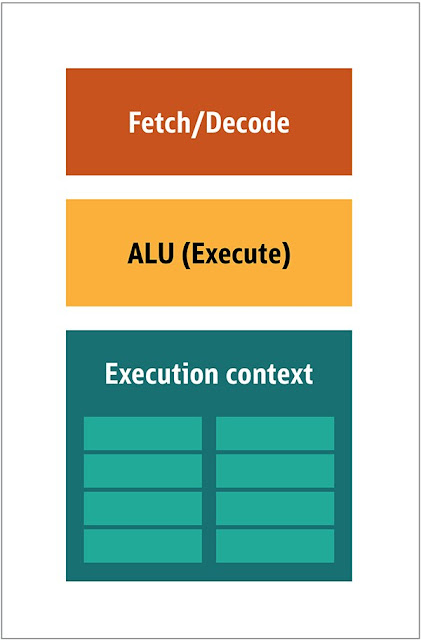
Figure 1. Block architecture of a CPU

In the CPU, the actual processing elements—the fetchers, the arithmetic logic unit (ALU), and the execution contexts—are just a small part of the whole system. To speed up the irregular calculations arriving in unpredictable order, there are a large, fast, and expensive cache; different kinds of prefetchers; and branch predictors.

You don’t need all of this on a GPU, because the data is received in a predictable manner and the GPU performs a very limited set of operations on the data. Thus, it is possible to make a very small and inexpensive processor with a block architecture similar to that in Figure 2.

Oracle Java Tutorials and Material, Oracle Java Learning, Oracle Java Guides, Oracle Java Certifications, Oracle Java Prep

Figure 2. Block architecture for a simple GPU core

Because these kinds of processors are cheap and they process data in parallel chunks, it’s easy to put many of them to work in parallel. This design is referred to as multiple instruction, multiple data or MIMD (pronounced “mim-dee”).

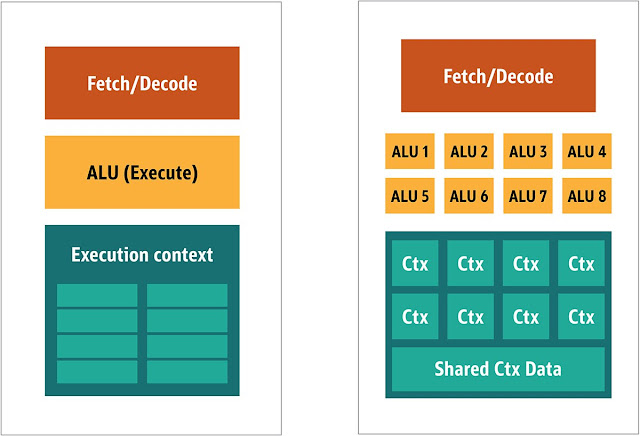
A second approach focuses on the fact that often a single instruction is applied to multiple data items. This is known as single instruction, multiple data or SIMD (pronounced “sim-dee”). In this design, a single GPU contains multiple ALUs and execution contexts, with a small area dedicated to shared context data, as shown in Figure 3.

Oracle Java Tutorials and Material, Oracle Java Learning, Oracle Java Guides, Oracle Java Certifications, Oracle Java Prep

Figure 3. Comparing a MIMD-style GPU block architecture (left) with a SIMD design (right)

Combining SIMD and MIMD processing provides the maximal processing throughput, which I’ll discuss shortly. In such a design, you have multiple SIMD processors running in parallel, as shown in Figure 4.

Oracle Java Tutorials and Material, Oracle Java Learning, Oracle Java Guides, Oracle Java Certifications, Oracle Java Prep

Figure 4. Running multiple SIMD processors in parallel; here, 16 cores with 128 total ALUs

Because you have a bunch of small, simple processors, you can program them to gain special effects in the output.

Running Programs on the GPU


Most of the early visual effects in games were actually hardcoded small programs running on a GPU and applied to the data stream from the CPU.

It was obvious, even then, that hardcoded algorithms were insufficient, especially in game design, where visual representation is actually one of the main selling points. In response, the big vendors opened access to GPUs, and then third-party developers could code for them.

The typical approach was to write small programs, called shaders, in a special language (usually a subset of C) and compile them with a special compiler for the corresponding architecture. The term shaders was chosen because shaders were often used to control lighting and shading effects, but there’s no reason they can’t handle other special effects.

Each GPU vendor had its own specific programming language and infrastructure for creating shaders for its hardware. From these efforts, several platforms have been created. The major ones include

◉ DirectCompute: A proprietary shader language/API from Microsoft that is part of Direct3D, starting with DirectX 10

◉ AMD FireStream: An ATI/Radeon proprietary technology, which was discontinued by AMD

◉ OpenACC: A multivendor-consortium parallel computing solution

◉ C++ AMP: A Microsoft proprietary library for data parallelism in C++

◉ CUDA: Nvidia’s proprietary platform, which uses a subset of the C language

◉ OpenCL: A common standard originally designed by Apple but now managed by the consortium Khronos Group

Most of the time, working with GPUs is low-level programming. To make it a little bit more understandable for developers to code, several abstractions are provided. The most famous are DirectX, from Microsoft, and OpenGL, from the Khronos Group. These APIs are for writing high-level code, which then can be offloaded to the GPU mostly seamlessly by the developer.

As far as I know, there is no Java infrastructure that supports DirectX, but there is a nice binding for OpenGL. JSR 231 was started in 2002 to address GPU programming, but it was abandoned in 2008 and supported only OpenGL 2.0. Support of OpenGL has been continued in an independent project called JOCL, (which also supports OpenCL), and it’s publicly available. By the way, the famous Minecraft game was written with JOCL underneath.

Advent of the GPGPU


Still, Java and GPUs are not a seamless fit, although they should be. Java is heavily used in enterprises, data science, and the financial sector, where many computations and a lot of processing power are needed. This is how the idea of the general-purpose GPU (GPGPU) came about.

The idea to use the GPU this way started when the vendors of video adapters started to open the frame buffer programmatically, enabling developers to read the contents. Some hackers recognized that they could then use the full power of the GPU for general-purpose computations. The recipe was straightforward:

1. Encode the data as a bitmap array.
2. Write a shader to process it.
3. Submit them both to the video card.
4. Retrieve the result from the frame buffer.
5. Decode the data from the bitmap array.

This is a very simplified explanation. I’m not sure this process was ever heavily used in production, but it did work.

Then several researchers from Stanford University began looking for a way to make using a GPGPU easier. In 2005 they released BrookGPU, which was a small ecosystem that included a language, a compiler, and a runtime.

BrookGPU compiled programs written in the Brook stream programming language, which is a variant of ANSI C. It could target OpenGL v1.3+, DirectX v9+, or AMD’s Close to Metal for the computational back end, and it ran on both Microsoft Windows and Linux. For debugging, BrookGPU could also simulate a virtual graphics card on the CPU.

However, it did not take off, because of the hardware available at the time. In the GPGPU world, you need to copy the data to the device (in this context, device refers to the GPU and the board on which it is situated), wait for the GPU to process the data, and then copy the data back to the main runtime. This creates a lot of latency. And in the mid-2000s, when the project was under active development, this latency almost precluded extensive use of GPUs for general computing.

Nevertheless, many companies saw a future in this technology. Several video adapter vendors started providing GPGPUs with their proprietary technologies, and others formed alliances to provide more-general, versatile programming models to run a larger variety of hardware devices.

Now that I’ve shared this background, let’s examine the two most successful technologies for GPU computing—OpenCL and CUDA—and see how Java works with them.

OpenCL and Java


Like many other infrastructure packages, OpenCL provides a base implementation in C. It is technically accessible via Java Native Interface (JNI) or Java Native Access (JNA), but such access would be a bit too much work for most developers. Fortunately, this work has already been done by several libraries: JOCL, JogAmp, and JavaCL. Unfortunately, JavaCL is a dead project. But the JOCL project is alive and quite up to date. I will use it in the following examples.

But first I should explain what OpenCL is. As I mentioned earlier, OpenCL provides a very general model, suitable for programming all sorts of devices—not only GPUs and CPUs but even digital signal processors (DSPs) and field-programmable gate arrays (FPGAs) as well.

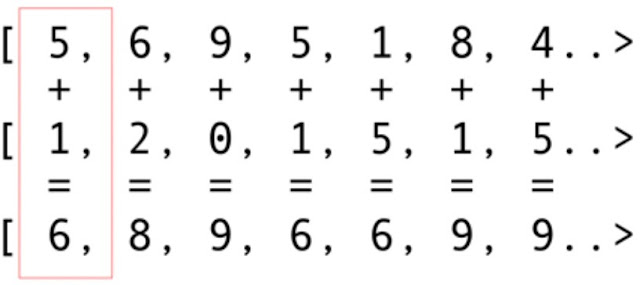
Let’s explore the easiest example: vector addition, probably the most representative and simple example. You have two integer arrays you’re adding and one resulting array. You take an element from the first array and an element from the second array, and then you put the sum of them in the result array, as shown in Figure 5.

Oracle Java Tutorials and Material, Oracle Java Learning, Oracle Java Guides, Oracle Java Certifications, Oracle Java Prep

Figure 5. Adding the contents of two arrays and storing the sums in a result array

As you can see, the operation is highly concurrent and thus very parallelizable. You can push each of the add operations to a separate GPU core. This means that if you have 2,048 cores, as on an Nvidia 1080 graphics card, you can perform 2,048 simultaneous add operations. That means there are potentially teraflops of computing power waiting for you. Here is the code for arrays with 10 million integers taken from the JOCL site:

public class ArrayGPU {
    /**
     * The source code of the OpenCL program 
     */
    private static String programSource =
        "__kernel void "+
        "sampleKernel(__global const float *a,"+
        "             __global const float *b,"+
        "             __global float *c)"+
        "{"+
        "    int gid = get_global_id(0);"+
        "    c[gid] = a[gid] + b[gid];"+
        "}";
    
    public static void main(String args[])
    {
        int n = 10_000_000;
        float srcArrayA[] = new float[n];
        float srcArrayB[] = new float[n];
        float dstArray[] = new float[n];
        for (int i=0; i<n; i++)
        {
            srcArrayA[i] = i;
            srcArrayB[i] = i;
        }
        Pointer srcA = Pointer.to(srcArrayA);
        Pointer srcB = Pointer.to(srcArrayB);
        Pointer dst = Pointer.to(dstArray);


        // The platform, device type and device number
        // that will be used
        final int platformIndex = 0;
        final long deviceType = CL.CL_DEVICE_TYPE_ALL;
        final int deviceIndex = 0;

        // Enable exceptions and subsequently omit error checks in this sample
        CL.setExceptionsEnabled(true);

        // Obtain the number of platforms
        int numPlatformsArray[] = new int[1];
        CL.clGetPlatformIDs(0, null, numPlatformsArray);
        int numPlatforms = numPlatformsArray[0];

        // Obtain a platform ID
        cl_platform_id platforms[] = new cl_platform_id[numPlatforms];
        CL.clGetPlatformIDs(platforms.length, platforms, null);
        cl_platform_id platform = platforms[platformIndex];

        // Initialize the context properties
        cl_context_properties contextProperties = new cl_context_properties();
        contextProperties.addProperty(CL.CL_CONTEXT_PLATFORM, platform);
        
        // Obtain the number of devices for the platform
        int numDevicesArray[] = new int[1];
        CL.clGetDeviceIDs(platform, deviceType, 0, null, numDevicesArray);
        int numDevices = numDevicesArray[0];
        
        // Obtain a device ID 
        cl_device_id devices[] = new cl_device_id[numDevices];
        CL.clGetDeviceIDs(platform, deviceType, numDevices, devices, null);
        cl_device_id device = devices[deviceIndex];

        // Create a context for the selected device
        cl_context context = CL.clCreateContext(
            contextProperties, 1, new cl_device_id[]{device}, 
            null, null, null);
        
        // Create a command-queue for the selected device
        cl_command_queue commandQueue = 
            CL.clCreateCommandQueue(context, device, 0, null);

        // Allocate the memory objects for the input and output data
        cl_mem memObjects[] = new cl_mem[3];
        memObjects[0] = CL.clCreateBuffer(context,
            CL.CL_MEM_READ_ONLY | CL.CL_MEM_COPY_HOST_PTR,
            Sizeof.cl_float * n, srcA, null);
        memObjects[1] = CL.clCreateBuffer(context,
            CL.CL_MEM_READ_ONLY | CL.CL_MEM_COPY_HOST_PTR,
            Sizeof.cl_float * n, srcB, null);
        memObjects[2] = CL.clCreateBuffer(context,
            CL.CL_MEM_READ_WRITE,
            Sizeof.cl_float * n, null, null);
        
        // Create the program from the source code
        cl_program program = CL.clCreateProgramWithSource(context,
            1, new String[]{ programSource }, null, null);
        
        // Build the program
        CL.clBuildProgram(program, 0, null, null, null, null);
        
        // Create the kernel
        cl_kernel kernel = CL.clCreateKernel(program, "sampleKernel", null);
        
        // Set the arguments for the kernel
        CL.clSetKernelArg(kernel, 0,
            Sizeof.cl_mem, Pointer.to(memObjects[0]));
        CL.clSetKernelArg(kernel, 1,
            Sizeof.cl_mem, Pointer.to(memObjects[1]));
        CL.clSetKernelArg(kernel, 2,
            Sizeof.cl_mem, Pointer.to(memObjects[2]));
        
        // Set the work-item dimensions
        long global_work_size[] = new long[]{n};
        long local_work_size[] = new long[]{1};
        
        // Execute the kernel
        CL.clEnqueueNDRangeKernel(commandQueue, kernel, 1, null,
            global_work_size, local_work_size, 0, null, null);
        
        // Read the output data
        CL.clEnqueueReadBuffer(commandQueue, memObjects[2], CL.CL_TRUE, 0,
            n * Sizeof.cl_float, dst, 0, null, null);
        
        // Release kernel, program, and memory objects
        CL.clReleaseMemObject(memObjects[0]);
        CL.clReleaseMemObject(memObjects[1]);
        CL.clReleaseMemObject(memObjects[2]);
        CL.clReleaseKernel(kernel);
        CL.clReleaseProgram(program);
        CL.clReleaseCommandQueue(commandQueue);
        CL.clReleaseContext(context);

    }

    private static String getString(cl_device_id device, int paramName) {
        // Obtain the length of the string that will be queried
        long size[] = new long[1];
        CL.clGetDeviceInfo(device, paramName, 0, null, size);

        // Create a buffer of the appropriate size and fill it with the info
        byte buffer[] = new byte[(int)size[0]];
        CL.clGetDeviceInfo(device, paramName, buffer.length, Pointer.to(buffer), null);

        // Create a string from the buffer (excluding the trailing \0 byte)
        return new String(buffer, 0, buffer.length-1);
    }
}

This code doesn’t look like Java, but it actually is. I’ll explain the code next; don’t spend a lot of time on it now, because I will shortly discuss less complicated solutions.

The code is well documented, but let’s do a small walk-through. As you can see, the code is very C-like. This is quite normal, because JOCL is just the binding to OpenCL. At the start, there is some code inside a string, and this code is actually the most important part: It gets compiled by OpenCL and then sent to the video card and executed there. This code is called a kernel. Do not confuse this term with an OS kernel; this is the device code. This kernel code is written in a subset of C.

After the kernel comes the Java binding code to set up and orchestrate the device, to chunk the data, and to create proper memory buffers on the device where the data is going to be stored as well as the memory buffers for the resulting data.

To summarize: There is “host code,” which is usually a language binding (in this case, Java), and the “device code.” You always distinguish what runs on the host and what should run on the device, because the host controls the device.

The preceding code should be viewed as the GPU equivalent of “Hello World!” As you see, the amount of ceremony is vast.

Let’s not forget the SIMD capabilities. If your hardware supports SIMD extensions, you can make arithmetic code run much faster. For example, let’s look at the matrix multiplication kernel code. This is the code in the raw string of your Java application.

__kernel void MatrixMul_kernel_basic(int dim,
                  __global float *A,
                  __global float *B,
                  __global float *C){

    int iCol = get_global_id(0);
    int iRow = get_global_id(1);
    float result = 0.0;
    for(int i=0; i< dim; ++i)
    {
          result +=
          A[iRow*dim + i]*B[i*dim + iCol];
    }
    C[iRow*dim + iCol] = result;
}

Technically, this code will work on a chunk of data that was set up for you by the OpenCL framework, with the instructions you supply in the preparation ceremony.

If your video card supports SIMD instructions and is able to process vectors of four floats, a small optimization may turn the previous code into the following code:

#define VECTOR_SIZE 4    
__kernel void MatrixMul_kernel_basic_vector4(
    size_t dim, // dimension is in single floats
    const float4 *A,
    const float4 *B,
    float4 *C)
{
    size_t globalIdx = get_global_id(0);
    size_t globalIdy = get_global_id(1);
    float4 resultVec = (float4){ 0, 0, 0, 0 };
    size_t dimVec = dim / 4;
    for(size_t i = 0; i < dimVec; ++i) {
        float4 Avector = A[dimVec * globalIdy + i];
        float4 Bvector[4];
        Bvector[0] = B[dimVec * (i * 4 + 0) + globalIdx];
        Bvector[1] = B[dimVec * (i * 4 + 1) + globalIdx];
        Bvector[2] = B[dimVec * (i * 4 + 2) + globalIdx];
        Bvector[3] = B[dimVec * (i * 4 + 3) + globalIdx];
        resultVec += Avector[0] * Bvector[0];
        resultVec += Avector[1] * Bvector[1];
        resultVec += Avector[2] * Bvector[2];
        resultVec += Avector[3] * Bvector[3];
    }

    C[dimVec * globalIdy + globalIdx] = resultVec;
}

With this code, you can double the performance.

Cool. You have unlocked the GPU for the Java world! But as a Java developer, do you really want to do all of this binding, write C code, and work with such low-level details? I certainly don’t. But now that you have some knowledge of how the GPU architecture is used, let’s look at other solutions beyond the JOCL code I’ve just presented.

CUDA and Java


CUDA is Nvidia’s solution to these coding issues. CUDA provides many more ready-to-use libraries for standard GPU operations, such as matrices, histograms, and even deep neural networks. The emerging library list already contains many useful bindings. These are from the JCuda project:

◉ JCublas: all about matrices

◉ JCufft: fast Fourier transforms

◉ JCurand: all about random numbers

◉ JCusparse: sparse matrices

◉ JCusolver: factorization

◉ JNvgraph: all about graphs

◉ JCudpp: CUDA Data Parallel Primitives Library and some sorting algorithms

◉ JNpp: image processing on a GPU

◉ JCudnn: a deep neural network library

I’ll describe using JCurand, which generates random numbers. You can directly use it from Java code with no other specific kernel languages. For example:

...
int n = 100;
curandGenerator generator = new curandGenerator();
float hostData[] = new float[n];
Pointer deviceData = new Pointer();
cudaMalloc(deviceData, n * Sizeof.FLOAT);
curandCreateGenerator(generator, CURAND_RNG_PSEUDO_DEFAULT); 
curandSetPseudoRandomGeneratorSeed(generator, 1234);
curandGenerateUniform(generator, deviceData, n);
cudaMemcpy(Pointer.to(hostData), deviceData, 
        n * Sizeof.FLOAT, cudaMemcpyDeviceToHost);
System.out.println(Arrays.toString(hostData));
curandDestroyGenerator(generator);
cudaFree(deviceData);
...

Here the GPU is used to create more random numbers of high quality, based on some very strong mathematics.

In JCuda you can also write generic CUDA code and call it from Java by just adding some JAR files to your classpath.

Staying Above Low-Level Code


This all looks great, but there is too much ceremony, too much setup, and too many different languages to get this running. Is there a way to use a GPU at least partially?

What if you don’t want to think about all of this OpenCL, CUDA, and other internal stuff? What if you just want to code in Java and not think about the internals? The Aparapi project can help. Aparapi stands for “a parallel API.” I think of it as a kind of Hibernate for GPU programming that uses OpenCL under the hood. Let’s look at an example of vector addition.

public static void main(String[] _args) {
    final int size = 512;
    final float[] a = new float[size];
    final float[] b = new float[size];

    /* fill the arrays with random values */
    for (int i = 0; i < size; i++){
        a[i] = (float) (Math.random() * 100);
        b[i] = (float) (Math.random() * 100);
    }
    final float[] sum = new float[size];

    Kernel kernel = new Kernel(){
        @Override public void run() {
I           int gid = getGlobalId();
            sum[gid] = a[gid] + b[gid];
        }
    };

    kernel.execute(Range.create(size));
    for(int i = 0; i < size; i++) {
        System.out.printf("%6.2f + %6.2f = %8.2f\n", a[i], b[i], sum[i])
    }
    kernel.dispose();
}

This is pure Java code (taken from the Aparapi documentation), although here and there, you can spot some GPU domain-specific terms such as Kernel and getGlobalId. You still need to understand how the GPU is programmed, but you can approach GPGPU in a more Java-friendly way. Moreover, Aparapi provides an easy way to bind OpenGL contexts to the OpenCL layer underneath—thus enabling the data to stay entirely on the video card—and thereby avoid memory latency issues.

If many independent computations need to be done, consider Aparapi. This rich set of examples gives some use cases that are perfect for massive parallel computations.

In addition, there are several projects such as TornadoVM that automatically offload suitable calculations from the CPU to the GPU, thus enabling massive optimizations out of the box.

Source: oracle.com

Friday, January 17, 2020

Java Version History

Oracle Java Tutorials and Materials, Oracle Java Study Materials, Oracle Java Online Exam

JDK Alpha and Beta (1995)


The Java Alpha and Beta was the first releasesbut they have highly unstable APIs and ABIs. The supplied Java web browser was named WebRunner.

JDK 1.0 (January 23, 1996)


It was the first stable released version of Java. Its codename was Oak.The first stable version of JDK was JDK 1.0.2 and it was called Java 1.

Up to JDK 1.0.1, private and protected keywords could be used together to create yet another form of protection which used to act as a restriction to methods or variables mainly to subclasses of a given class. In JDK 1.0.2, this capability has been removed.

JDK 1.1 (February 19, 1997)


Some additions were included to this version. i.e.

◉ The concept of Inner Class
◉ JavaBeans
◉ JDBC
◉ RMI
◉ AWT event model was totally reshaped.
◉ Reflection(which supported Introspection only, modification was not possible at runtime).
◉ JIT(Just In Time) compiler on Microsoft Windows platforms, produced for JavaSoft by Symantec
◉ Internationalization and Unicode support originating from Taligent.


J2SE 1.2 (December 8, 1998)


Its codename was Playground. First time, it was called J2SE (Java 2 Platform, Standard Edition) .It replaced JDK to recognize the base platform from J2EE (Java 2 Platform, Enterprise Edition) and J2ME(Java 2 Platform, Micro Edition) .It was a very important java release as it tripled the size of the Java platform to 1520 classes in 59 packages.

Some additions were included to this version. i.e.

◉ Java plug-in
◉ Java IDL, an IDL implementation for CORBA interoperability
◉ Collections framework
◉ the Swing graphical API was integrated into the core classes
◉ Sun's JVM was equipped with a JIT compiler for the first time

J2SE 1.3 (May 8, 2000)


Its codename was Kestrel. Some additions were included to this version. i.e.

◉ HotSpot JVM included.
◉ RMI was modified to support optional compatibility with CORBA.
◉ JNDI (Java Naming and Directory Interface).
◉ Java Platform Debugger Architecture (JPDA) included.
◉ JavaSound.
◉ Synthetic proxy classes.


J2SE 1.4 (February 6, 2002)


Its codename was Merlin. It was the first Java platform which was released under the Java Community Process.

Some additions were included to this version. i.e.

◉ Improved libraries.
◉ Perl regular expressions included.
◉ Provided exception chaining (It allows an exception to encapsulate original lower-level exception).
◉ IPv6 support (Internet Protocol version 6).
◉ Logging API (Specified in JSR 47.)
◉ Image I/O API for reading and writing images in formats like JPEG and PNG.
◉ XML parser and XSLT processor integrated.
◉ Security and cryptography extensions (JCE, JSSE, JAAS) integrated.

Support and security updates for Java 1.4 ended in October 2008.

J2SE 5.0 (September 30, 2004)


Its codename was Tiger. It was originally numbered 1.5, which is still used as the internal version number. So, it was changed to 5.0 to "better reflect the level of maturity, stability, scalability and security of the J2SE". This process also was released under the Java Community Process.

Support and security updates for Java 5.0 ended on November 3, 2009 but updates were available to paid Oracle customers until May 2015.

Oracle Java Tutorials and Materials, Oracle Java Study Materials, Oracle Java Online Exam
J2SE 5.0added some significant new language features:

◉ It provided compile-time (static) type safety for collections and eliminates the need for most typecasts.
◉ Used Metadata or annotations.
◉ Autoboxing/unboxing.
◉ Enumerations.
◉ Enhanced for each loop.
◉ Improved semantics of execution for multi-threaded Java programs.
◉ Static imports.

There were also some improvements in standard libraries:

◉ Automatic stub generation for RMI objects.
◉ Swing: It provided a skinny look and feel.
◉ The concurrency utilities in package java.util.concurrent.
◉ Scanner class for parsing data from various input streams and buffers.

Java 5 was the last release of Java which officially supportedthe Microsoft Windows 9x line (Windows 95, Windows 98, Windows ME).

Windows Vista was the last version of Windows that J2SE 5 supported before going to end in October 2009.

Java 5.0 is the default version of Java installed on Apple Mac OS X 10.5 (Leopard). Java 6 can be installed

Java SE 6 (December 11, 2006)


Its codename was Mustang. After the release of this version, Java replaced the name J2SE to Java SE and dropped the .0 from the version number.

Some additions were included to this version. i.e.

◉ Dropped the support for older Win9x versions.
◉ Scripting Language Support.
◉ Generic API for tight integration with scripting languages.
◉ Improved Web Service support.
◉ JDBC 4.0 support.
◉ Use a Java Compiler API to invoke a Java Compiler programmatically.

After the release of Java 6, Sun released many updates to fix bugs.

Java SE 7 (July 28, 2011)


Its codename was Dolphin. It was launched on 7, July 2011 but was made available for developers on July 28, 2011.

Some additions were included to this version. i.e.

◉ JVM support for dynamic languages.
◉ Compressed 64-bits pointer.
◉ Strings added in switch.
◉ Automatic resource management in try-statement.
◉ Underscores allowed in numeric literals.
◉ Binary integer literals.
◉ Improved type interface for creating generic instance. (also called diamond operator <>)
◉ Improved catching and throwing. (catch multiple exceptions and rethrow with improved type checking)
◉ Provided Java Deployment rulesets.

It was the default version to download on java.com from April 2012 up to the release of Java 8.

Java SE 8 (March 18, 2014)


Its codename was Spider. Although, codenames have been discontinued, but the codename Spider is common among java developers.

It includes some features which were proposed for Java SE 7 but added in Java SE 8.

◉ Language-level support for Lambda expressions.
◉ Allowed developers to embed JavaScript code within applications.
◉ Annotation of Java Types.
◉ Provided Date and Time API.
◉ Repeating Annotations.
◉ Launching of JavaFX applications.
◉ Removal of permanent generation.

Java SE 8 is not supported in Windows XP but after JDK 8 update 25, we can install and run it under Windows XP.

Java 8 is set as a default version to download from java.com from October 2014.

Java SE 9 (September 21, 2017)


In 2016, Oracle discussed some features to release in Java 9. It was hoped that Java 9 would include better support for multi-gigabyte heaps, better native code integration, a different default garbage collector and a self-tuning JVM. The release of Java 9 was postponed many times and finally it was released on September 21, 2017.

It includes some specific features:

◉ Modularization of the JDK under Project Jigsaw.
◉ Provided Money and Currency API.
◉ Tight integration with JavaFX.
◉ Java implementation of reactive streams.
◉ More Concurrency Updates.
◉ Provided Java Linker.
◉ Automatic scaling and sizing.

Java SE 10 (March, 20, 2018)


Java SE 10 was released to remove primitive data types and move towards 64-bit addressable arrays to support large data sets.It was released on 20 March 2018, with twelve new features confirmed. These features are:

◉ Local-Variable Type Inference
◉ Experimental Java-Based JIT Compiler This is the integration of the Graal dynamic compiler for the Linux x64 platform
◉ Application Class-Data Sharing This allows application classes to be placed in the shared archive to reduce startup and footprint for Java applications
◉ Time-Based Release Versioning
◉ Parallel Full GC for G1
◉ Garbage-Collector Interface
◉ Additional Unicode Language-Tag Extensions
◉ Root Certificates
◉ Thread-Local Handshakes
◉ Heap Allocation on Alternative Memory Devices
◉ Remove the Native-Header Generation Tool - javah
◉ Consolidate the JDK Forest into a Single Repository

Also Read: DB Exam

Thursday, January 16, 2020

History of Java

Oracle Java Tutorial and Materials, Oracle Java Guides, Oracle Java Online Exam

The history of Java is very interesting. Java was originally designed for interactive television, but it was too advanced technology for the digital cable television industry at the time. The history of Java starts with the Green Team. Java team members (also known as Green Team), initiated this project to develop a language for digital devices such as set-top boxes, televisions, etc. However, it was suited for internet programming. Later, Java technology was incorporated by Netscape.

Oracle Java Tutorial and Materials, Oracle Java Guides, Oracle Java Online Exam
The principles for creating Java programming were "Simple, Robust, Portable, Platform-independent, Secured, High Performance, Multithreaded, Architecture Neutral, Object-Oriented, Interpreted, and Dynamic". Java was developed by James Gosling, who is known as the father of Java, in 1995. James Gosling and his team members started the project in the early '90s.

Currently, Java is used in internet programming, mobile devices, games, e-business solutions, etc. There are given significant points that describe the history of Java.

1) James Gosling, Mike Sheridan, and Patrick Naughton initiated the Java language project in June 1991. The small team of sun engineers called Green Team.

2) Initially designed for small, embedded systems in electronic appliances like set-top boxes.

3) Firstly, it was called "Greentalk" by James Gosling, and the file extension was .gt.

4) After that, it was called Oak and was developed as a part of the Green project.

Why Java named "Oak"?


5) Why Oak? Oak is a symbol of strength and chosen as a national tree of many countries like the U.S.A., France, Germany, Romania, etc.

6) In 1995, Oak was renamed as "Java" because it was already a trademark by Oak Technologies.

Why Java Programming named "Java"?


7) Why had they chosen java name for java language? The team gathered to choose a new name. The suggested words were "dynamic", "revolutionary", "Silk", "jolt", "DNA", etc. They wanted something that reflected the essence of the technology: revolutionary, dynamic, lively, cool, unique, and easy to spell and fun to say.

According to James Gosling, "Java was one of the top choices along with Silk". Since Java was so unique, most of the team members preferred Java than other names.

8) Java is an island of Indonesia where the first coffee was produced (called java coffee). It is a kind of espresso bean. Java name was chosen by James Gosling while having coffee near his office.

9) Notice that Java is just a name, not an acronym.

10) Initially developed by James Gosling at Sun Microsystems (which is now a subsidiary of Oracle Corporation) and released in 1995.

11) In 1995, Time magazine called Java one of the Ten Best Products of 1995.

12) JDK 1.0 released in(January 23, 1996). After the first release of Java, there have been many additional features added to the language. Now Java is being used in Windows applications, Web applications, enterprise applications, mobile applications, cards, etc. Each new version adds the new features in Java.

Java Version History


Many java versions have been released till now. The current stable release of Java is Java SE 10.
  1. JDK Alpha and Beta (1995)
  2. JDK 1.0 (23rd Jan 1996)
  3. JDK 1.1 (19th Feb 1997)
  4. J2SE 1.2 (8th Dec 1998)
  5. J2SE 1.3 (8th May 2000)
  6. J2SE 1.4 (6th Feb 2002)
  7. J2SE 5.0 (30th Sep 2004)
  8. Java SE 6 (11th Dec 2006)
  9. Java SE 7 (28th July 2011)
  10. Java SE 8 (18th Mar 2014)
  11. Java SE 9 (21st Sep 2017)
  12. Java SE 10 (20th Mar 2018)

Wednesday, January 15, 2020

Java OOPs Concepts

In this page, we will learn about the basics of OOPs. Object-Oriented Programming is a paradigm that provides many concepts, such as inheritance, data binding, polymorphism, etc.

Simula is considered the first object-oriented programming language. The programming paradigm where everything is represented as an object is known as a truly object-oriented programming language.

Smalltalk is considered the first truly object-oriented programming language.

The popular object-oriented languages are Java, C#, PHP, Python, C++, etc.

The main aim of object-oriented programming is to implement real-world entities, for example, object, classes, abstraction, inheritance, polymorphism, etc.

OOPs (Object-Oriented Programming System)


Object means a real-world entity such as a pen, chair, table, computer, watch, etc. Object-Oriented Programming is a methodology or paradigm to design a program using classes and objects. It simplifies software development and maintenance by providing some concepts:

◉ Object
◉ Class
◉ Inheritance
◉ Polymorphism
◉ Abstraction
◉ Encapsulation

Apart from these concepts, there are some other terms which are used in Object-Oriented design:

◉ Coupling
◉ Cohesion
◉ Association
◉ Aggregation
◉ Composition

Oracle Java Study Materials, Oracle Java Learning, Oracle Java Prep, Java Online Exam

Object

Oracle Java Study Materials, Oracle Java Learning, Oracle Java Prep, Java Online Exam
Any entity that has state and behavior is known as an object. For example, a chair, pen, table, keyboard, bike, etc. It can be physical or logical.

An Object can be defined as an instance of a class. An object contains an address and takes up some space in memory. Objects can communicate without knowing the details of each other's data or code. The only necessary thing is the type of message accepted and the type of response returned by the objects.

Example: A dog is an object because it has states like color, name, breed, etc. as well as behaviors like wagging the tail, barking, eating, etc.

Class

Collection of objects is called class. It is a logical entity.

A class can also be defined as a blueprint from which you can create an individual object. Class doesn't consume any space.

Inheritance

When one object acquires all the properties and behaviors of a parent object, it is known as inheritance. It provides code reusability. It is used to achieve runtime polymorphism.

Polymorphism

Oracle Java Study Materials, Oracle Java Learning, Oracle Java Prep, Java Online Exam
If one task is performed in different ways, it is known as polymorphism. For example: to convince the customer differently, to draw something, for example, shape, triangle, rectangle, etc.

In Java, we use method overloading and method overriding to achieve polymorphism.

Another example can be to speak something; for example, a cat speaks meow, dog barks woof, etc.

Abstraction

Hiding internal details and showing functionality is known as abstraction. For example phone call, we don't know the internal processing.

In Java, we use abstract class and interface to achieve abstraction.

Encapsulation

Oracle Java Study Materials, Oracle Java Learning, Oracle Java Prep, Java Online Exam
Binding (or wrapping) code and data together into a single unit are known as encapsulation. For example, a capsule, it is wrapped with different medicines.

A java class is the example of encapsulation. Java bean is the fully encapsulated class because all the data members are private here.

Coupling

Coupling refers to the knowledge or information or dependency of another class. It arises when classes are aware of each other. If a class has the details information of another class, there is strong coupling. In Java, we use private, protected, and public modifiers to display the visibility level of a class, method, and field. You can use interfaces for the weaker coupling because there is no concrete implementation.

Cohesion

Cohesion refers to the level of a component which performs a single well-defined task. A single well-defined task is done by a highly cohesive method. The weakly cohesive method will split the task into separate parts. The java.io package is a highly cohesive package because it has I/O related classes and interface. However, the java.util package is a weakly cohesive package because it has unrelated classes and interfaces.

Association

Association represents the relationship between the objects. Here, one object can be associated with one object or many objects. There can be four types of association between the objects:

- One to One
- One to Many
- Many to One, and
- Many to Many

Let's understand the relationship with real-time examples. For example, One country can have one prime minister (one to one), and a prime minister can have many ministers (one to many). Also, many MP's can have one prime minister (many to one), and many ministers can have many departments (many to many).

Association can be undirectional or bidirectional.

Aggregation

Aggregation is a way to achieve Association. Aggregation represents the relationship where one object contains other objects as a part of its state. It represents the weak relationship between objects. It is also termed as a has-a relationship in Java. Like, inheritance represents the is-a relationship. It is another way to reuse objects.

Composition

The composition is also a way to achieve Association. The composition represents the relationship where one object contains other objects as a part of its state. There is a strong relationship between the containing object and the dependent object. It is the state where containing objects do not have an independent existence. If you delete the parent object, all the child objects will be deleted automatically.

Advantage of OOPs over Procedure-oriented programming language


1) OOPs makes development and maintenance easier, whereas, in a procedure-oriented programming language, it is not easy to manage if code grows as project size increases.

2) OOPs provides data hiding, whereas, in a procedure-oriented programming language, global data can be accessed from anywhere.

Oracle Java Study Materials, Oracle Java Learning, Oracle Java Prep, Java Online Exam

Figure: Data Representation in Procedure-Oriented Programming

Oracle Java Study Materials, Oracle Java Learning, Oracle Java Prep, Java Online Exam
Figure: Data Representation in Object-Oriented Programming

3) OOPs provides the ability to simulate real-world event much more effectively. We can provide the solution of real word problem if we are using the Object-Oriented Programming language.

Monday, January 13, 2020

Java Database Connectivity with 5 Steps

Java Database Connectivity, Oracle Java Tutorial and Material, Oracle Java Learning, Oracle Certifications

There are 5 steps to connect any java application with the database using JDBC. These steps are as follows:

1. Register the Driver class
2. Create connection
3. Create statement
4. Execute queries
5. Close connection

Java Database Connectivity, Oracle Java Tutorial and Material, Oracle Java Learning, Oracle Certifications


1) Register the driver class


The forName() method of Class class is used to register the driver class. This method is used to dynamically load the driver class.

Syntax of forName() method

public static void forName(String className)throws ClassNotFoundException 

Note: Since JDBC 4.0, explicitly registering the driver is optional. We just need to put vender's Jar in the classpath, and then JDBC driver manager can detect and load the driver automatically.

Example to register the OracleDriver class

Here, Java program is loading oracle driver to esteblish database connection.

Class.forName("oracle.jdbc.driver.OracleDriver"); 

2) Create the connection object


The getConnection() method of DriverManager class is used to establish connection with the database.

Syntax of getConnection() method

1) public static Connection getConnection(String url)throws SQLException 
2) public static Connection getConnection(String url,String name,String password) 
throws SQLException 

Example to establish connection with the Oracle database

Connection con=DriverManager.getConnection( 
"jdbc:oracle:thin:@localhost:1521:xe","system","password"); 

3) Create the Statement object


The createStatement() method of Connection interface is used to create statement. The object of statement is responsible to execute queries with the database.

Syntax of createStatement() method

public Statement createStatement()throws SQLException 

Example to create the statement object

Statement stmt=con.createStatement(); 

4) Execute the query


The executeQuery() method of Statement interface is used to execute queries to the database. This method returns the object of ResultSet that can be used to get all the records of a table.

Syntax of executeQuery() method

public ResultSet executeQuery(String sql)throws SQLException 

Example to execute query

ResultSet rs=stmt.executeQuery("select * from emp"); 
 
while(rs.next()){ 
System.out.println(rs.getInt(1)+" "+rs.getString(2)); 
} 

5) Close the connection object


By closing connection object statement and ResultSet will be closed automatically. The close() method of Connection interface is used to close the connection.

Syntax of close() method

public void close()throws SQLException 

Example to close connection

con.close(); 

Note: Since Java 7, JDBC has ability to use try-with-resources statement to automatically close resources of type Connection, ResultSet, and Statement.

Sunday, January 12, 2020

The Introduction of Java Memory Leaks

One of the most significant advantages of Java is its memory management. You simply create objects and Java Garbage Collector takes care of allocating and freeing memory. However, the situation is not as simple as that, because memory leaks frequently occur in Java applications.

This post illustrates what is memory leak, why it happens, and how to prevent them.

1. What is Memory Leak?


Definition of Memory Leak: objects are no longer being used by the application, but Garbage Collector can not remove them because they are being referenced.

To understand this definition, we need to understand objects status in memory. The following diagram illustrates what is unused and what is unreferenced.

Oracle Java Tutorial and Material, Oracle Java Learning, Oracle Java Guides, Oracle Prep, Oracle Java Online Exam

From the diagram, there are referenced objects and unreferenced objects. Unreferenced objects will be garbage collected, while referenced objects will not be garbage collected. Unreferenced objects are surely unused, because no other objects refer to it. However, unused objects are not all unreferenced. Some of them are being referenced! That's where the memory leaks come from.

2. Why Memory Leaks Happen?


Let's take a look at the following example and see why memory leaks happen. In the example below, object A refers to object B. A's lifetime (t1 - t4) is much longer than B's (t2 - t3). When B is no longer being used in the application, A still holds a reference to it. In this way, Garbage Collector can not remove B from memory. This would possibly cause out of memory problem, because if A does the same thing for more objects, then there would be a lot of objects that are uncollected and consume memory space.

It is also possible that B hold a bunch of references of other objects. Those objects referenced by B will not get collected either. All those unused objects will consume precious memory space.

Oracle Java Tutorial and Material, Oracle Java Learning, Oracle Java Guides, Oracle Prep, Oracle Java Online Exam

3. How to Prevent Memory Leaks?


The following are some quick hands-on tips for preventing memory leaks.

1. Pay attention to Collection classes, such as HashMap, ArrayList, etc., as they are common places to find memory leaks. When they are declared static, their life time is the same as the life time of the application.

2. Pay attention to event listeners and callbacks. A memory leak may occur if a listener is registered but not unregistered when the class is not being used any longer.

3. "If a class manages its own memory, the programer should be alert for memory leaks." Often times member variables of an object that point to other objects need to be null out.